What is n8n? The Secret to Scaling Your Operations Without Headcount
Problem: Your team is drowning. You have hired smart, talented people, but they are spending 40% of their week copy-pasting data between spreadsheets, emails, and your CRM. You want to grow your department, but you can’t justify hiring another person just to do data entry. Processes are slow, errors are slipping through, and your team is burning out from “death by 1,000 clicks.”
Agitation: This is the “Operational Bottleneck.” In the past, business leaders only had three imperfect options.
- Option A (Legacy ERP): Buy massive, expensive Enterprise software (like Salesforce MuleSoft or SAP) that takes 6 months and $50k to implement.
- Option B (Legacy RPA): Hire consultants to build UiPath or Automation Anywhere bots that “record” screens. These are powerful but notoriously fragile—if a website button moves 10 pixels, your entire bot breaks. Plus, the licensing costs can rival a full-time salary.
- Option C (Manual Labor): Continue doing it manually. This works for a while, but as you scale, your efficiency plummets. Human error increases. You wake up at 2 AM wondering if the invoices were actually sent.
You know “Automation” exists. You’ve heard of Zapier. You’ve heard of RPA. But you need something industrial-grade like UiPath, but stable and affordable like Zapier.
Solution: This is where n8n changes the game.
n8n is a “Workflow Automation Platform” that allows you to build Digital Workers. It connects your existing apps (like Microsoft 365, Google Workspace, Slack, Salesforce) and automates the flow of data between them. Unlike RPA which mimics clicks, n8n talks directly to the “Brain” of the application (APIs), making it infinitely more stable. It gives you the power to replicate your best employee’s logic at infinite scale.
In this guide, we are going to unpack exactly what n8n is from a business perspective, why it is replacing legacy tools in forward-thinking SMEs, and how you can use it to build an “Operational Backbone” that scales with you.
1. What is n8n? (In Plain English)
To understand n8n, you first need to understand the problem with modern work. Your company uses 20 different SaaS tools.
- Salesforce for CRM.
- Slack for communication.
- Gmail for email.
- Quickbooks for accounting.
These tools are powerful islands. They don’t talk to each other naturally. To get data from Salesforce to Quickbooks, a human usually has to download a CSV, format it, and upload it. This is “Glue Work”—the manual, repetitive labor that holds your business together but adds zero strategic value.
n8n is the Digital Glue.
Think of your company’s operations like a busy commercial kitchen. You have raw ingredients (Data) coming in from vendors, customers, and partners. You have finished meals (Reports, Emails, Invoices, Contracts) going out. Right now, your highly paid chefs (your staff) are running back and forth, carrying ingredients by hand from the fridge to the stove. They are tired, they drop things, and they are slow.
n8n is the automated conveyor belt system.
It is a visual tool where you draw a map of your process. You don’t perform the task; you design the flow once, and it runs forever.
The “Visual Programming” Paradigm
Unlike traditional coding where you stare at a blank screen and type import requests, n8n is strictly visual.
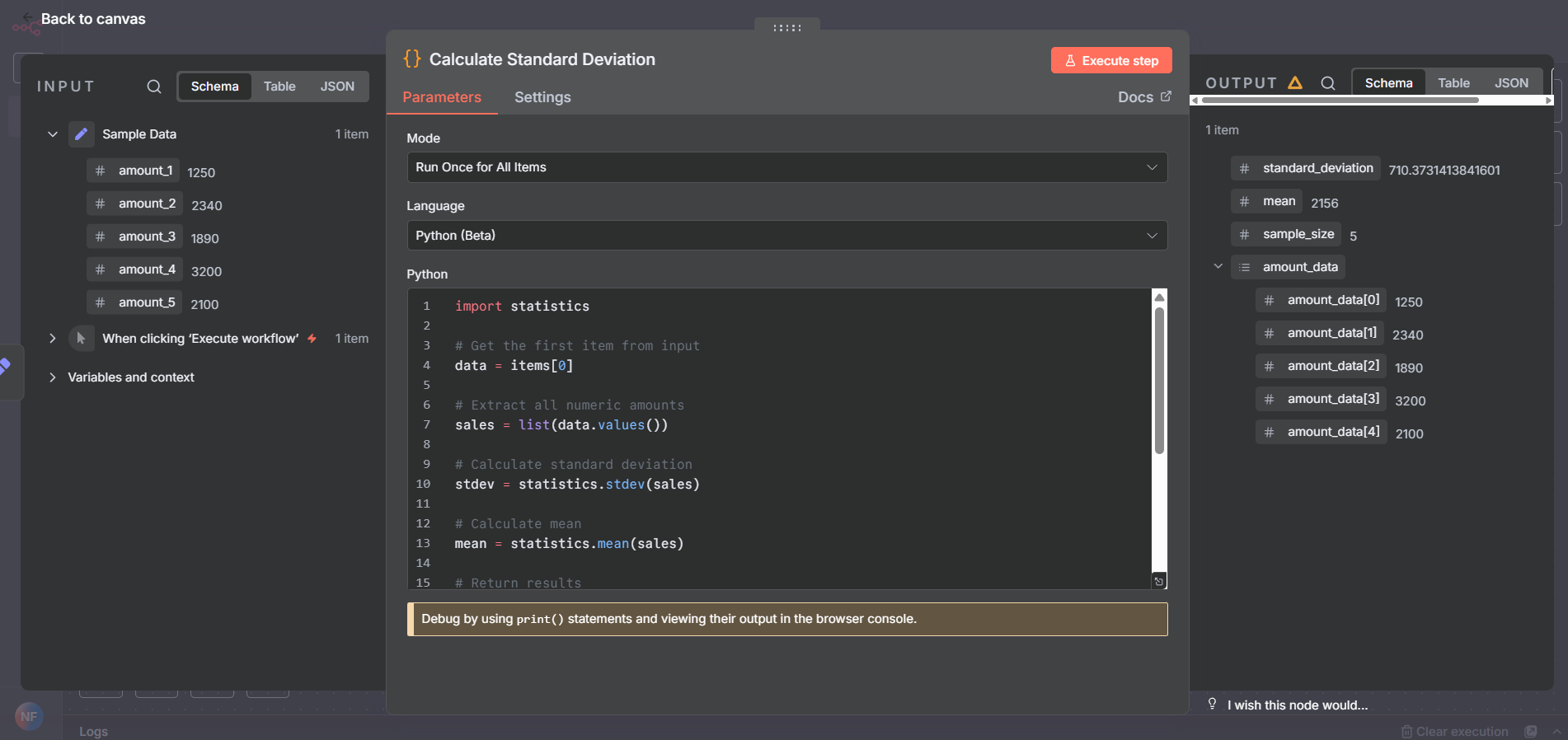
- The Canvas: An infinite whiteboard where you place your steps.
- The Wires: The lines connecting steps, representing the flow of data.
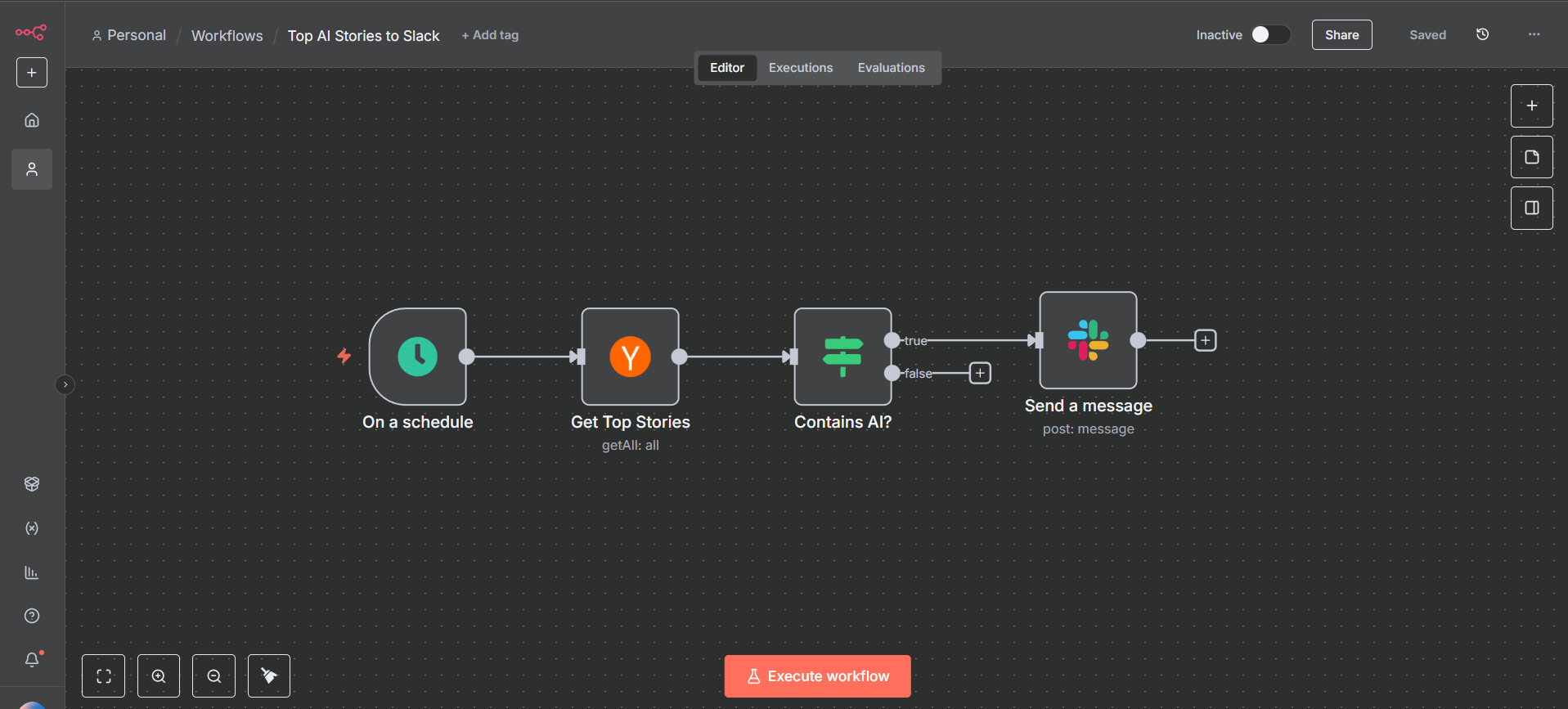
Here is a concrete example of a “flow”:
- Trigger: “When a new Order comes in via Email…”
- Action: “…Read the PDF attachment using OCR…”
- Action: “…Update the Inventory Database…”
- Logic: “…Check if stock is low. IF yes -> Alert Manager. IF no -> Do nothing.”
- Action: “…Send a ‘Thank You’ SMS to the customer.”
You don’t need to write complex code to build this. You drag “Nodes” onto a screen and connect them with lines. Once you turn it on, it runs in the background, 24/7/365. It never calls in sick, it never forgets a step, and it costs a fraction of a human salary. It transforms your operations from a series of manual handoffs into a unified, humming engine.
2. The Business Case: Why Leaders Choose n8n
If you are a Process Owner, Consultant, or Department Head, you likely care about three things: ROI, Security, and Stability. You aren’t interested in the layout of the code; you are interested in the output of the business.
Here is why n8n is winning in the SME and Enterprise space against competitors like Zapier or Make.
The “Hidden Cost” of SaaS Automation (ROI Analysis)
Most “easy” automation tools charge you per “Task” or “Operation.”
- The Trap: Imagine if Microsoft Excel charged you $0.01 every time you updated a cell. That is how most automation tools work.
- The Scenario: You build a workflow to sync contacts. It has 10 steps. You have 5,000 contacts. That is 50,000 tasks.
- The Bill: On Zapier, that single run could cost you hundreds of dollars. As your business grows 10x, your automation bill grows 10x.
The n8n Difference: n8n uses a model called “Fair-Code” Source-Available. You pay for the server capacity, not the number of tasks.
- The Math: You can host n8n on a secure cloud server (like DigitalOcean or Hetzner) for ~$20-$50/month.
- The Scale: On that same $50 server, you can run 1,000 workflows processing 1,000,000 tasks.
- The Savings: To run 1,000,000 tasks on Zapier, you would need the “Company” plan costing upwards of $3,000/month. That is a 98% cost reduction just by switching platforms.
- The Budgeting: The cost remains flat. It decouples your operational costs from your growth. You can scale infinitely without a “Success Tax.”
Bottom Line: n8n decouples your operational costs from your growth. You can scale infinitely without a “Success Tax.”
Data Security & Sovereignty (The “IT” Pitch)
For many industries—Healthcare, Finance, Legal, Manufacturing—sending customer data to a third-party cloud is a non-starter.
- The Risk: When you use a SaaS automation tool, you are sending your customer lists, contracts, and financial data to their servers in the US or Europe. You don’t control it.
- The n8n Solution: Because n8n is self-hostable, your IT team can install it on your own private servers (On-Premise or Private Cloud).
- Compliance: Your data never leaves your perimeter. It complies with GDPR, SOC2, and HIPAA requirements because you control the environment. This makes n8n the only viable choice for compliance-heavy industries.
Handling “Real World” Complexity
Business processes are rarely a straight line.
- Simple Tool: “If X happens, do Y.”
- Real Business: “If Invoice > $5,000, send to CFO via Slack. Wait for her to click ‘Approve’. If she ‘Rejects’, email the vendor. If she doesn’t reply in 24 hours, escalate to the CEO. If Invoice < $5,000, just pay it.”
n8n is designed to handle this complexity using Flow Logic. It supports Loops, Merges, Wait/Sleep functions, and advanced Error Handling. You can build decision trees that mirror your actual organizational rules, ensuring that edge cases don’t break the system.
n8n vs. Legacy RPA (UiPath / Power Automate Desktop)
Many Enterprise leaders equate “Automation” with “RPA” (Robotic Process Automation). It is important to distinguish the two.
- RPA (UiPath) is UI-Based. It opens a browser, moves the mouse, clicks a button.
- Pro: Can work with ancient legacy software that has no API.
- Con: Extremely fragile. If a button moves, the bot breaks. Heavy resource usage (needs a full Windows VM). High licensing costs per bot.
- n8n is API-Based. It sends data directly from server to server.
- Pro: Rock-Solid Stability. It doesn’t care what the UI looks like; it cares about the data payload. It runs on lightweight Linux servers (Docker).
- Cost: n8n is often 90% cheaper than an equivalent RPA license stack for high-volume modern web apps.
Verdict: If you are automating a 1995 Mainframe Green Screen, keep UiPath. For everything else (Salesforce, SAP, Hubspot, Email, Chat), n8n is the modern, superior choice.
3. Real World Use Cases: What Can You Build?
Talking about “Nodes” is abstract. Let’s look at 5 concrete examples of “Digital Workers” you can deploy next week.
Use Case A: The “Zero-Touch” Employee Onboarding (HR)
The Pain: Hiring a new employee triggers 20 manual tasks. Creating emails, adding to Slack, ordering equipment, assigning training. The n8n Workflow:
- Trigger: New employee marked “Hired” in your HR system (e.g., BambooHR, Workday).
- Step 1: n8n creates their Google Workspace/Outlook email account.
- Step 2: Adds them to specific Slack channels (#general, #sales) based on their department.
- Step 3: Generates a fast-tracked Contract PDF, sends it via DocuSign.
- Step 4: Waits for signature. Once signed, stores it in the secure “Personnel” folder in Drive/SharePoint.
- Step 5: Emails the IT vendor to ship a laptop to the employee’s home address. Result: A consistent, professional experience for every new hire, with 0 hours of Admin time.
Use Case B: The Intelligent Sales Router (Sales)
The Pain: Leads come in via the website, but sit in a generic inbox for hours. Speed to lead is critical. The n8n Workflow:
- Trigger: New Form Submission (Typeform/Webflow).
- Step 1: n8n uses a “Clearbit” or “Apollo” node to enrich the email. (e.g., finds the company size, revenue, location).
- Step 2: Logic Gate:
- If Company Size > 500: Route to “Enterprise Sales” Team (Round Robin assignment). Text the Rep immediately.
- If Company Size < 500: Route to “SME” email sequence.
- Step 3: Update Salesforce/HubSpot with all enriched data. Result: High-value leads are contacted instantly by humans; smaller leads are nurtured automatically.
Use Case C: Automated Financial Reconciliation (Finance)
The Pain: The end-of-month close. Accountants manually matching Stripe receipts to bank transactions. The n8n Workflow:
- Trigger: Periodically check bank feed and Stripe payouts.
- Step 1: n8n pulls transaction data from both sources.
- Step 2: Runs a “Merge” operation to match Transaction IDs or amounts/dates.
- Step 3:
- Match Found: Mark as “Reconciled” in Xero/Quickbooks.
- No Match: Add to a “Discrepancy Report” Google Sheet and alert the Finance Manager. Result: The finance team only reviews the exceptions, not the entire haystack.
Use Case D: The AI Customer Support Triage (Support)
The Pain: Support tickets pile up. Agents spend time tagging tickets like “Billing” or “Technical” instead of solving them. The n8n Workflow:
- Trigger: New Ticket in Zendesk/Intercom.
- Step 1: Send the ticket text to a Local LLM (or OpenAI) with the prompt: “Categorize this ticket and determining sentiment (Angry/Happy).”
- Step 2: Update the ticket with tags (e.g., “Urgent”, “Billing Problem”).
- Step 3: If sentiment is “Angry”, escalate priority to High and alert a Manager. Result: Faster response times and better prioritization of critical issues.
5. Addressing the Fear: “Is This Too Technical?”
This is the most common objection from business leaders. “I don’t have developers. My IT team is busy. Can my Marketing Manager actually use this?”
The Short Answer: You don’t need Software Engineers. You need System Thinkers.
The Long Answer: n8n is built for the “Citizen Developer.” Who is a Citizen Developer? It is the person on your team who knows Excel really well. You know the one—the person who creates the complex spreadsheets with VLOOKUPs, Conditional Formatting, and Pivot Tables. The person who gets annoyed when data is messy.
If someone can understand the logic of an Excel formula (=IF(A1>500, "High", "Low")), they can learn n8n in a week. The logic is identical; only the interface is better.
3 Features that Bridge the “Code Gap”
n8n has realized that its biggest growth area is non-technical business users, so they have built three critical features to lower the barrier to entry:
-
The AI Assistant (Code-Free Logic):
- In the past, if you wanted to filter a list of messy data, you needed to write JavaScript.
- Now: You open the AI Assistant in the editor and type: “Filter this list to only show customers from Germany who spent more than $500 last month.”
- Result: The AI writes the code for you, inserts it into the node, and it just works. You don’t need to know the syntax; you just need to know what you want.
-
The Template Library (Don’t Start from Scratch):
- Blank page syndrome is real. n8n solves this with a library of 1,000+ community templates.
- Do you want to sync HubSpot Contacts to Slack? Don’t build it. Search for it, click “Import,” and you get the entire workflow pre-built. All you have to do is double-click the nodes and paste in your API keys. It turns “Development” into “Configuration.”
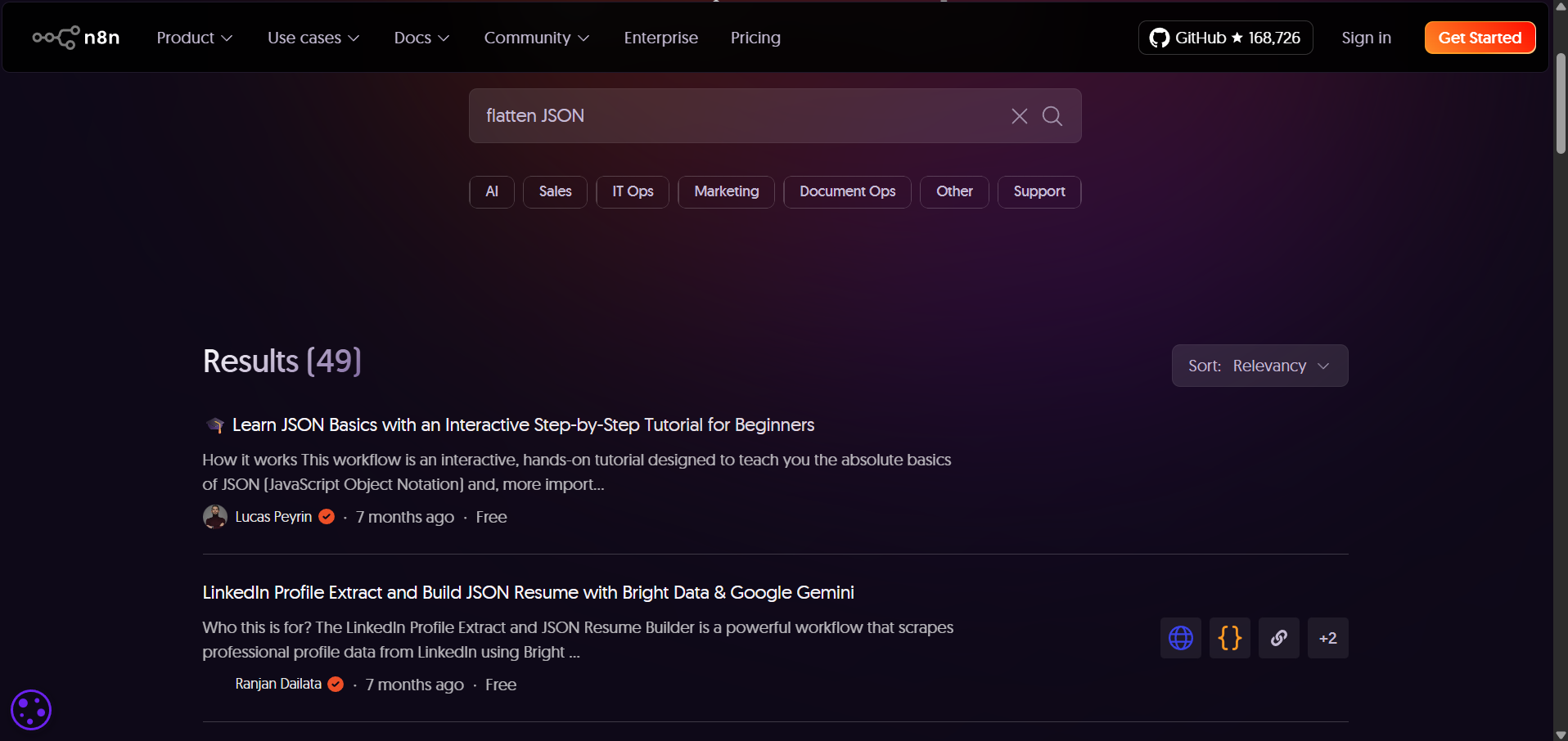
n8n Community Template Library -
Visual Debugging (No Black Boxes):
- In traditional code, if a script breaks, you get a cryptic error line in a terminal.
- In n8n, you see a red light on the specific node that failed. You can click it and see exactly what data went in (e.g., “Email Address: null”) and why it failed. This “Inspectability” gives non-technical users the confidence to fix their own bots without calling IT.
6. Implementation Strategy: How to Start
The biggest mistake companies make is trying to “Automate Everything” on Day 1. They try to build a massive, complex system that handles billing, HR, and sales all at once. This usually leads to frustration and failure. Automation is a muscle. You need to build it slowly. We recommend the “Crawl, Walk, Run” Framework.
Phase 1: Crawl (Personal Productivity)
Goal: Build confidence and familiarity with the interface. Timeline: Week 1-2. Action: Pick ONE painful, low-risk task that annoys you personally.
- Example: “Every time I receive a Gmail invoice, save the attachment to Google Drive.”
- Why: If this breaks, nobody dies. You just miss a file. But when it works, you get that “Aha!” moment. You verify that the tool works and you understand the basic concept of Triggers and Actions.
Phase 2: Walk (Departmental Pilot)
Goal: Demonstrate ROI to the organization. Timeline: Month 1. Action: Pick ONE stable, high-volume process in a single department (e.g., Marketing).
- Example: “Weekly Ad Reporting.”
- The Process: Currently, a Junior Marketer spends 4 hours every Monday logging into Facebook Ads, Google Ads, and LinkedIn, downloading CSVs, and pasting them into Excel.
- The Automation: Build an n8n workflow that fetches these numbers via API and populates the Sheet automatically at 8:00 AM.
- The Win: You save 4 hours/week (200 hours/year). The team sees immediate value. The “Fear of AI” turns into “Can it do this too?”
Phase 3: Run (Company Infrastructure)
Goal: Build the “Operational Backbone.” Timeline: Month 3+. Action: This is where you bring in IT. You deploy n8n on a dedicated, secure server. You connect it to your core “Source of Truth” databases (ERP, CRM, SQL).
- Strategy: You stop building “Scripts” and start building “Products”. You treat your internal automation like software products with version control, error alerting, and documentation. Use n8n’s “User Management” features to give different departments access to their own folders.
Critical Rule: Never automate a Broken Process. If your sales process is chaotic manually, automating it will just create chaos faster. Optimize the human process first (standardize the inputs), then apply n8n.
6. The Future of Automation: Agentic Workflows
We are moving past simple “Trigger -> Action” automation. We are entering the era of AI Agents.
Traditional automation is rigid. “If A, then B.” AI Automation is adaptive. “Here is a goal. Figure out how to achieve it.”
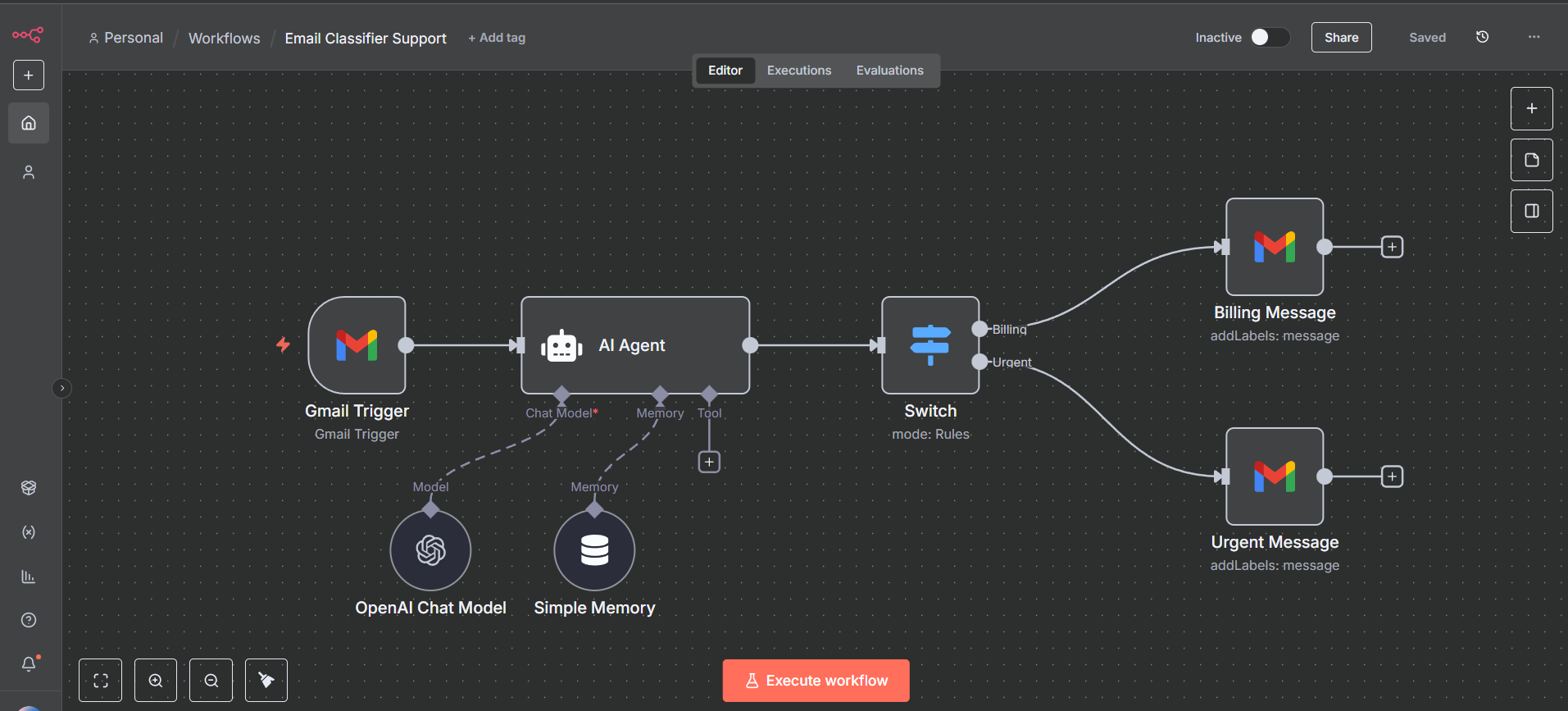
n8n is currently the leader in Agentic Workflows. With the new LangChain integration, you can build a node that acts as a “Marketing Assistant.”
- Goal: “Research 5 competitors and write a summary.”
- Process: The n8n Agent will autonomously browse the web, read the sites, summarize the text, and email you the report.
This isn’t science fiction; it is available in n8n today. By adopting n8n, you aren’t just solving today’s admin problems; you are preparing your infrastructure for the AI revolution.
7. Conclusion: Build Your Operational Backbone
In 2026, efficient businesses don’t just work hard; they work smart. Your value as a leader isn’t measured by how many emails you send, but by the systems you build.
n8n offers you a way to build a reliable, secure, and scalable Operational Backbone for your department. It handles the repetitive, high-volume work so your team can focus on the high-value, creative work they were hired to do.