n8n vs. Zapier vs. Make.com: The AI Automation Showdown (2026)
The Context: It is 2026. Automation is no longer a “nice to have”; it is the operating system of your business. For the last decade, the choice was simple: Use Zapier. Then, Make (formerly Integromat) came along for the visual thinkers. Now, n8n has exploded onto the scene, fueled by the AI revolution.
The Problem: You are likely reading this because you just hit a wall.
- The Cost Wall: Your Zapier bill just hit $500/month because you added a “loop” to your workflow.
- The Complexity Wall: You want to build an AI Agent that “thinks” and “retries”, but Zapier’s linear logic can’t handle it.
- The Privacy Wall: You realized you are sending your client’s PII (Personally Identifiable Information) to a third-party US server.
The Solution: This guide is not a generic “Pros and Cons” list. It is a strategic breakdown of the Automation Maturity Curve. We will explore why startups begin with Zapier, graduate to Make, and ultimately scale with n8n.
1. The Cost Breakdown (The “Task Tax” Exposed)
The Context: How SaaS Pricing Actually Works
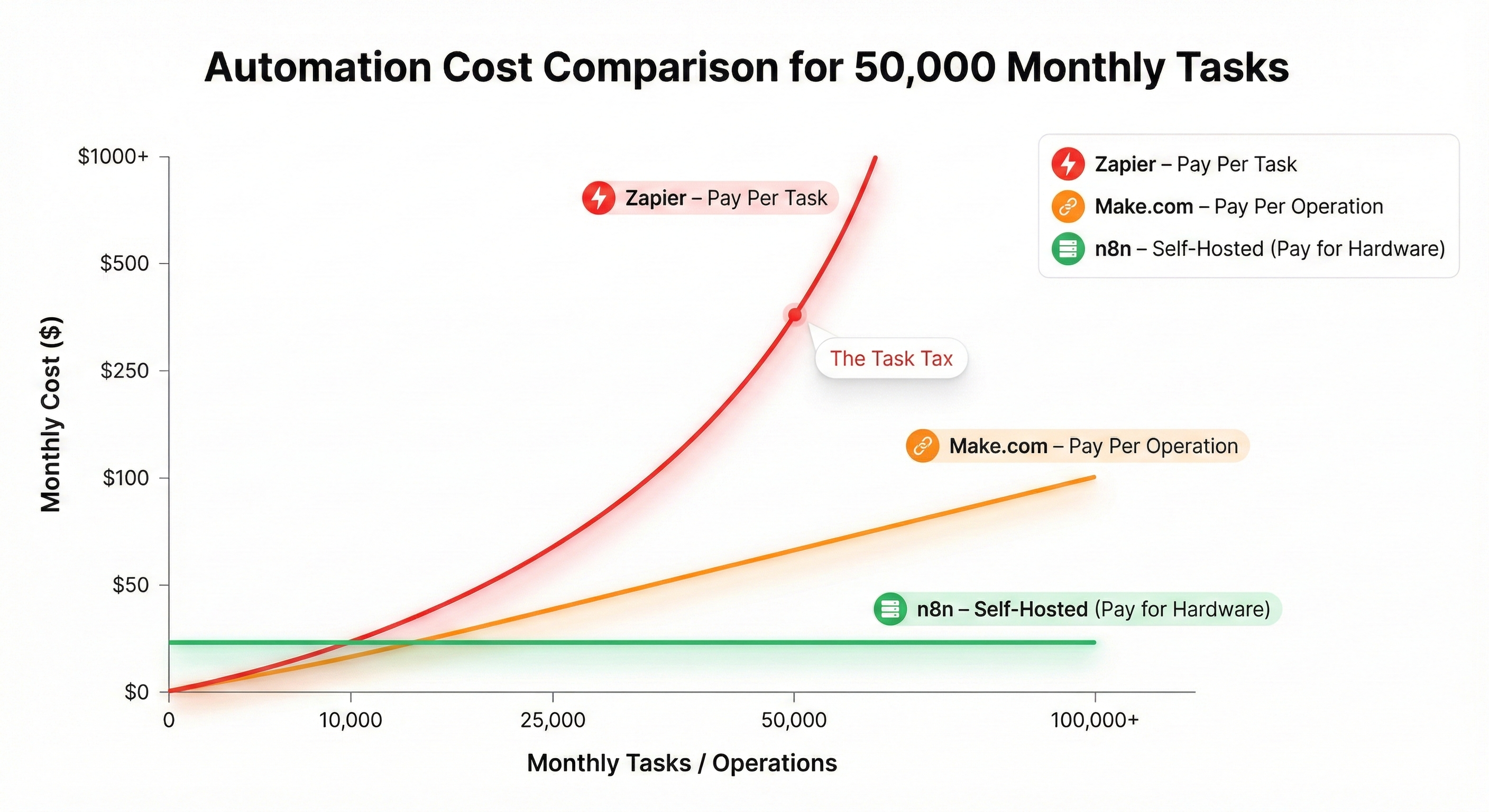
Most automation tools operate on a “Value Capture” model. They hook you with a free tier, but as you scale, their pricing curve is exponential, not linear. This is what I call the “Task Tax”. Zapier charges you based on activity. Every time you filter an email, format a date, or check a spreadsheet row, the meter is running. This penalizes efficiency. A poorly designed workflow that loops 1,000 times can bankrupt a small startup overnight. n8n changes the paradigm by charging for compute (hardware), not activity.
The Build: Comparative Analysis
Let’s simulate a real-world scenario: Syncing 10,000 E-Commerce Orders. Each order needs 5 steps: (Trigger -> Filter -> Format -> Lookup -> Add to Sheet). Total Operations: 50,000 per month.
1. Zapier (The “Pay Per Task” Model)
- Pricing: ~$0.03 - $0.05 per task on lower tiers.
- Cost: For 50k tasks, you need the “Professional” plan tier, easily costing $200 - $300/month.
- Constraint: If you grow to 100k tasks, your bill doubles.
2. Make.com (The “Pay Per Operation” Model)
- Pricing: Significantly cheaper, approx $0.001 per op.
- Cost: For 50k ops, you are looking at $29/month.
- Constraint: Complex workflows in Make often require more operations (bubbles) to do the same thing as one n8n node, inflating your usage count.
3. n8n (The “Pay For Hardware” Model)
- Self-Hosted Pricing: Free software. You pay for the VPS.
- Cost: A standard DigitalOcean Droplet costs $6/month.
- Constraint: You can run 50k, 500k, or 5 million tasks. The cost remains $6. You are limited only by CPU and RAM.
The “Pro Tip”: The “Polling” Trap
In Zapier, if you want to check for new emails every 1 minute, you use “Tasks” just to check. In n8n self-hosted, checking is free. The silence doesn’t cost you money. You can poll every second if you want.
Common Pitfalls
- Server Maintenance: With n8n Self-Hosted, you are the IT department. If the server runs out of disk space (logs), the automation stops. You trade money (Zapier cost) for time (Server maintenance).
- Hidden Limits: Make.com has file size limits and execution timeout limits (40 minutes) that can kill long-running jobs.
2. Visual Power & Usability (Nodes vs Steps)
The Context: How Logic is Visualized
The interface determines the complexity of what you can build. If the tool forces you into a list, you will build linear processes. If it offers a canvas, you will build systems.
The Build: Structure Comparison
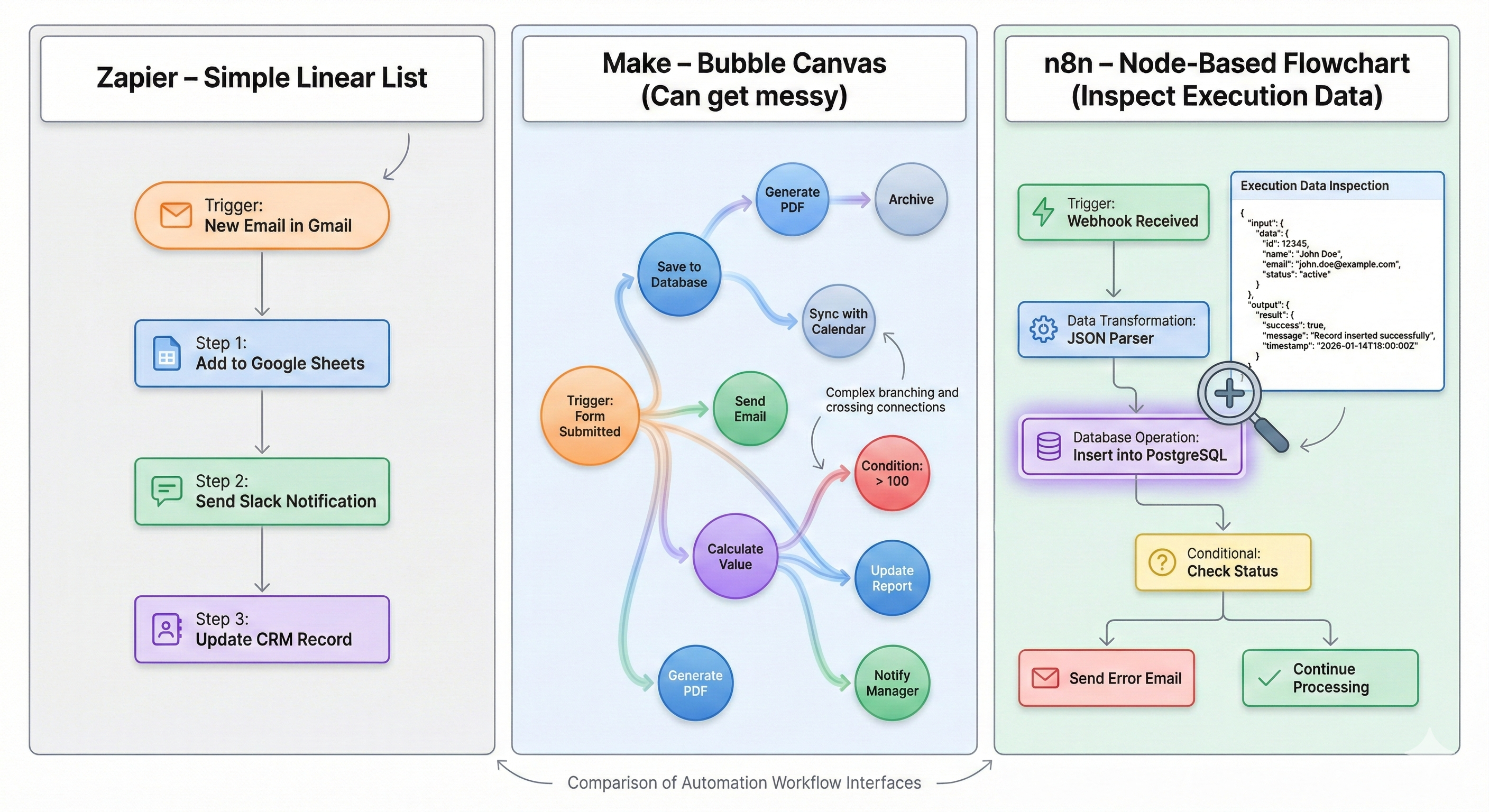
1. Zapier: The Linear List Zapier effectively invented the category. Its interface is a linear list: “Trigger -> Step 1 -> Step 2”.
- Pros: Impossible to mess up. Great for simple “If This Then That”.
- Cons: Terrible for logic. If you need a “Loop”, you have to use a weird sub-zap. If you need complex branching, it gets messy fast.
2. Make: The Bubble Map Make uses a “Bubble” interface where nodes float on a canvas.
- Pros: Visually stunning. You can see the logic diverge.
- Cons: It can become “Spaghetti”. Wires crossing everywhere. Debugging a large scenario often involves clicking into huge bubbles to find hidden settings.
3. n8n: The Flowchart (Node-Based) n8n looks like a developer’s flowchart. It uses rectangular Nodes connected by Wires.
- The Killer Feature: Execution Data Inspection.
In n8n, you can click on any node in a past execution and see exactly:
- The JSON that went in.
- The JSON that came out. This transparency is unmatched. Zapier hides the data. Make shows bubbles. n8n shows you the raw Truth (JSON).
The “Pro Tip”: Copy/Paste Workflows
An n8n workflow is just a JSON text object.
You can select 10 nodes, hit Cmd+C, and paste the text into a GitHub Gist, a Forum post, or a Slack message.
Your friend can Cmd+V it into their canvas.
This “Shareability” is why the n8n community grows faster—knowledge transfer is frictionless.
Common Pitfalls
- Complexity Overload: New users open n8n and see “JavaScript Code” or “Expressions” and panic. The learning curve is steep (Steps vs Walls).
- The “Run” Button: In n8n, you have to be careful about running “Test” vs “Active”. Testing a “Delete Email” node might actually delete real emails if you aren’t careful with mock data.
3. The AI Advantage (Why n8n Wins for Agents)
The Context: From Automation to Autonomy
This is the 2026 differentiator. Traditional automation (2015-2023) was linear. “When Form Submitted, Send Email”. AI Automation (2024+) is Circular. “Check email. Is it angry? If yes, draft apology. If no, file it. Check draft. Is it good? If no, rewrite.” This requires Loops.
The Build: AI Architecture
1. The Loop Problem
- Zapier: Hates loops. It treats them as “Dangerous” infinite recursion risks.
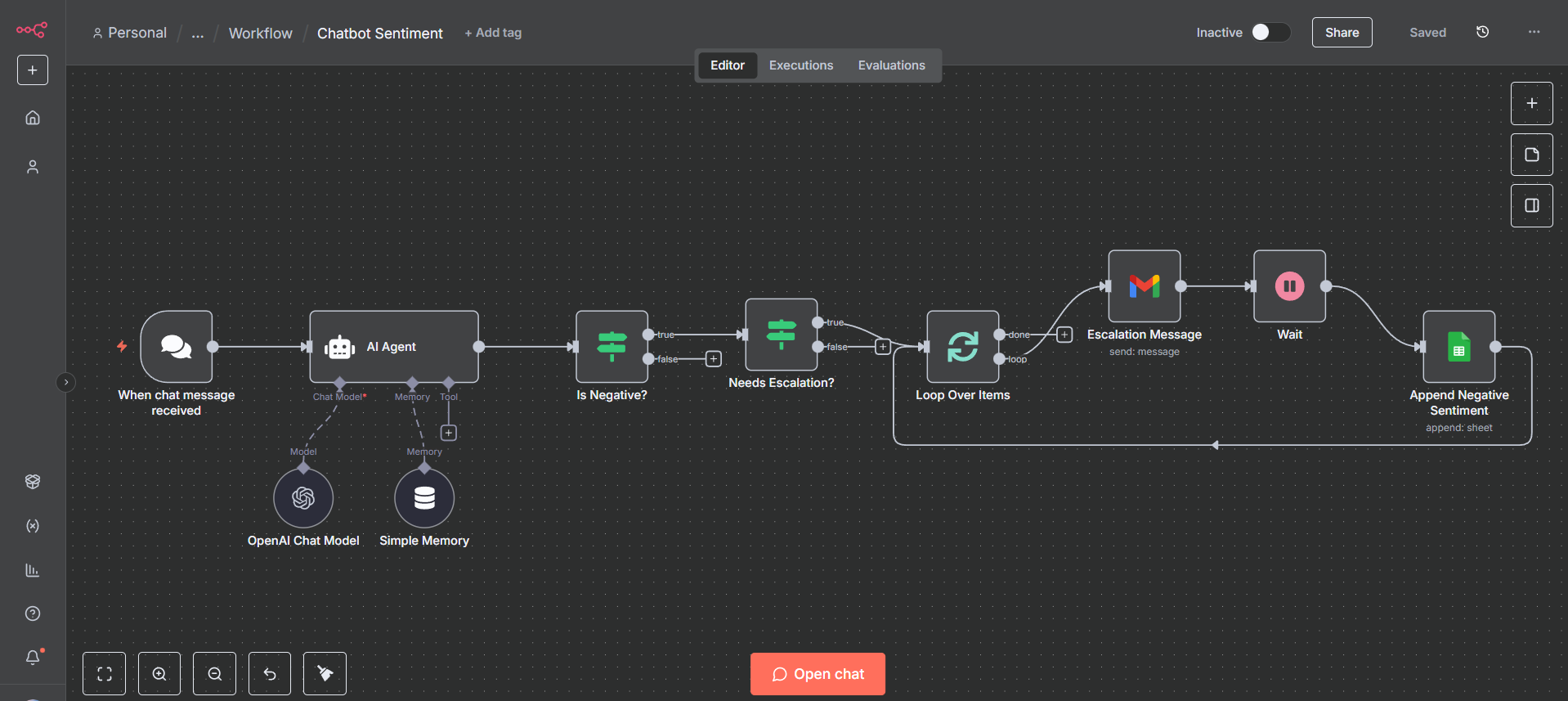
- n8n: Loves loops. The Loop Over Items node and the ability to wire a node backwards to a previous node makes it the native environment for building autonomous agents.
2. Memory & Context Chatbots need “Memory”. They need to remember what you said 3 turns ago.
- n8n: Has native “Window Buffer Memory” nodes for integration with LangChain. It manages the chat history for you. You can connect a “Chat Memory” node directly to your generic “Chain” node.
- Zapier: You have to hack this together with a database. You need to write to Airtable, read from Airtable, format the string, feed it to OpenAI. It adds 4 steps (and 4 * 0.05 = $0.20) to every single message.
3. Local LLMs (Ollama) n8n allows you to use the Ollama node to call an AI model running on your own server.
- Zapier: Has no concept of “Local”. Everything must go to the Cloud. You cannot ask Zapier to “talk to localhost:11434”.
The “Pro Tip”: Self-Correcting Agents
In n8n, you can build a “Critique Loop”.
- AI Generate: Write a blog post.
- AI Critique: Read the post. Give it a score 1-10.
- If Node: If Score < 7, loop back to Step 1 with feedback “Make it punchier”. This circular logic is impossible in a linear editor like Zapier.
Common Pitfalls
- Token Costs: Even in n8n, if you build a loop that runs 50 times, and each time calls GPT-4, you will burn $10 in 5 minutes.
- Rate Limits: OpenAI has strict rate limits. n8n processes so fast it can hit these limits instantly. You often need to add “Wait” nodes to slow down your super-fast local bot.
4. Deployment & Security (The Enterprise Block)
The Context: Data Sovereignty
As your company matures, your CTO will start asking about “Data Sovereignty”. “Where does the customer data live?” With Zapier, the answer is “On Zapier’s servers in the US.” For GDPR (Europe) or HIPAA (Health), this is often a dealbreaker.
The Build: Deployment Options
1. The SaaS Risk When you connect your Salesforce to Zapier, you are giving Zapier a persistent token to read your data. If Zapier suffers a breach (as many SaaS tools do), your data pipeline is exposed. You are relying on their security team.
2. The Self-Hosted Control With n8n, you can deploy the instance inside your own VPC (Virtual Private Cloud).
- Database: n8n stores workflows and execution data in a Postgres database that you control.
- Firewall: You can put n8n behind your corporate VPN. No public internet access required.
- HIPAA / GDPR: Because you control the storage, you can build compliant workflows.
3. Source Control Developers love Git. n8n has a “Source Control” feature where every change to a workflow is committed to a GitHub Repository.
- Rollback: You broke the workflow? Just
git revert. - Review: You can create Pull Requests for automation changes. Zapier has “Version History”, but it is not true Git-based Source Control.
The “Pro Tip”: Environment Variables
In n8n, you can use unique credentials for Dev, Staging, and Production.
You can configure your workflow to read {{ $env.API_KEY }}.
This allows you to test safely on a dev server without risking sending emails to real customers, then deploy the exact same workflow to production.
Common Pitfalls
- Backup Neglect: If you self-host, you must back up your SQLite/Postgres database. If the server dies and you have no backup, your workflows are gone.
- Update Fear: Self-hosted means you have to manually update Docker containers. Sometimes a new version breaks an old node. You need a testing strategy.
5. The Learning Curve (The “Python” Myth Revisited)
The Context: Code Anxiety
We often hear: “n8n is too hard. It’s for developers.” This is a myth derived from its flexibility. Yes, Zapier takes 15 minutes to learn. n8n might take you a weekend. But that weekend investment pays dividends for the rest of your career.
The Build: Skill Ceiling Comparison
1. Level 1: The Weekend
- Zapier Skill Ceiling: Low. You hit the wall fast. Once you need a loop or complex regex, you are stuck.
- n8n Skill Ceiling: Infinite. You can write custom JavaScript, build custom nodes, and architect entire applications.
2. The “JavaScript” Unlock
You do not need to be a coder. But knowing how to write:
{{ $json.name.toUpperCase() }}
…gives you more power than 10 Zapier “Formatter” steps.
n8n forces you to understand Data Structures (JSON). This makes you a better digital operator, not just a better n8n user.
3. Community Support
- Zapier: Support Ticket (24-48 hour response).
- n8n: Community Forum. The founder (Jan) and the core engineers are active daily. The shared template library is vast and open.
The “Pro Tip”: The “Code Generator”
Use ChatGPT to learn. “I have this JSON struct. Write me a JavaScript snippet for n8n to filter items where price > 50.” Paste the result into the Code Node. You learn by doing.
Common Pitfalls
- Giving Up: The first time you see an “ERROR: Cannot read property of undefined”, you might want to quit. This just means your data structure changed. Use the Debug view.
- Over-Engineering: Just because you can write code doesn’t mean you should. n8n has a “Filter” node. Use it. Don’t write a JS filter unless necessary.
6. Migration Guide (How to Switch)
The Context: The “Strangler Fig” Pattern
Ready to move? Don’t do it all at once. Use the “Strangler Fig” engineering pattern. Wrap the old system with the new one, and slowly replace parts until the old system is dead.
The Build: Migration Strategy
Strategy 1: The “Cost Kills” Identify the Top 3 Workflows that are driving 80% of your Zapier bill. Usually, this is something simple like “Syncing Contacts” or “Checking Orders” that runs thousands of times. Move only these to n8n first.
- Result: Immediate 80% bill reduction.
Strategy 2: The “Greenfield” For any New AI Project, start in n8n. Don’t try to build a complex RAG (Retrieval Augmented Generation) pipeline in Zapier. It will break. Build it in n8n from Day 1.
Strategy 3: The Webhook Proxy (Cheat Mode) If you have an app that only integrates with Zapier:
- Zapier: Trigger -> “Webhooks by Zapier (POST)” -> Send to n8n.
- n8n: Webhook Node (Receive) -> Do 50 complex steps. This uses Zapier only as the “Listener” (1 Task), but does all the heavy processing in n8n (Free).
The “Pro Tip”: The “Dual Run” Verification
For mission-critical financial workflows (e.g., Invoicing), do not just switch.
- Clone the workflow in n8n.
- Have n8n write to a Google Sheet called “n8n Logs”.
- Keep the Zapier workflow running. Have Zapier write to “Zapier Logs”.
- Run both for 3 days.
- Compare the sheets. Did n8n miss anything? Did Zapier miss anything?
- Once you have 100% parity, turn off the Zap.
Common Pitfalls
- Polling Intervals: Zapier might prompt you instantly, while your n8n Schedule Trigger is set to “Every hour”. Ensure your expectations match your settings.
- Webhook Security: When moving webhooks, ensure you verify the “Header Secret” so random people can’t trigger your workflow.
Conclusion
Zapier is the tricycle. It is amazing for learning to move. It is safe, stable, and easy. Make is the bicycle. It is faster, more agile, and looks great. n8n is the F-15 Fighter Jet. It requires a bit of training to fly, but once you are in the air, nothing else comes close.
In 2026, with the rise of AI Agents and the need for data privacy, n8n is the only logical choice for serious scaling businesses.
Ready to pilot the jet? Check out our 5 Boring Tasks Guide to build your first “Digital Intern” in n8n today.