
Generate Custom AI Assistants for Any Notion Database
Instantly create specialized Notion AI Assistants, reducing development time by up to 90% and ensuring accurate database interactions.
Manually configuring AI chatbot assistants for diverse Notion databases is time-consuming and prone to errors. This n8n workflow automatically generates a fully functional, customized AI Assistant workflow tailored to any Notion database schema.


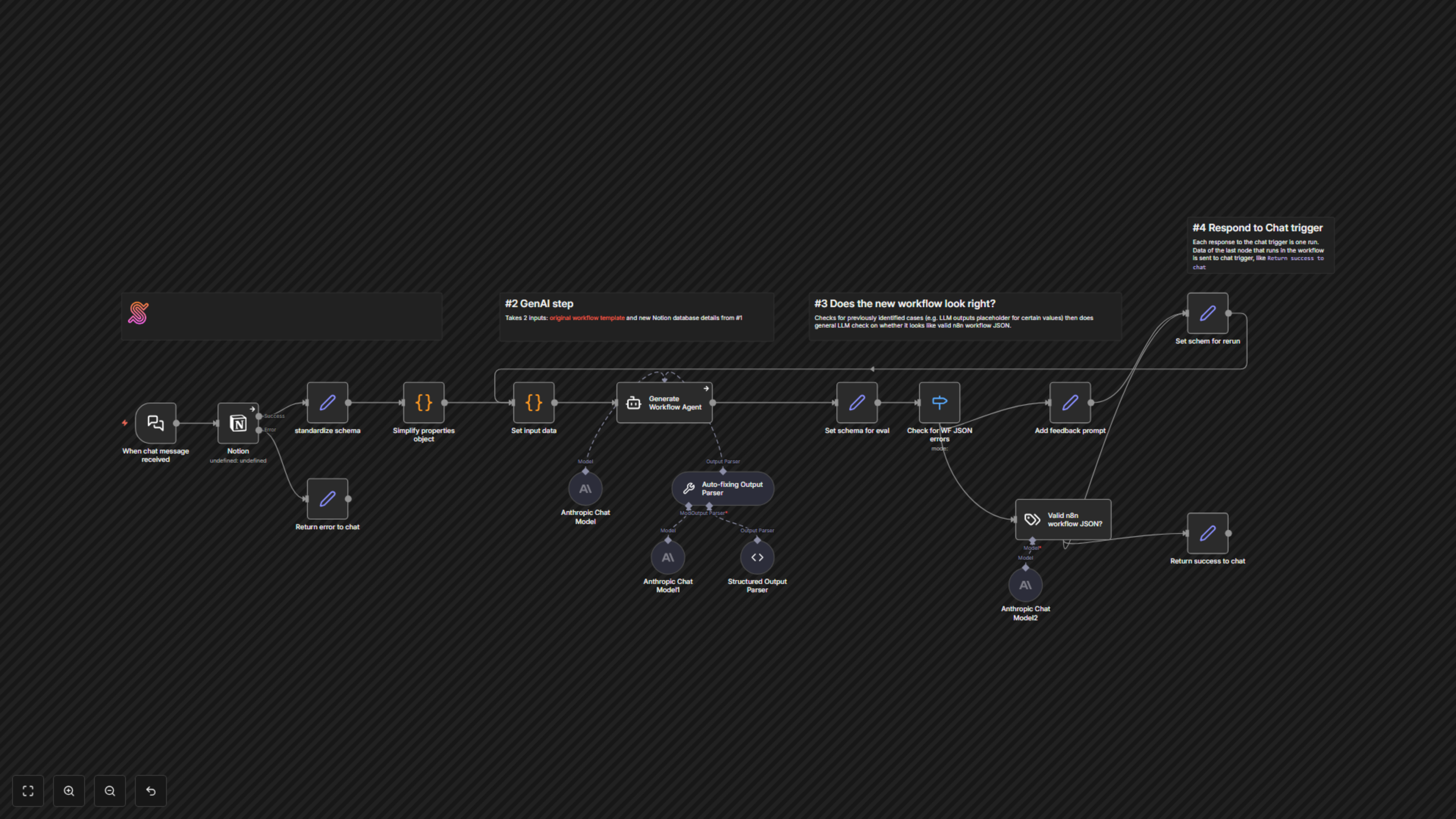

Documentation
Notion AI Assistant Workflow Generator
This workflow automates the creation of AI chatbot assistants designed to query any Notion database. Users simply provide a Notion database URL, and the workflow intelligently generates a custom n8n AI Agent workflow, pre-configured to interact with that specific database schema. This eliminates manual setup and dramatically speeds up the deployment of powerful, data-driven assistants for internal knowledge bases, customer support, or data retrieval.
Key Features
- Dynamic AI Workflow Generation: Automatically creates n8n AI Agents tailored to any Notion database schema.
- Robust Validation & Retry Logic: Ensures correct workflow creation by validating generated JSON and self-correcting if errors occur.
- Simplified Notion Schema Processing: Optimizes Notion database properties for efficient use with large language models.
- Interactive Chat Interface: Easily generate workflows via a simple chat input, providing immediate JSON output for deployment.
How It Works
The workflow initiates when a user provides a Notion database URL through a chat interface. It first retrieves and simplifies the database's schema, preparing it for AI processing. An n8n AI Agent then uses this schema, along with a base AI Assistant workflow template, to intelligently modify and generate a new workflow specific to the provided Notion database. The generated workflow JSON undergoes validation, and if any issues are detected (e.g., malformed JSON), the AI Agent receives feedback and attempts to regenerate a correct version. Finally, the validated n8n workflow JSON is returned to the user, ready to be pasted into their n8n canvas.