Facebook Comment Sentiment Analysis - Automated Tracking & Insights
Automatically track and analyze Facebook post comment sentiment, enabling proactive engagement with negative feedback and a better understanding of audience perception.
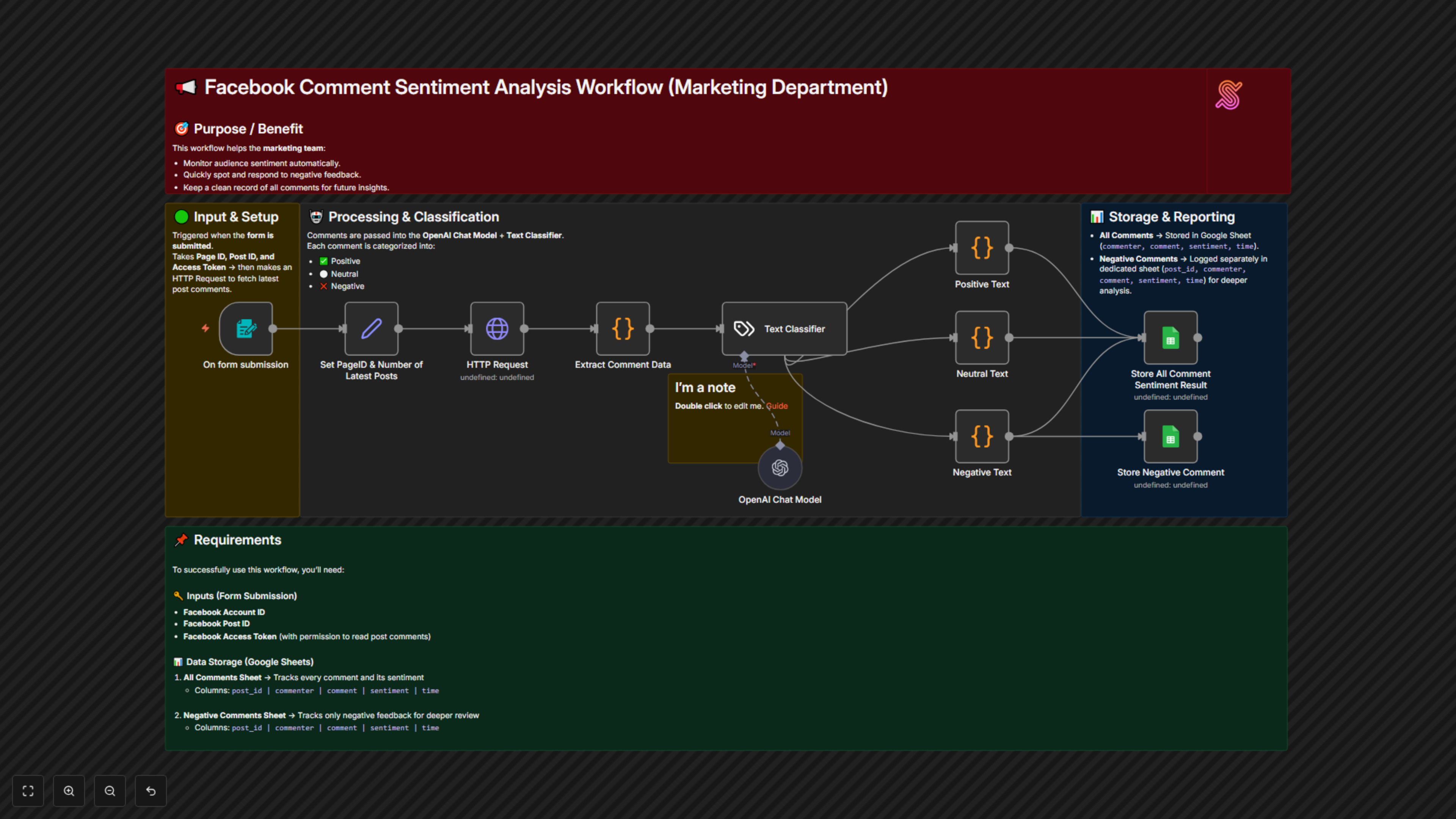
This workflow automates the collection and sentiment classification of Facebook post comments, storing all feedback in Google Sheets and highlighting negative comments for the marketing team to monitor audience sentiment and react promptly.


Documentation
📖 Description
This automation workflow empowers marketing teams to monitor, classify, and analyze Facebook post comments in real time.
When a form is submitted with Facebook details, the workflow will:
- Retrieve all comments from the specified Facebook post using the provided Account ID, Post ID, and Access Token.
- Automatically classify each comment’s sentiment as Positive, Neutral, or Negative using an AI-powered text classifier.
- Store all results in a Google Sheet for easy tracking and reporting.
- Save all Negative Comments into a dedicated Google Sheet for deeper review and faster response.
This seamless process allows marketing departments to focus on improving engagement strategies instead of manually reading and categorizing every comment.
🎯 Benefits for Marketing Teams
- ⏳ Time-Saving Automation – No need for manual comment monitoring or classification.
- 🔎 Deeper Insights – Quickly understand audience sentiment across campaigns.
- ⚡ Fast Response to Negativity – Negative comments are highlighted for immediate attention.
- 📊 Centralized Data – All sentiment results stored in Google Sheets for analysis and reporting.
- 🤝 Improved Customer Engagement – Enables faster feedback loops and better community management.
📌 Requirements
To use this workflow, you need:
- Form Submission Inputs:
- Facebook Account ID
- Facebook Post ID
- Facebook Access Token (with comment read permissions)
- Google Sheets Setup:
- All Comments Sheet → To track every comment with sentiment.
- Columns: commenter | comment | sentiment | time
- Negative Comments Sheet → To track only negative feedback for further analysis.
- Columns: post_id | commenter | comment | sentiment | time
Tools Used:
- Facebook Graph API – To fetch post comments.
- OpenAI / Text Classifier Node – To classify sentiment into Positive, Neutral, or Negative.
- Google Sheets – To store sentiment results and negative comments for review.