
Automate Bitrix24 Chatbot Responses & Boost User Engagement
Automate Bitrix24 chatbot deployment and message handling, reducing setup time by 90% and enabling instant user engagement.
Building and managing interactive chatbots for platforms like Bitrix24 can be complex and time-consuming. This n8n workflow provides a robust framework to instantly deploy and manage a Bitrix24 chatbot, automating responses and handling various user interactions with ease.


Documentation
Automate Bitrix24 Chatbot Responses & Boost User Engagement
This n8n workflow demonstrates how to create a Bitrix24 chatbot that intelligently responds to user messages, welcomes new participants, and manages its own lifecycle events like installation and deletion. It serves as a foundational example for building more sophisticated conversational agents within Bitrix24, enhancing communication and automating routine tasks.
Key Features
- Automatically registers a new chatbot with Bitrix24 upon installation, streamlining deployment.
- Responds to incoming user messages with customizable logic, providing interactive support.
- Greets users upon joining a chat, ensuring an immediate and personalized welcome.
- Secures communications through robust application token validation.
- Manages bot deletion events for graceful shutdown and resource management.
How It Works
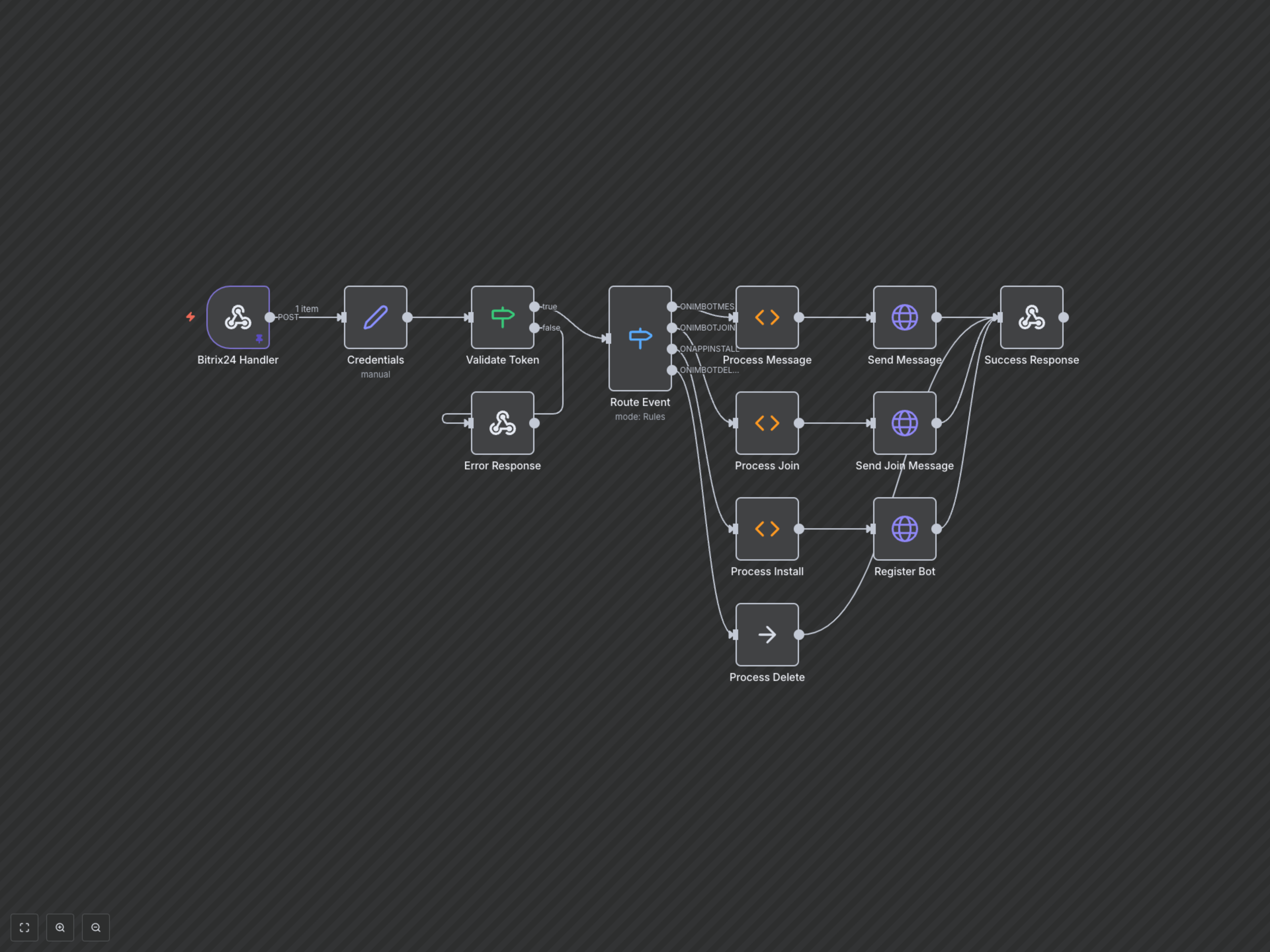
This workflow is triggered by a Bitrix24 Webhook Handler, actively listening for various chatbot-related events such as new messages (ONIMBOTMESSAGEADD), bot joining a chat (ONIMBOTJOINCHAT), bot application installation (ONAPPINSTALL), and bot deletion (ONIMBOTDELETE). Upon receiving an event, the workflow extracts essential authentication credentials and event-specific data. A 'Validate Token' step rigorously checks the authenticity of the request to maintain security. The 'Route Event' node then intelligently directs the flow to specialized processing branches based on the detected event type. For instance, a new message event leads to the 'Process Message' node, which analyzes the content (e.g., looks for specific keywords like "what's hot") and formulates an appropriate reply. Similarly, a 'Process Join' node is activated for welcome messages when the bot joins a chat. The 'Process Install' branch is crucial for initial setup, where it collects bot details and uses an HTTP Request node ('Register Bot') to officially register the chatbot with the Bitrix24 API, configuring its event listeners. Finally, an 'HTTP Request' node sends the formulated response (message or welcome) back to Bitrix24, or a 'Success Response' confirms successful event handling. In cases of authentication failure, an 'Error Response' is promptly returned.