
Automated Receipt Generator with PDF & Email
Automatically create and send professional PDF receipts to customers, saving time and improving customer experience.
Collects customer details, generates a professional receipt as a PDF, and emails it automatically.
Compatible with

$29
Ready-to-use workflow template
Complete workflow template
Setup documentation
Community support
Preview - Google
Documentation
📌 Brief Description
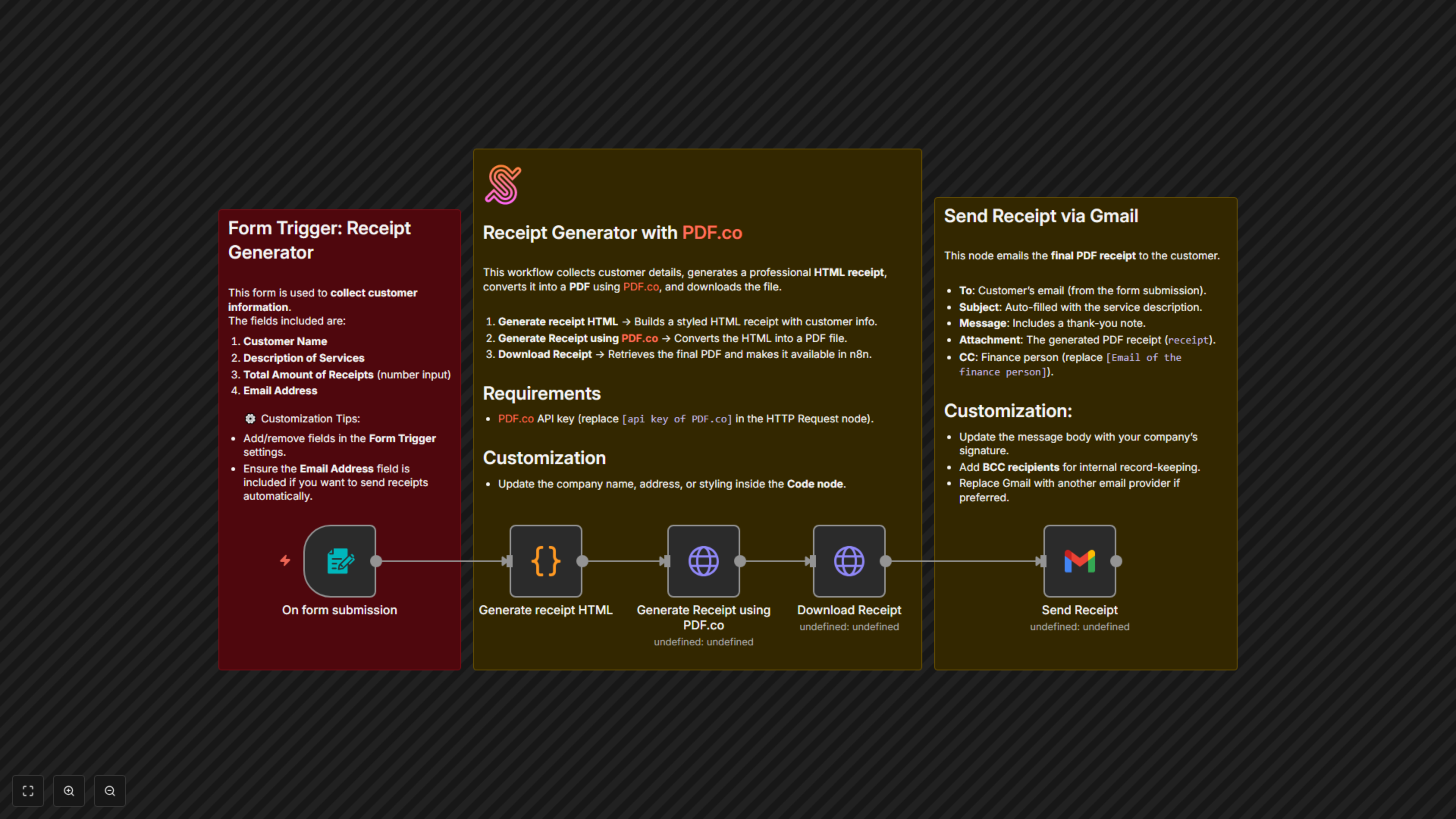
This workflow streamlines receipt generation and delivery. Customers submit a form with their details, and the system automatically generates a professional PDF receipt using PDF.co. The receipt is then sent to the customer via Gmail, with an optional CC to finance for record-keeping.
⚙️ Workflow Steps
- Form Submission (Trigger)
- Customer enters: Name, Service Description, Total Amount, and Email.
- Generate Receipt HTML (Code)
- Creates a styled HTML receipt with company branding.
- Adds receipt number, customer info, service details, and amount.
- Convert HTML to PDF (PDF.co API)
- Sends the generated HTML to PDF.co.
- Receives a downloadable PDF link.
- Download Receipt (HTTP Request)
- Downloads the final PDF file.
- Stores it as a binary object for email attachment.
- Send Receipt via Gmail
- Emails the PDF receipt to the customer.
- Subject auto-fills with the service description.
- CCs the finance person for records.
🗂️ Data Sources & Tools
- Form Trigger – Captures customer input.
- PDF.co API – Converts HTML to professional PDF receipts.
- n8n Code Node – Generates dynamic HTML receipt template.
- Gmail – Sends the final receipt to the customer.
✅ Key Benefits
- Fully automated receipt generation and delivery.
- Professional PDF receipts with custom branding.
- No manual editing or emailing required.
- Keeps finance in the loop with CC.
- Reduces admin workload for customer payments.