
Automate Linear Bug Triage & Assign Teams with AI
Streamline Linear bug triage by automatically assigning tickets to the correct teams, reducing manual effort by up to 90% and accelerating resolution times.
Manually triaging bug tickets and assigning them to the correct engineering teams consumes valuable time and delays resolution. This workflow leverages AI to automatically classify Linear bugs, assigning them to the right team for rapid, efficient issue resolution.



Documentation
AI-Powered Linear Bug Classification
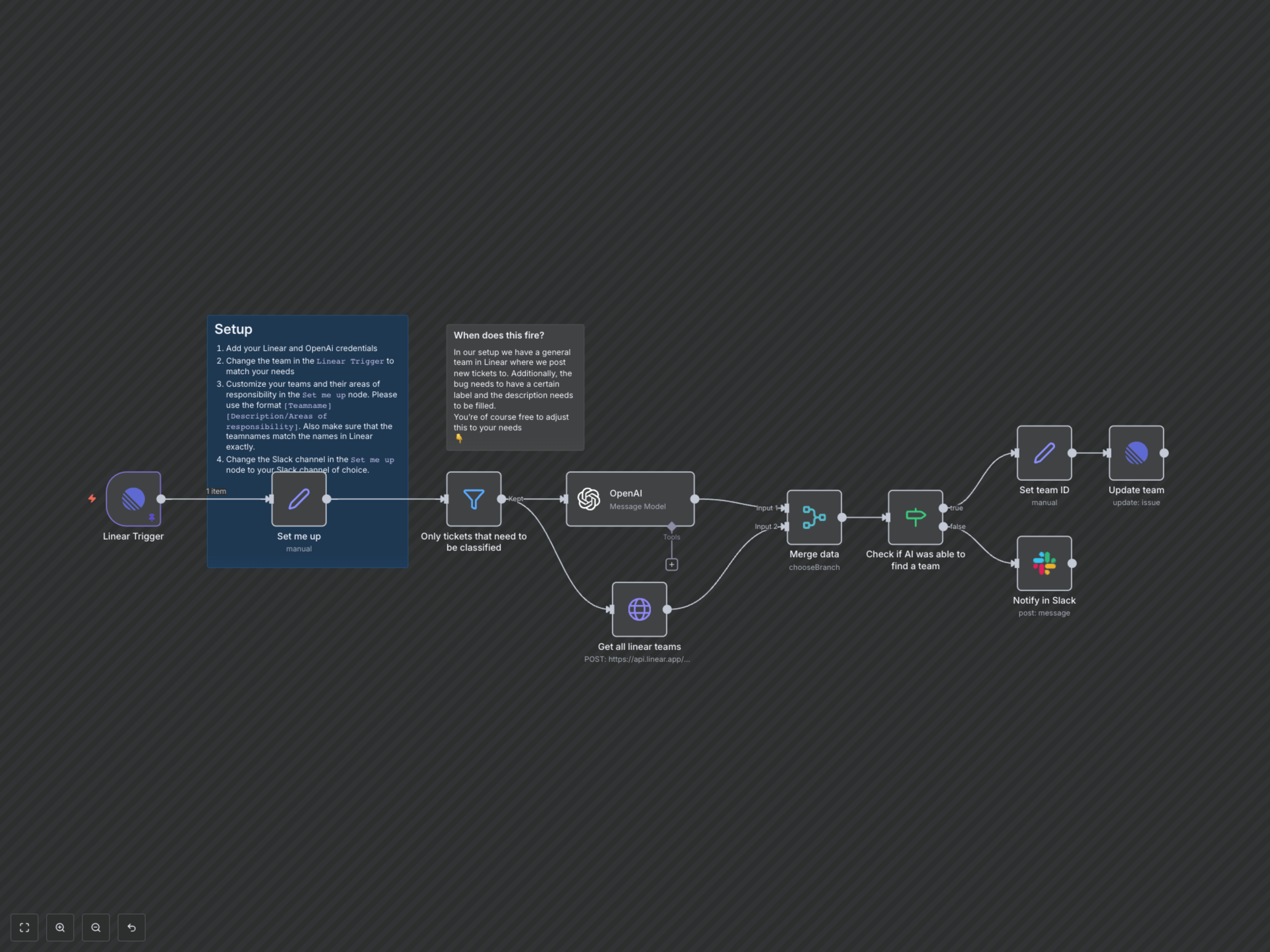
This powerful n8n workflow revolutionizes your bug triage process by integrating Linear with advanced AI. It automatically listens for new or updated bug tickets, classifies them based on their description, and assigns them to the appropriate engineering team. This eliminates manual sorting, speeds up resolution, and ensures every bug reaches the right experts without delay.
Key Features
- Automatic bug classification using advanced AI (OpenAI).
- Intelligent routing of issues to specific Linear teams based on their responsibilities.
- Instant Slack notifications for bug tickets that the AI couldn't classify.
- Customizable team definitions and areas of responsibility within the workflow.
How It Works
1. **Trigger:** The workflow activates when a new or updated bug ticket is created in Linear, specifically when it's in a 'Triage' state, has a description, and is labeled as 'type/bug'. 2. **Data Preparation:** It gathers all relevant bug details (title, description) and retrieves a list of your predefined Linear teams along with their areas of responsibility. 3. **AI Classification:** The bug's title and description are sent to OpenAI, which uses its advanced language model to classify the bug and recommend the most suitable team based on your provided team responsibilities. 4. **Team Assignment:** If the AI successfully identifies a specific team, the workflow updates the original Linear issue, assigning it to the newly classified team. 5. **Fallback Notification:** In cases where the AI cannot confidently classify the bug to a specific team (assigns to 'Other'), a notification is sent to your designated Slack channel, prompting manual review to ensure no bug is missed.