
Automate Lead Capture, Email Verification, & CRM Sync
Streamline lead processing by over 70%, eliminate manual data entry errors, and accelerate sales outreach with fully verified contact information.
Manually verifying emails and transferring lead data from web forms to CRMs and marketing platforms is time-consuming and prone to errors. This workflow automates the entire lead capture process, instantly verifying email addresses, creating leads in SuiteCRM, and syncing contact details to Brevo, ensuring clean data and immediate engagement.

Documentation
Automated Lead Capture & CRM Sync with Email Verification
This n8n workflow provides an end-to-end solution for capturing new leads from web forms, performing real-time email verification, and automatically populating your CRM and marketing automation platforms. It ensures data accuracy and keeps your sales and marketing teams informed through integrated notifications.
Key Features
- Automated Lead Ingestion: Instantly capture new lead data from your web forms (e.g., Tally Forms).
- Real-time Email Verification: Validate email addresses using CaptainVerify to reduce bounce rates and improve deliverability.
- Dynamic CRM Lead Creation: Automatically create new lead records in SuiteCRM with verified contact information.
- Marketing Platform Synchronization: Seamlessly sync new contacts, including their CRM lead ID, to Brevo for targeted campaigns.
- Proactive Notifications: Receive instant alerts in NextCloud Talk for invalid emails, low verification credits, and successfully created leads.
How It Works
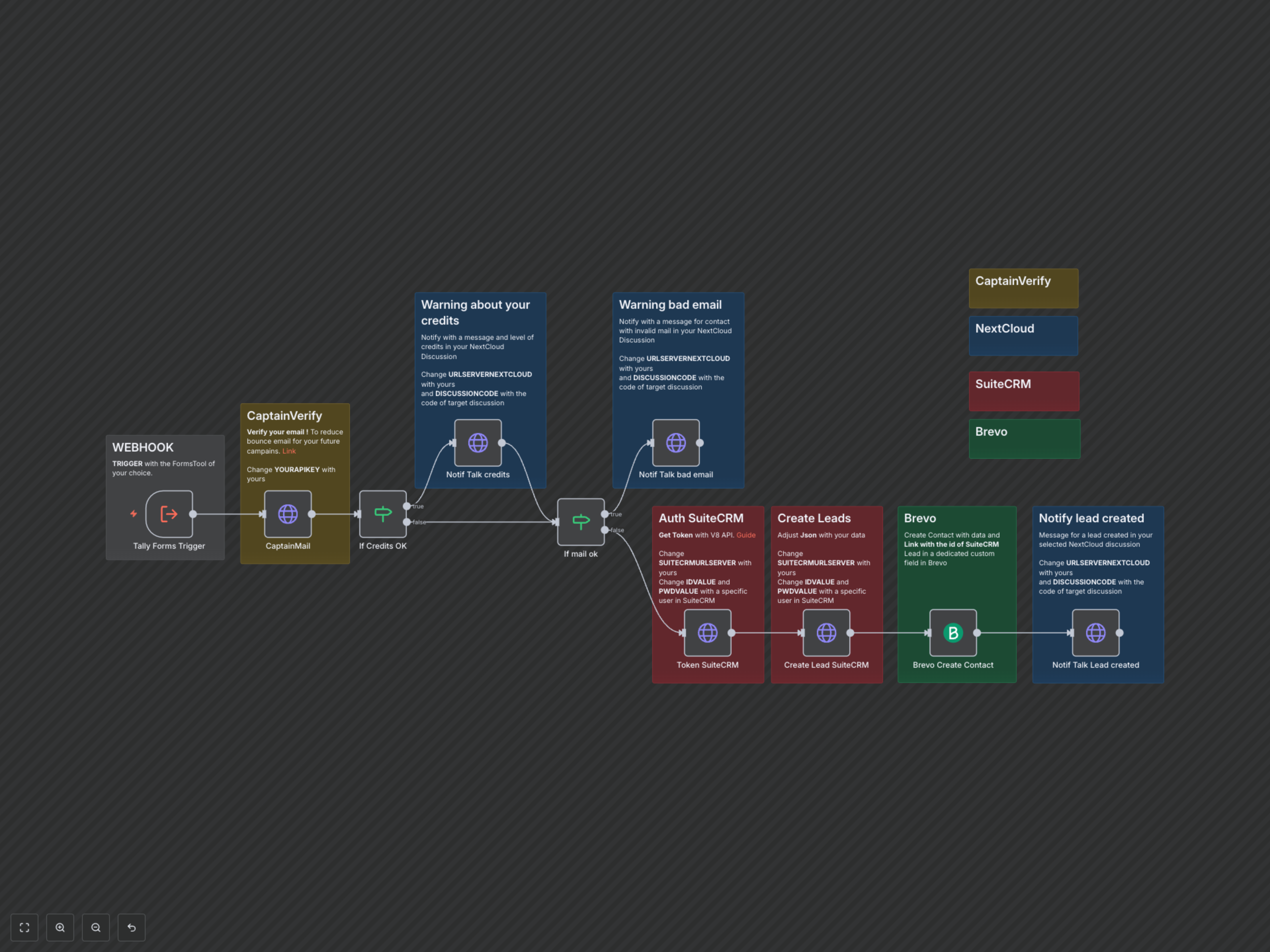
This workflow starts by receiving new lead submissions from a connected web form (e.g., Tally Forms). It immediately sends the submitted email address to CaptainVerify for real-time validation. Based on the verification result and available credits, the workflow either notifies a team via NextCloud Talk about invalid emails or low credits, or proceeds to authenticate with SuiteCRM. After obtaining an access token, it creates a new lead in SuiteCRM using the verified email and form data. Finally, it creates a corresponding contact in Brevo, linking it back to the SuiteCRM lead ID, and sends a success notification to NextCloud Talk. This ensures a fully automated, data-validated lead generation pipeline.