Academic Report Performance Automation | Comparative Analysis & Parent Notification
Teachers can automatically analyze student performance across subjects, compare it against previous results, and instantly notify parents via email, improving communication and saving valuable time.
Academic Report Performance Automation | Comparative Analysis & Parent Notification


$29
Ready-to-use workflow template
Complete workflow template
Setup documentation
Community support
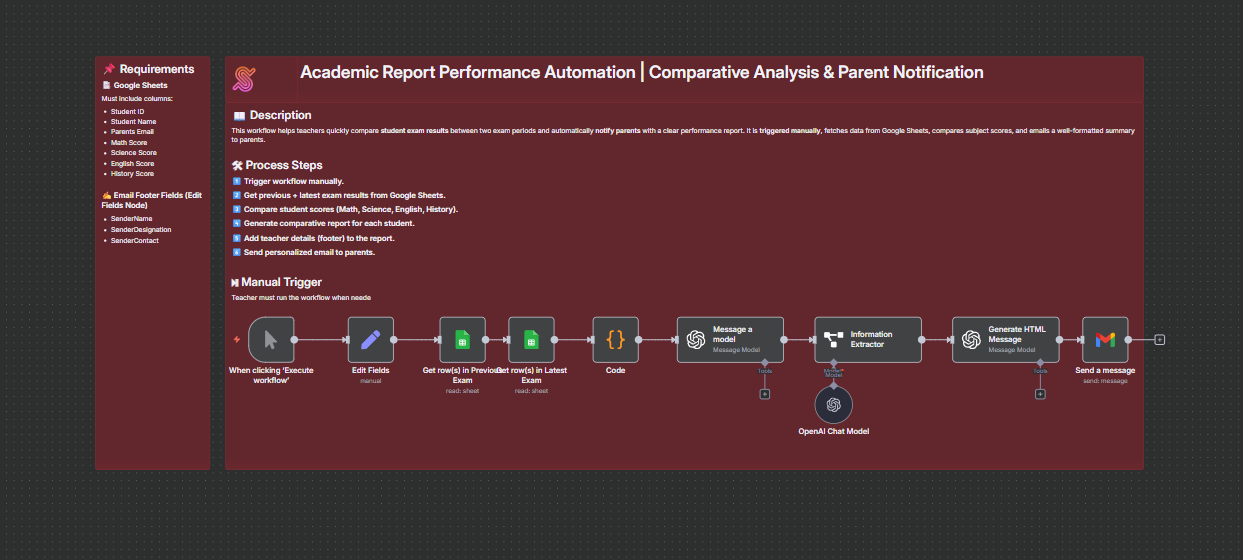
Preview - N8n


Feature 1

Feature 2
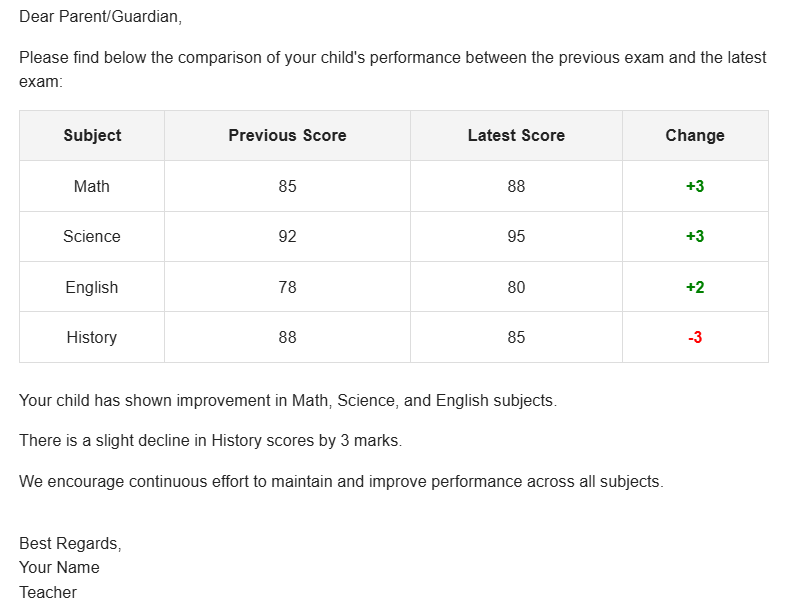
Output 1
Output 2
Documentation
This workflow automates the process of analyzing student performance across two exam periods and sending formatted reports to parents. It compares the previous and latest exam results stored in Google Sheets, highlights performance changes, and delivers personalized emails to parents. Teachers can trigger the workflow manually, ensuring accuracy and flexibility in reporting.
Step-by-step process:
- Manually trigger the workflow.
- Fetch student data from two Google Sheets (previous exam + latest exam).
- Compare scores subject-wise using Student ID as the core reference.
- Generate a comparative report highlighting improvements or declines.
- Format the report with teacher details (footer).
- Send a personalized email to each parent with the student’s performance update.
Benefits for Customers / Users
- Clear Performance Tracking – Easily see subject-wise improvement or decline in scores.
- Automated Parent Communication – Saves teachers time by sending structured performance reports automatically.
- Personalized Insights – Parents receive clear insights tailored to their child’s progress.
- Consistent Reporting – Standardized format ensures clarity and reduces miscommunication.
Tools Used
- Google Sheets – Stores student exam results for comparison.
- Email (Gmail/SMTP) – Sends formatted reports directly to parents.
- n8n Workflow Automation – Orchestrates data fetching, comparison, formatting, and notifications.