
Transform Product Images with AI: Add Models & Boost Appeal
Automatically enhance product images by integrating human models, increasing visual appeal and reducing photography expenses by over 70%.
Manually integrating human models into product photos for enhanced appeal is complex and costly, hindering marketing effectiveness. This workflow automates the AI-powered editing of existing product images to seamlessly incorporate human models, creating professional and engaging marketing visuals effortlessly.



Documentation
AI-Powered Product Photography Enhancement
This powerful n8n workflow revolutionizes product photography by leveraging advanced AI to transform your existing product images. It seamlessly integrates human models and enhances visual appeal, ideal for e-commerce brands and marketers looking to create compelling visuals without expensive photoshoots.
Key Features
- Automated analysis of existing product images using AI vision.
- Intelligent, dynamic prompt generation to guide AI image editing for optimal results.
- AI-powered image editing to seamlessly integrate diverse human models into your product photos.
- High-quality output generation suitable for professional marketing assets and e-commerce listings.
- Direct upload of enhanced images to Google Drive for centralized storage.
- Comprehensive tracking of original images, generated prompts, and final output links in Google Sheets.
How It Works
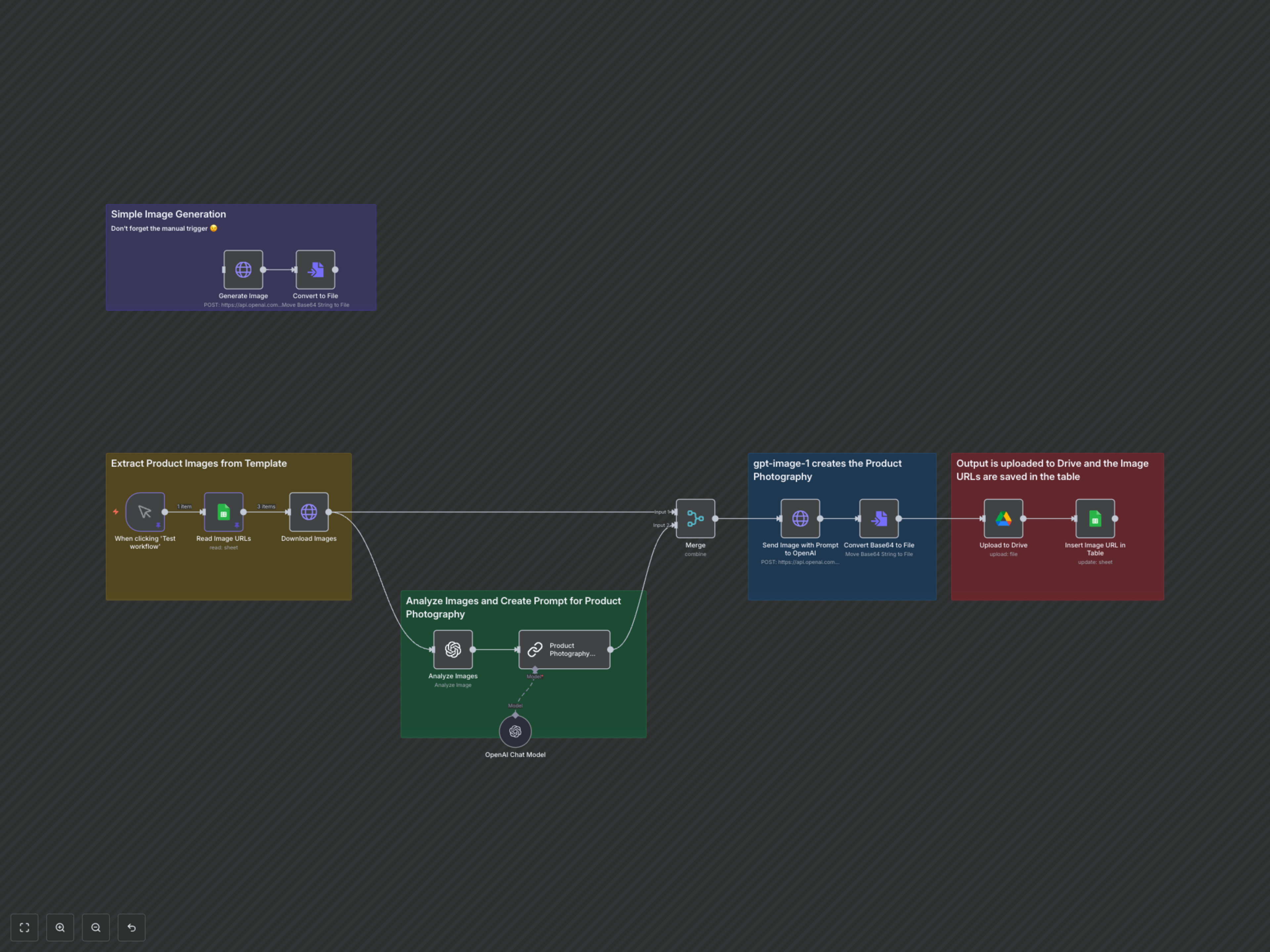
The workflow begins by retrieving a list of existing product image URLs from your designated Google Sheet. For each URL, it downloads the product image. An AI vision model (GPT-4o-mini) then briefly analyzes the product to understand its context. This description is used by another AI model (GPT-4.1-mini, orchestrated by LangChain) to craft a highly specific prompt. This prompt instructs the AI to add a human model interacting with the product, while optimizing for realism, cinematic look, lighting, angle, and overall professional quality. The original product image and the newly generated prompt are then sent to OpenAI's image editing API (gpt-image-1). The AI processes this request, producing a high-quality, edited version of your product image that features a human model. This resulting image is then converted to a binary file, uploaded to a specified folder within your Google Drive, and finally, the links to the original image, the AI-generated prompt, and the new output image are meticulously recorded back into your Google Sheet for easy tracking and reference.