
Shopify Customer to Zendesk Contact Sync Automation
Reduce manual support data entry by 100% with automated Shopify-to-Zendesk contact sync.
Support teams waste time manually adding or updating customer details in Zendesk whenever someone signs up or updates information in Shopify. This automation instantly checks if a contact already exists, updates their phone number if needed, or creates a brand-new Zendesk user profile. You get clean, accurate helpdesk records — without any manual effort or duplicates.



Documentation
🔍 Description
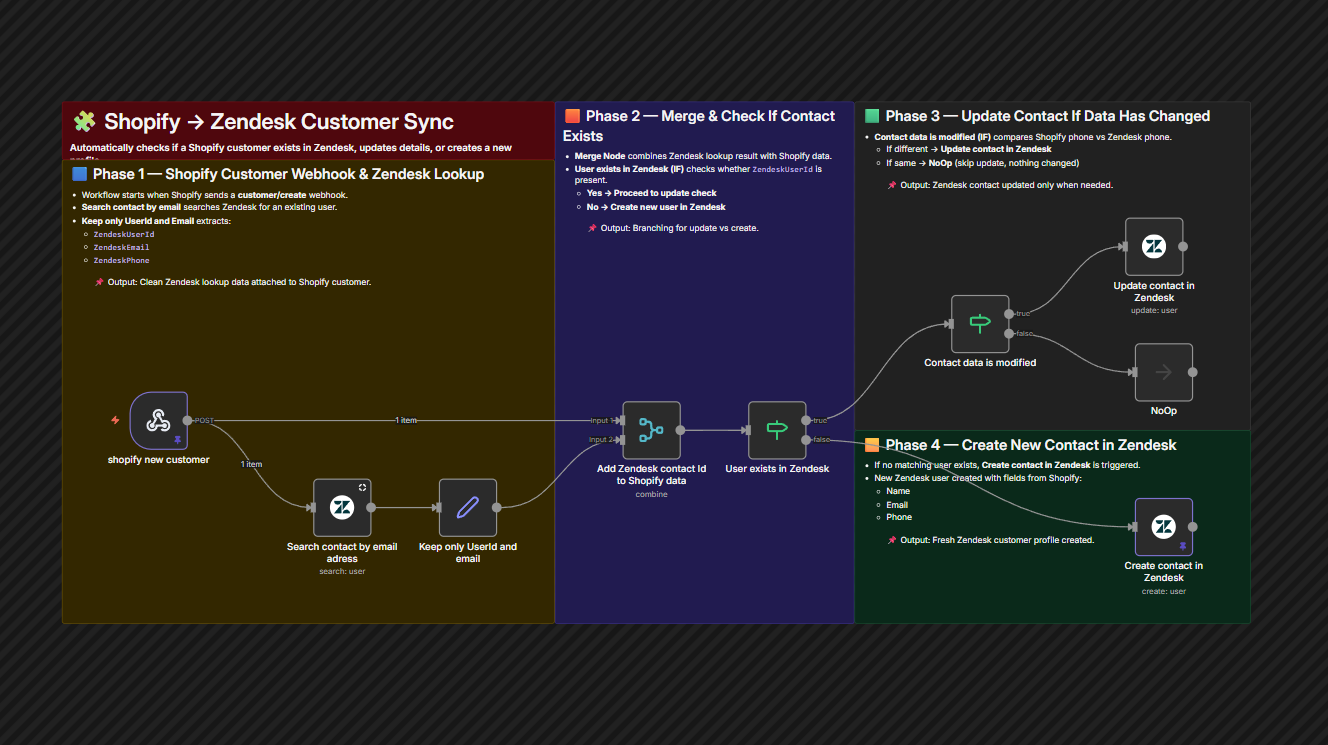
This workflow eliminates manual CRM and helpdesk maintenance by keeping Zendesk aligned with Shopify’s customer updates. It runs the moment a customer is created in Shopify, checks if the contact already exists in Zendesk using their email, and updates only when their data is different. If the user doesn’t exist, the workflow automatically creates them — ensuring tickets always connect to the right person.
🔄 Workflow Steps
- Shopify webhook triggers on new customer creation.
- Zendesk search checks if the email already exists in the helpdesk.
- If a match exists — phone number is compared with Shopify’s record.
- If changed — Zendesk contact is updated automatically.
- If no contact exists — a new Zendesk user profile is created.
⭐ Key Benefits
- No More Duplicate Tickets or UsersContacts are matched cleanly by email.
- Support Teams Move FasterAlways-accurate requester profiles save lookup time.
- Smart Sync Only When NeededOnly updates changed fields — optimized API usage.