
Empower Your Google Drive Docs with AI Chat & Qdrant RAG
Reduce document research time by up to 90%, delivering instant, context-aware answers from your Google Drive content.
Manually searching large document repositories for answers is time-consuming and inefficient. This workflow builds an AI-powered RAG chatbot that instantly extracts information from your Google Drive documents and provides context-aware answers using Gemini AI and Qdrant.




Documentation
AI-Powered RAG Chatbot for Google Drive Docs
This comprehensive n8n workflow transforms your static Google Drive documents into a dynamic, interactive knowledge base. It streamlines document ingestion, intelligently extracts metadata, and enables a powerful RAG (Retrieval-Augmented Generation) chatbot powered by Google Gemini and Qdrant for immediate, context-aware insights.
Key Features
- Automated Google Drive Document Ingestion: Effortlessly import documents from specified Google Drive folders for processing.
- AI-Enhanced Metadata Extraction with Gemini: Automatically identify and extract critical metadata using Google Gemini for richer, more precise search capabilities.
- Robust Qdrant Vector Database Integration: Securely store and manage document embeddings for high-performance semantic search.
- Intelligent Retrieval-Augmented Generation (RAG): Provide highly accurate, context-aware answers by retrieving relevant document snippets before generating responses.
- Human-in-the-Loop Document Deletion: Ensure data integrity with a Telegram-based approval step for deleting records from the vector store.
- Persistent Chat History Logging: Automatically save all chatbot interactions to a Google Doc for audit trails and future reference.
How It Works
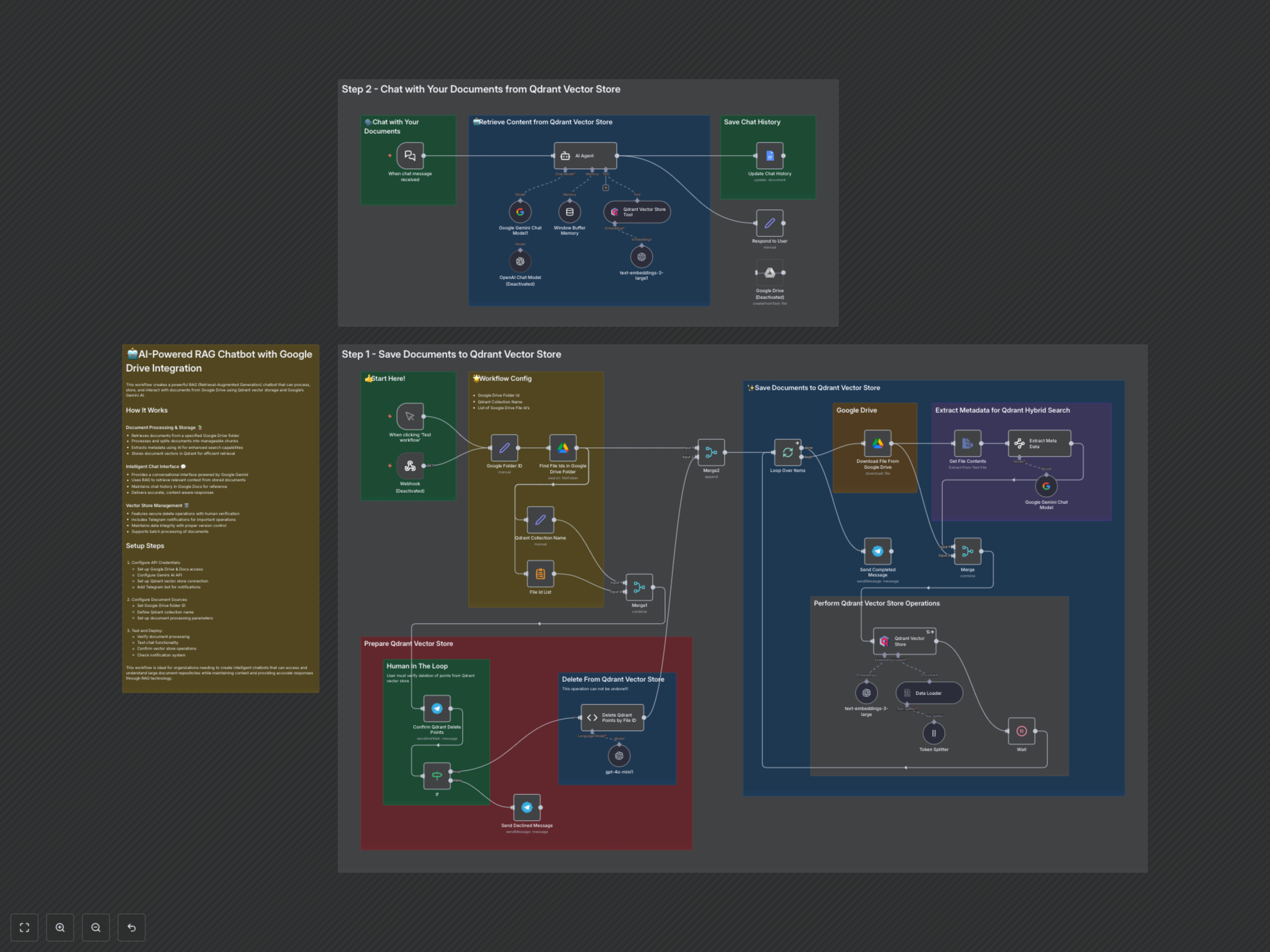
This workflow operates in two primary phases: ingesting and storing documents in a Qdrant vector database, and then leveraging that database to power an AI-driven RAG chatbot.
Phase 1: Document Processing and Storage
The workflow initiates either manually or via a webhook to a specified Google Drive folder. It identifies all file IDs within the folder and, after an optional human-in-the-loop approval via Telegram for existing data deletion, downloads each document. Document contents are then extracted, and Google Gemini is used to extract rich metadata (like overarching themes, recurring topics, pain points, and keywords). The extracted text is chunked into manageable sizes by a token splitter. OpenAI embeddings are generated for these chunks, which are then saved along with their metadata into your Qdrant vector store. A Telegram notification confirms the completion of the upsert process.
Phase 2: AI Chat Interaction
When a chat message is received, the workflow uses a Google Gemini chat model along with a window buffer memory to maintain conversation context. An AI Agent then leverages a Qdrant vector store tool to perform semantic searches, retrieving the most relevant document chunks based on the user's query and the extracted metadata. The agent synthesizes this retrieved information with its own capabilities to generate accurate and informative responses. Finally, the entire interaction, including the user's input and the AI's response, is logged into a designated Google Doc for historical tracking.