
Empower AI Agents with Secure Filesystem Automation
Streamline AI agent integration with file system operations, reducing custom development time by up to 50% while ensuring secure command execution.
Integrating AI agents with low-level system operations often involves complex scripting and security risks, hindering their practical application. This workflow provides a secure, abstracted interface, enabling AI agents to safely perform filesystem tasks like reading, writing, and managing files and directories with ease.


Documentation
Empower AI Agents with Secure Filesystem Automation
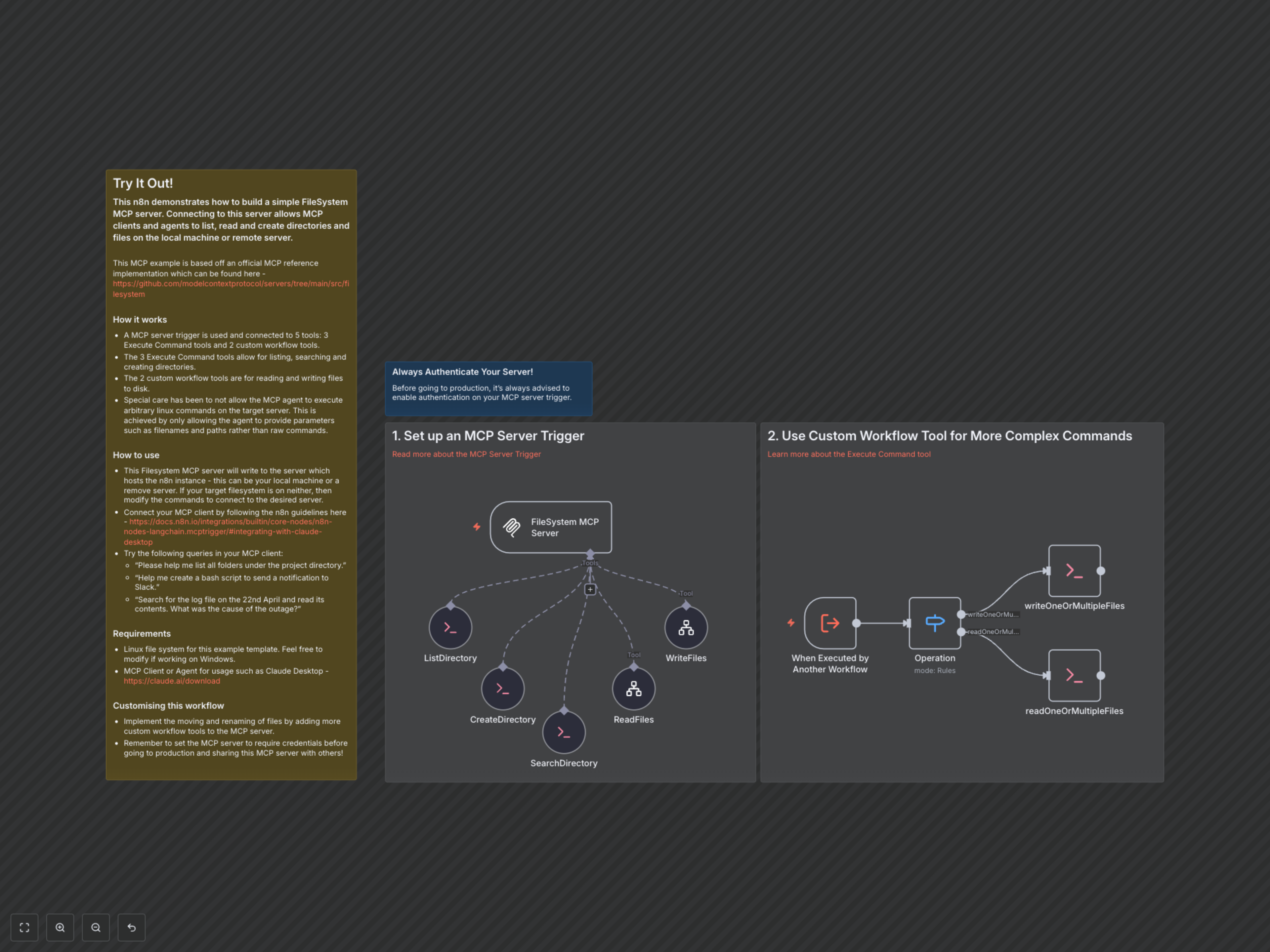
This n8n workflow creates a robust Model Context Protocol (MCP) server, enabling AI agents to securely interact with your server's filesystem. It abstracts complex command-line operations, offering a safe and controlled environment for AI-driven file and directory management.
Key Features
- Secure Command Execution: Prevents AI agents from executing arbitrary commands, enhancing system security.
- Directory Listing & Creation: Allows agents to list contents and create new directories efficiently within the designated project root.
- File Reading & Writing: Empowers AI to read existing files and write new content to the filesystem.
- File Searching: Enables agents to quickly locate files by name within the project folder.
- Seamless AI Agent Integration: Provides a dedicated MCP endpoint for easy connection with leading AI clients and agents like Claude Desktop.
How It Works
The workflow begins with an MCP Server Trigger, acting as the secure gateway for AI agent requests. This trigger is connected to five distinct tools: three Execute Command Tool nodes for listing, creating, and searching directories, and two custom Workflow Tool nodes dedicated to reading and writing files. For file read/write operations, the Workflow Tool nodes internally call this same workflow via an Execute Workflow Trigger, routing requests through a Switch node to either the 'readOneOrMultipleFiles' or 'writeOneOrMultipleFiles' Execute Command nodes. This design ensures that AI agents only provide parameters (like filenames or paths) to pre-defined, secure shell commands, rather than executing raw, potentially malicious commands, operating within the '/home/node/' project root.