
Automate Survey Insight Generation with AI & Google Sheets
Generate detailed survey insights, including response summaries and sentiment, in minutes per question, accelerating analysis by over 90%.
Analyzing large volumes of survey responses manually is time-consuming and often leads to missed insights. This n8n workflow leverages AI and vector clustering to automatically identify trends, summarize responses, and provide sentiment analysis, transforming raw data into actionable intelligence in minutes.



Documentation
AI-Powered Survey Insights from Google Sheets
This n8n workflow automates the extraction of meaningful insights from large volumes of unstructured survey responses stored in Google Sheets. By combining advanced AI, vector embeddings, and clustering algorithms, it identifies common themes and sentiments, providing a comprehensive understanding of participant feedback without manual review.
Key Features
- Automatically imports and vectorizes survey responses from Google Sheets.
- Utilizes K-means clustering to identify groups of similar answers for each question.
- Summarizes clustered responses and determines sentiment using an OpenAI LLM (gpt-4o-mini).
- Exports categorized insights, including participant IDs and raw responses, to a new, organized Google Sheet.
- Scales efficiently to analyze feedback from a large number of survey participants.
How It Works
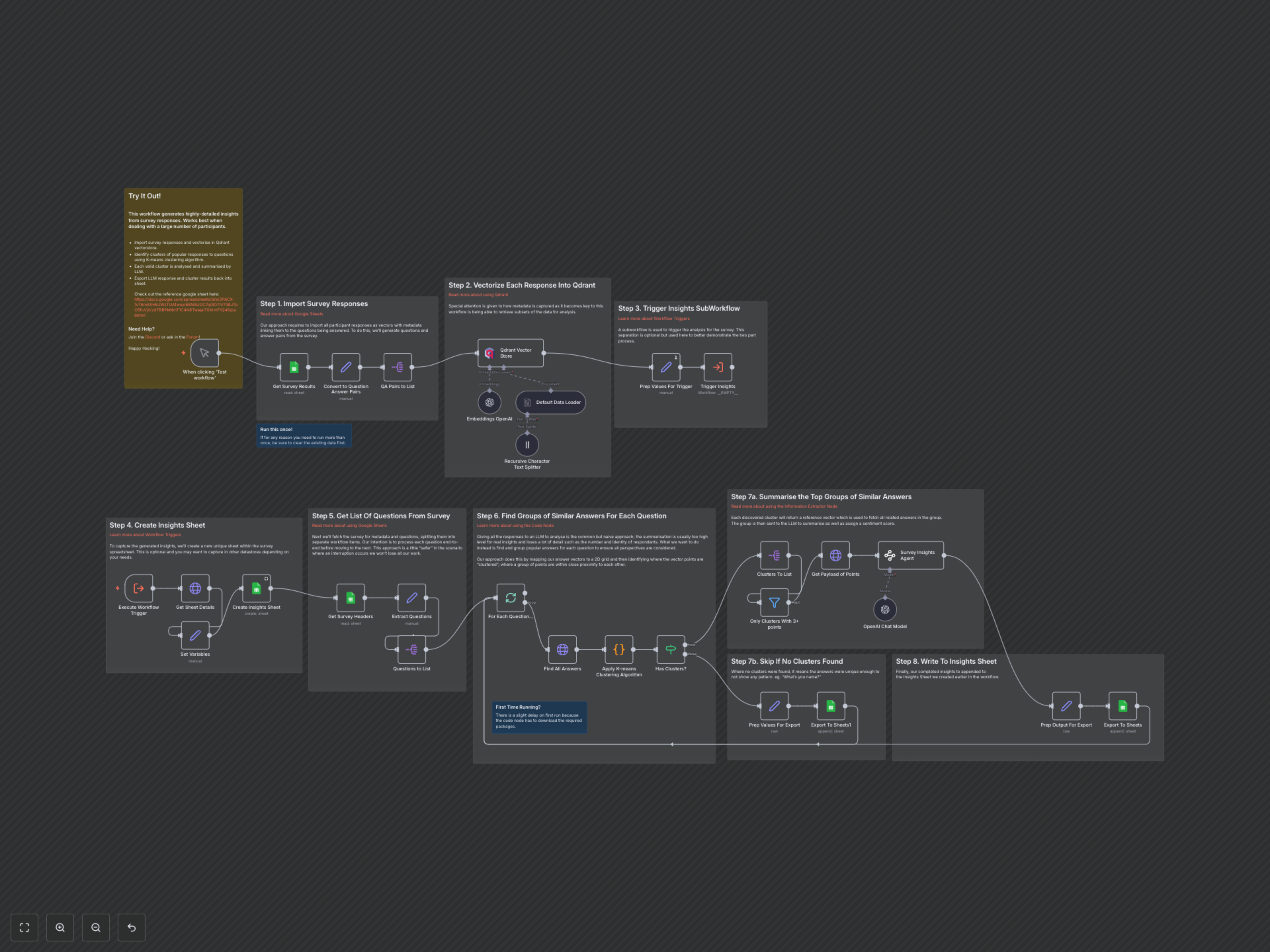
The workflow processes survey responses in distinct stages:
- 1. Import and Prepare Survey Responses: The workflow starts by fetching all survey results from your specified Google Sheet. It then transforms each row into question-answer pairs, complete with participant details. For questions with long answers, a recursive character text splitter ensures optimal processing.
- 2. Vectorize and Store in Qdrant: Each question-answer pair is vectorized using OpenAI embeddings. These vector embeddings, along with rich metadata (question, participant, survey name), are then stored in a Qdrant vector database. This structured storage enables efficient querying and analysis of similar responses later.
- 3. Initialize Insights Generation: A sub-workflow is triggered to begin the analysis. This initial step retrieves metadata about your survey sheet and dynamically creates a new, dated "Insights" sheet within your existing spreadsheet to store the generated findings.
- 4. Extract and Iterate Through Questions: The workflow identifies all questions from your survey headers. It then processes each question sequentially, ensuring a thorough, question-by-question analysis.
- 5. Discover Answer Clusters with K-means: For each question, the workflow queries Qdrant to retrieve all relevant answer vectors. A Python Code node applies the K-means clustering algorithm to these vectors, identifying groups of similar responses. Only clusters containing three or more similar responses are considered for further analysis, filtering out unique or insignificant answers.
- 6. Summarize and Analyze Clusters with AI: For each identified cluster, the workflow fetches the raw content of the grouped responses. These responses are then fed to an OpenAI Large Language Model (LLM) via an Information Extractor. The LLM summarizes the collective feedback, extracts key insights, and assigns an overall sentiment (e.g., positive, neutral, negative) to the cluster.
- 7. Export Actionable Insights: The summarized insights, along with supporting data like the number of responses, participant IDs, and the raw answers, are meticulously formatted. These comprehensive insights are then appended as new rows to the dedicated "Insights" Google Sheet, providing a clear, structured overview of your survey findings. If a question yields no significant clusters, a "No Insight Found" entry is recorded.