
Automate Shopify Orders to Google Sheets for Sales Reporting
Eliminate manual Shopify order data entry, ensuring real-time sales reporting and analysis while saving hours of administrative work weekly.
Manual extraction and aggregation of Shopify order data is time-consuming and prone to errors. This workflow automates fetching all Shopify orders, including pagination, and seamlessly syncs them to a Google Sheet for effortless reporting and analysis.

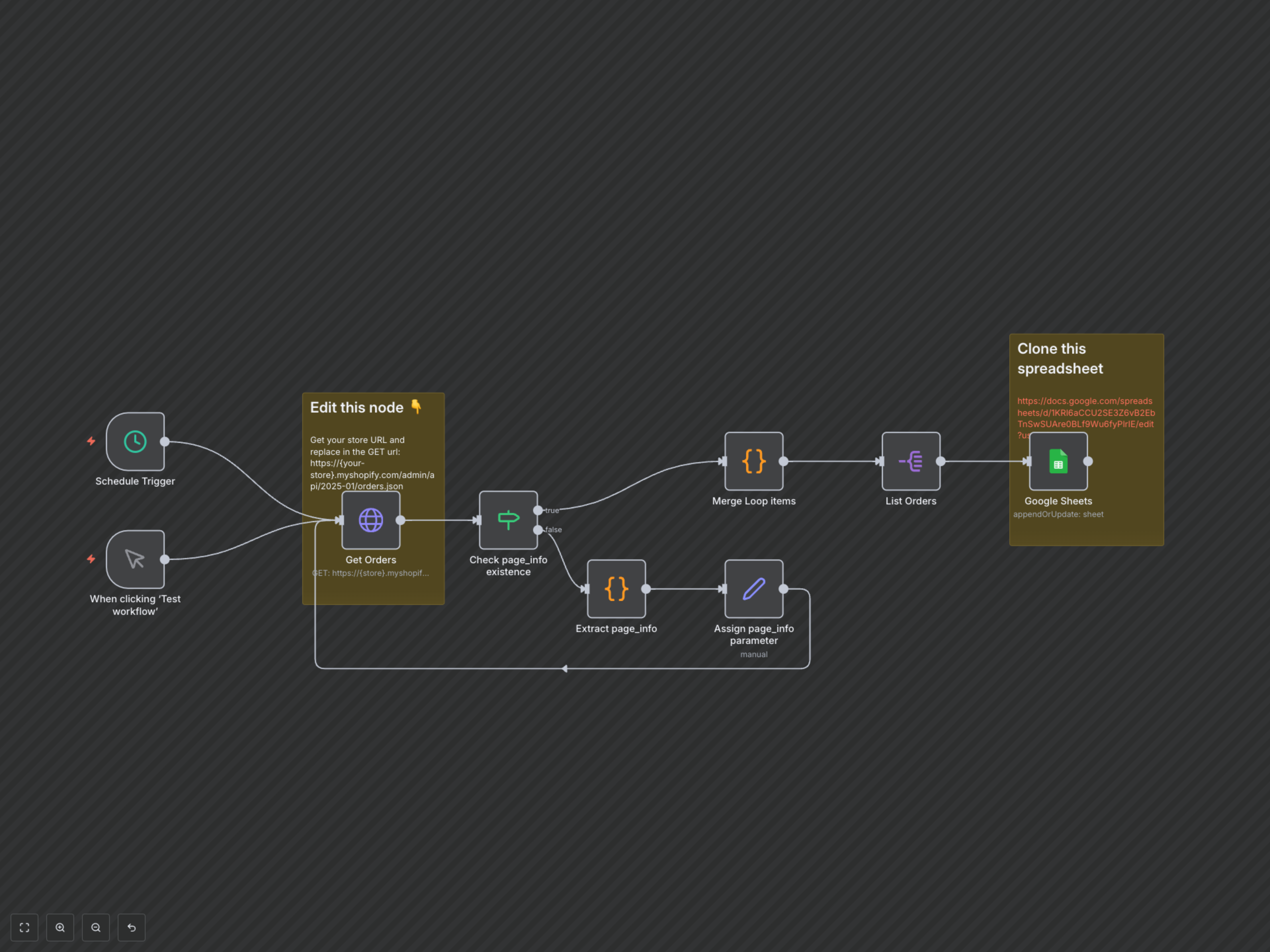

Documentation
Shopify Order to Google Sheets Sync
This workflow provides a robust solution for businesses looking to automatically export their Shopify order data into a Google Sheet. It's ideal for e-commerce managers, data analysts, or anyone needing up-to-date sales information for reporting, inventory management, or customer insights.
Key Features
- Automated Shopify Order Collection: Fetches all orders, handling API pagination for comprehensive data.
- Scheduled Data Synchronization: Keeps your Google Sheet updated with the latest order information automatically.
- Intelligent Data Mapping: Transfers critical order details like ID, email, note, and processing date.
- Append or Update Functionality: Ensures existing order data is updated while new orders are added without duplicates.
How It Works
1. Trigger: The workflow is activated manually or on a predefined schedule. 2. Fetch Orders (Get Orders): It connects to your Shopify store via API to retrieve order data. It intelligently uses 'page_info' for efficient pagination, ensuring all orders are collected. 3. Handle Pagination (Check page_info existence, Extract page_info, Assign page_info parameter): If more orders are available (indicated by a 'rel="next"' link header), the workflow extracts the necessary pagination token and loops back to fetch the next set of orders. 4. Consolidate Data (Merge Loop items): All collected order data from various pages is combined into a single dataset. 5. Prepare for Sheets (List Orders): Each individual order record is then separated, ready for individual processing. 6. Update Google Sheet (Google Sheets): Finally, the workflow connects to your specified Google Sheet, appending new orders or updating existing ones based on the order ID, providing a continuously updated sales ledger.