
Automate OpenSea NFT Market Analysis & Gain Trading Insights
Gain immediate access to critical OpenSea NFT market insights, reducing research time by up to 90% and improving decision-making accuracy.
Manually tracking NFT listings, offers, and market data across OpenSea is time-consuming and can lead to missed opportunities. This AI-powered n8n workflow automates comprehensive OpenSea market analysis, providing real-time data on NFT listings, offers, and traits to empower smarter trading and collection decisions.



Documentation
Automate OpenSea NFT Market Analysis with AI
Manually tracking NFT listings, offers, and market data across OpenSea is time-consuming and can lead to missed opportunities. This AI-powered n8n workflow automates comprehensive OpenSea market analysis, providing real-time data on NFT listings, offers, and traits to empower smarter trading and collection decisions.
Key Features & Benefits
- Real-time Market Insights: Instantly retrieve active NFT listings and offers for any collection or specific NFT.
- Optimal Pricing Discovery: Quickly identify the cheapest available NFT listings and the highest offers to inform your buying and selling strategies.
- Detailed Order Tracking: Access specific NFT listing or offer details using their unique order hash.
- Trait-Specific Analysis: Understand market dynamics by fetching offers related to particular NFT traits within a collection.
- Streamlined Data Access: Automate complex OpenSea API queries without writing a single line of code, ensuring compliance with API requirements.
How It Works: Your AI-Powered Market Agent
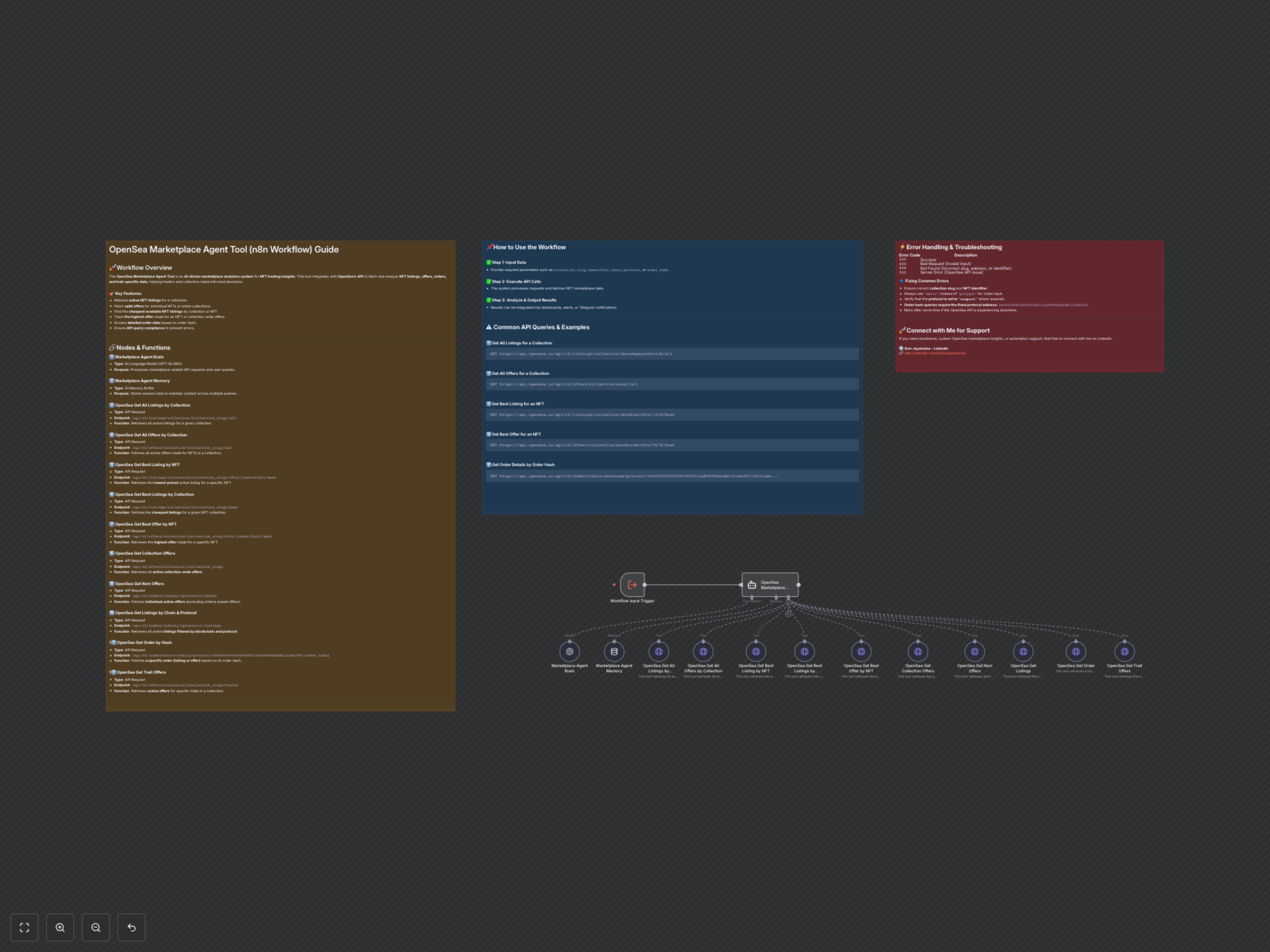
This workflow acts as an intelligent agent, taking your natural language queries about the OpenSea marketplace. It uses an AI brain to understand your request, consults its memory for context, and then intelligently dispatches the appropriate OpenSea API tool to fetch the exact data you need. The results are then processed and can be used for further automation, analytics, or immediate insights.
Core Workflow Components
- Marketplace Agent Brain (AI Language Model): Utilizes a powerful AI model (GPT-4o Mini) to interpret user queries and generate API requests dynamically.
- Marketplace Agent Memory (AI Memory Buffer): Maintains conversational history, allowing the agent to understand follow-up questions and operate with ongoing context.
- OpenSea Marketplace Agent (AI Agent): The central orchestrator that intelligently routes user requests to the correct OpenSea API tool based on the query's intent.
- OpenSea API Tools (HTTP Request Nodes): A collection of 10 specialized n8n HTTP Request nodes, each pre-configured to interact with a specific OpenSea API endpoint for various data retrieval tasks (e.g., listings, offers, orders, traits).
Understanding the OpenSea API Tools
This workflow provides an extensive suite of tools to interact with the OpenSea API:
- Get All Listings (by Collection): Fetches all active, valid NFT listings for a specified collection slug.
- Get All Offers (by Collection): Retrieves all active, valid offers for NFTs within a given collection slug.
- Get Best Listing (by NFT): Identifies the lowest-priced active listing for a specific NFT using its collection slug and token identifier.
- Get Best Listings (by Collection): Returns the cheapest active listings across an entire NFT collection.
- Get Best Offer (by NFT): Finds the highest offer made for a particular NFT.
- Get Collection Offers: Lists all active collection-wide offers for a given collection slug.
- Get Item Offers: Retrieves all valid individual offers (excluding criteria-based offers), filterable by blockchain chain and protocol.
- Get Listings (by Chain & Protocol): Fetches all active listings, filterable by blockchain chain and protocol.
- Get Order (Single Order by Hash): Provides detailed information for a specific OpenSea order (listing or offer) using its unique order hash, requiring the blockchain chain and a fixed protocol address.
- Get Trait Offers: Retrieves all active offers made for specific traits within an NFT collection.
Important API Usage Guidelines
To ensure successful queries and avoid errors, please note the following critical restrictions and best practices:
- Supported Blockchains: Only use explicitly supported chains. For instance, always use "matic" instead of "polygon". A list of supported chains is provided within the 'OpenSea Marketplace Agent' node's system message.
- Protocol Requirement: For tools like "Get Item Offers" and "Get Listings (by Chain & Protocol)", the protocol field must consistently be set to "seaport".
- Fixed Protocol Address for Get Order: When using the "Get Order (Single Order by Hash)" tool, the protocol_address parameter must always be 0x0000000000000068f116a894984e2db1123eb395. This is a fixed requirement, not a credential.
Common API Query Examples
"Retrieve all active listings for the 'boredapeyachtclub' collection."
"Fetch all current offers for 'azuki' collection."
"Find the lowest-priced listing for NFT #1234 in 'doodles' collection."
"Get the 10 cheapest listings for 'mutantapeyachtclub'."
"Find the highest offer for NFT #5678 in 'moonbirds' collection."
"List all collection offers for 'clonex'."
"Fetch all active item offers for NFTs on Ethereum using Seaport protocol."
"Retrieve all active listings for Ethereum Seaport orders."
"Fetch details for order `0x123abc...` on Ethereum."
"Find all offers for 'Background: Blue' in the 'azuki' collection."
Error Handling & Troubleshooting
While this workflow includes built-in instructions to guide the AI agent, here are common issues and their solutions:
- 400 Bad Request: This typically means an invalid input parameter. Double-check collection_slug, identifier, chain names (e.g., matic vs. polygon), and ensure protocol is seaport when required.
- 404 Not Found: The requested resource (collection, NFT, or order hash) does not exist or is incorrect. Verify your input identifiers.
- 500 Server Error: Indicates an issue on the OpenSea API side. Wait a few minutes and retry your query.
- "Unrecognized URL" Warnings: The analysis might flag OpenSea URLs as "unrecognized." These are false positives as the workflow uses legitimate OpenSea API endpoints. No action is needed unless an actual API call fails.
- Credential Issues: Ensure both your OpenAI and OpenSea API keys are correctly configured in n8n's credentials.