
Automate Meeting Summaries & Follow-ups with AI
Automatically summarize Google Meet transcripts and schedule follow-up actions, reducing post-meeting administrative time by up to 70%.
Manually summarizing meetings, identifying action items, and scheduling follow-ups is time-consuming and prone to errors. This n8n workflow leverages AI to automatically extract key insights from Google Meet transcripts and proactively manage all post-meeting follow-up actions.



Documentation
AI-Powered Meeting Assistant for Google Meet
Manually summarizing meetings, identifying action items, and scheduling follow-ups can be a significant drain on productivity. This n8n workflow streamlines your entire post-meeting process by leveraging AI to automatically extract key insights from Google Meet transcripts and proactively manage follow-up actions.
Key Features
- Effortless Transcript Retrieval: Automatically fetches meeting transcripts from Google Drive for any specified Google Meet event.
- Intelligent AI Summarization: Utilizes an AI agent (OpenAI) to generate concise meeting summaries, highlight critical discussion points, and identify attendee-specific contributions.
- Automated Next Steps & Action Items: Clearly lists all agreed-upon next steps or suggests relevant actions if none are explicitly stated in the transcript.
- Proactive Follow-up Scheduling: Automatically creates new Google Calendar events and invites attendees based on the AI agent's analysis of follow-up meeting requirements.
- Customizable AI Tooling: Demonstrates how to integrate custom workflow tools, allowing the AI agent to interact with various services and perform complex actions within n8n.
How It Works
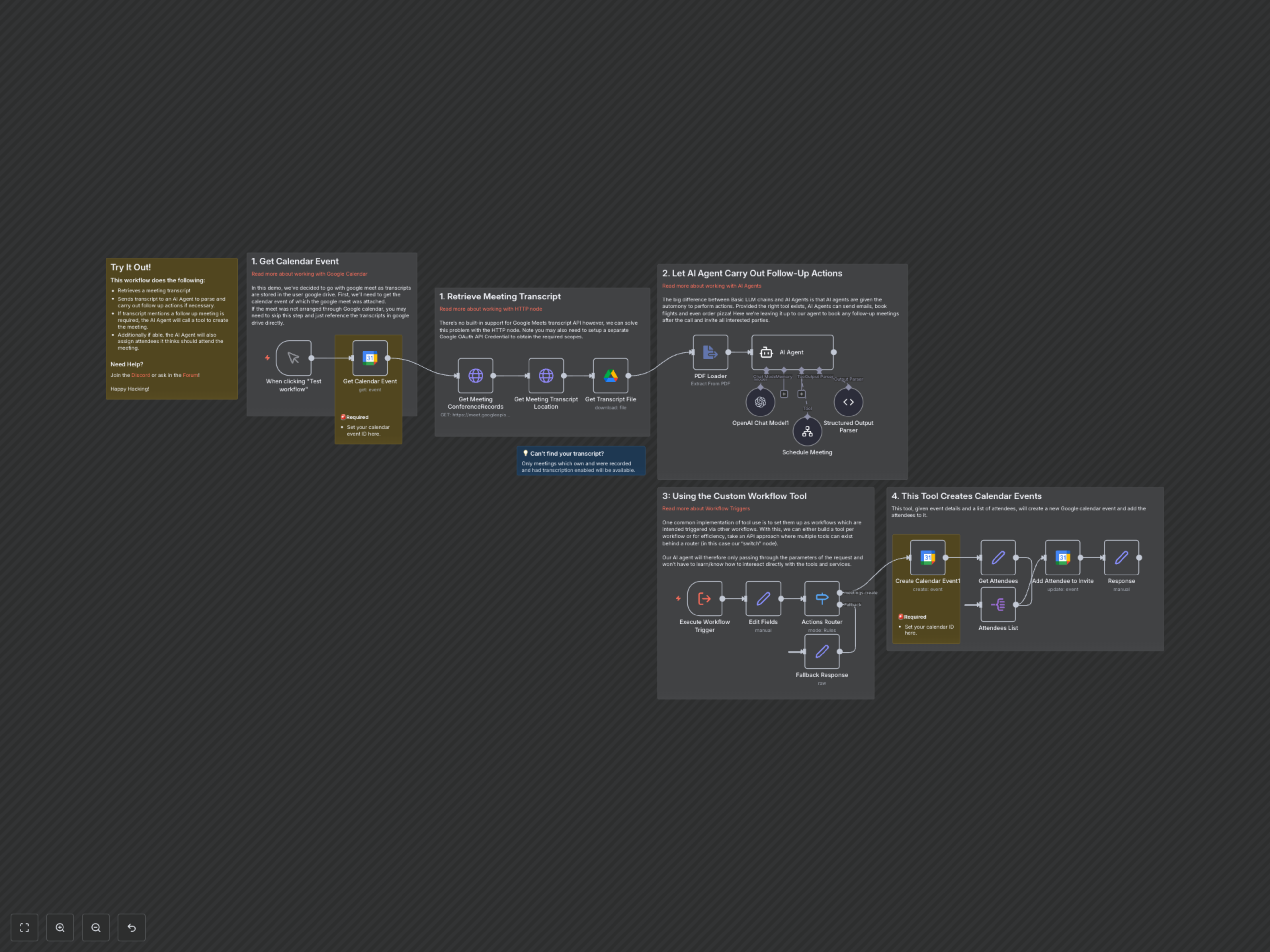
This workflow begins by retrieving a specific Google Calendar event that hosted a Google Meet. It then queries the Google Meet API to locate the corresponding conference records and identify where the meeting transcript is stored in Google Drive. Once identified, the transcript (a PDF file) is downloaded and processed by a PDF Loader.
The extracted text from the transcript, along with meeting details (creator, attendees, schedule), is then fed into an AI Agent powered by OpenAI. This agent is instructed to summarize the meeting, highlight key points per attendee, list next steps, and crucially, identify if a follow-up meeting is required.
If the AI agent determines a follow-up meeting is needed, it calls a custom n8n workflow tool named "create_calendar_event." This tool is designed as a sub-workflow that receives structured data (title, description, dates, times, attendees) from the AI. The sub-workflow then proceeds to create the new event in Google Calendar and adds all specified attendees, ensuring seamless post-meeting task management.
Important Considerations
- Transcript Availability: This workflow relies on Google Meet transcription being enabled during the meeting and the transcript being stored in Google Drive. Only recorded meetings with transcription enabled will generate accessible transcripts.
- Google Meet API: Direct integration with Google Meet's advanced APIs for conference records and transcripts currently requires using the HTTP Request node and specific Google OAuth2 scopes.
- Calendar ID: Ensure the Google Calendar ID is correctly configured in the relevant Google Calendar nodes for event creation and updates.