
Automate Gmail Vectorization for AI-Powered Search & Insights
Transform raw Gmail data into an AI-searchable vector database, reducing email information retrieval time by over 90% and unlocking semantic search capabilities.
Manually sifting through emails for specific information is time-consuming and limits advanced analysis capabilities. This workflow automatically extracts, categorizes, and vectorizes your Gmail data, enabling powerful AI-driven semantic search and deeper insights.



Documentation
Gmail to Vector Embeddings with PGVector and Ollama
This powerful n8n workflow turns your Gmail inbox into an intelligent, AI-searchable knowledge base. It extracts email content and metadata, stores it in a structured PostgreSQL database, and generates vector embeddings using Ollama, which are then stored in PGVector. This setup enables semantic search, allowing you to find emails based on meaning and context, not just keywords.
Key Features
- Automates the extraction of key information (sender, recipient, subject, body, attachments, IDs) from both historical and new Gmail emails.
- Organizes email metadata in a structured PostgreSQL table (`emails_metadata`) for easy querying and record-keeping.
- Generates high-quality vector embeddings using the Ollama `nomic-embed-text` model for advanced semantic understanding.
- Stores vector embeddings in a PGVector table (`emails_embeddings`) for efficient similarity searches and AI-driven insights.
- Supports both initial bulk import of historical emails and continuous, real-time processing of new incoming messages.
How It Works
The workflow operates in two main modes: a manual trigger for historical bulk imports and an automated trigger for continuous monitoring of new emails.
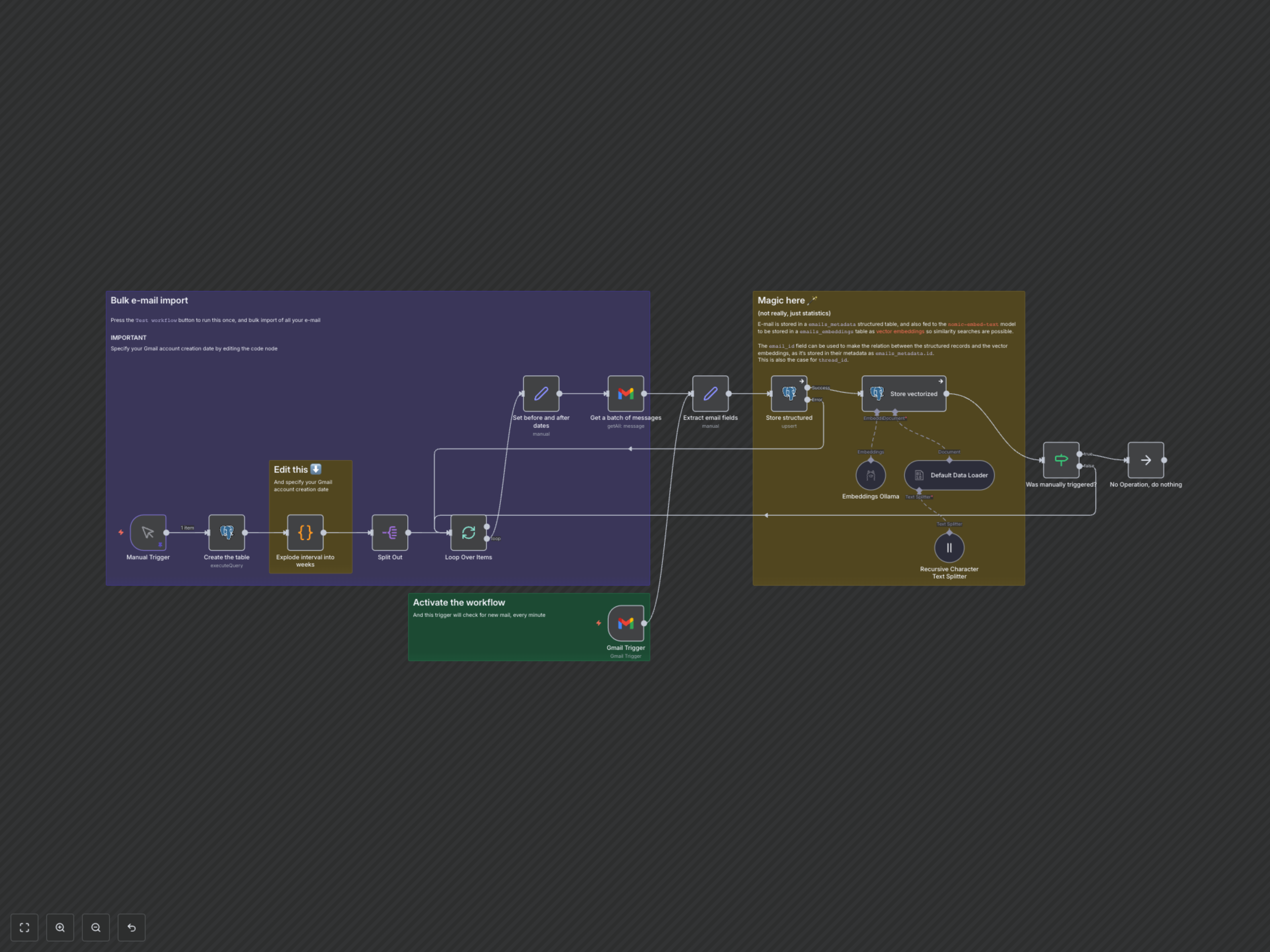
- Initial Setup: When triggered manually, the workflow first creates the necessary structured email metadata table in PostgreSQL.
- Historical Import (Manual Trigger): It calculates weekly date ranges from your Gmail account creation date to the present, then retrieves emails in batches for each week. This ensures efficient processing of your entire email history.
- Real-time Monitoring (Gmail Trigger): Once activated, the workflow continuously polls your Gmail inbox every minute for new emails.
- Data Extraction & Structured Storage: For each retrieved email, key fields like sender, recipient, subject, date, body, and unique IDs are extracted. This metadata is then upserted into the `emails_metadata` PostgreSQL table.
- Vectorization & Embeddings Storage: The email body text is passed through a recursive character text splitter and then fed to the Ollama `nomic-embed-text` model to generate numerical vector embeddings. These embeddings, along with references to the original email ID and thread ID, are stored in the `emails_embeddings` PGVector table.
- Looping & Completion: For manual imports, the workflow continues processing weekly batches until all historical emails are indexed. For continuous monitoring, each new email is processed independently.