
Automate Gmail Classification & Prioritize Important Emails
Automatically classify incoming emails, reducing manual sorting time by up to 90% and ensuring critical messages are prioritized instantly.
Manual email sorting is time-consuming and leads to missed priorities, often burying critical messages. This workflow leverages AI to automatically classify incoming Gmail emails, applying custom labels to keep your inbox organized and ensure important communications are always highlighted.




Documentation
AI-Powered Gmail Classification
This n8n workflow uses advanced AI to automatically sort and label your incoming Gmail emails. It helps you maintain an organized inbox, prioritize important communications, and eliminate the tedious task of manual classification, allowing you to focus on what matters most.
Key Features
- Automatic Email Categorization: Intelligently classifies emails into predefined categories (e.g., High Priority, Work Related, Promotions) using Google Gemini.
- Custom Gmail Labeling: Automatically applies the correct Gmail labels based on the AI's classification, keeping your inbox tidy and easily navigable.
- Real-time Inbox Management: Processes new emails as they arrive, ensuring your inbox is always up-to-date and organized without manual intervention.
- Flexible AI Integration: Easily configure your preferred Large Language Model (LLM) for classification tasks, offering adaptability for future needs.
How It Works
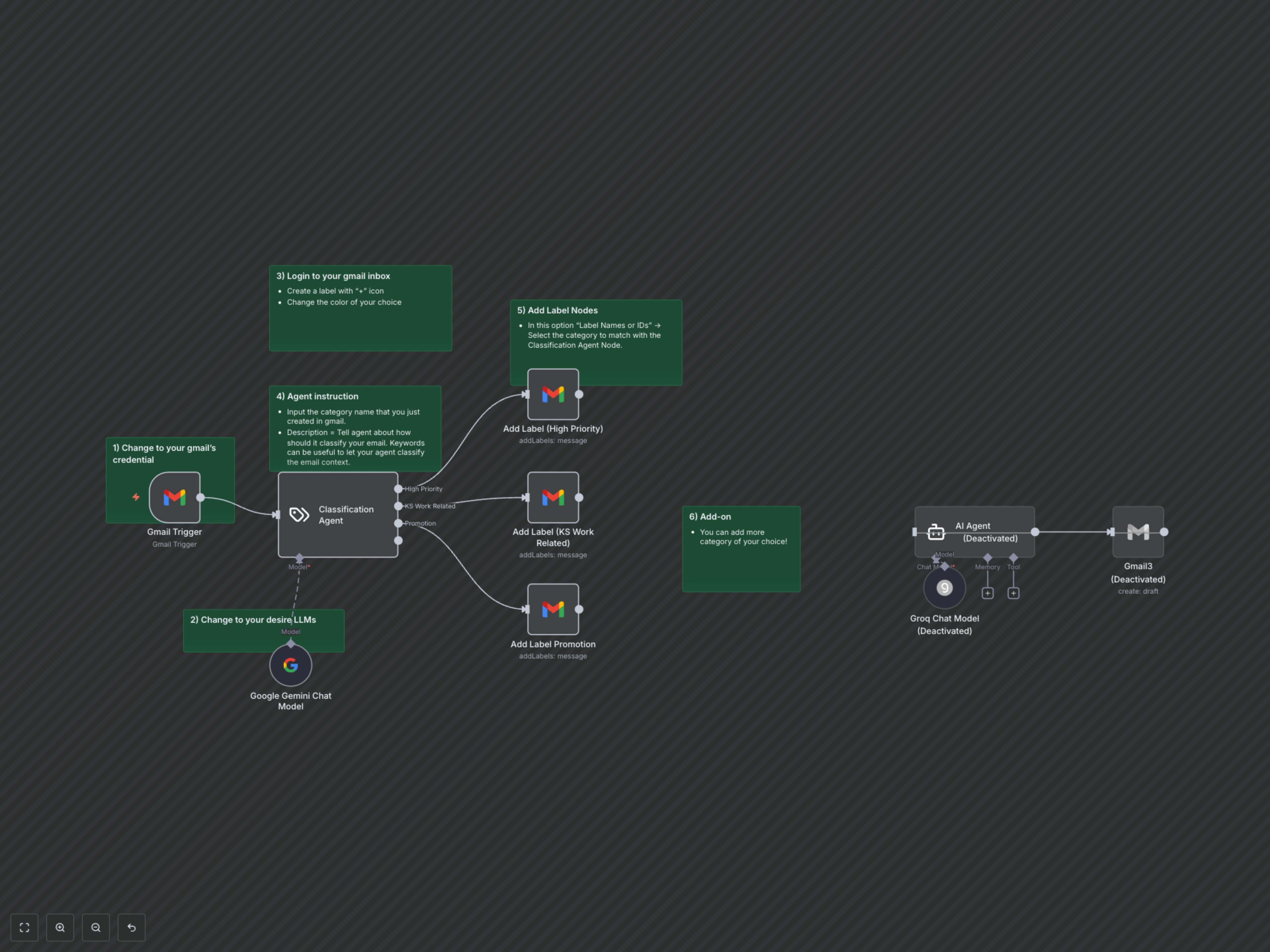
The workflow activates whenever a new email arrives in your Gmail inbox, detected by the Gmail Trigger. The email content is then sent to a Classification Agent, powered by Google Gemini, which analyzes the text and assigns it to one of your custom categories. Based on this AI-driven classification, the workflow automatically applies the corresponding Gmail label to the email, instantly organizing your inbox according to your preferences and rules.