
Automate Expense Tracking: Extract Spend Details to Google Sheets
Automate expense data extraction to Google Sheets, reducing manual entry time by up to 90% and ensuring accurate financial records.
Manually tracking expenses from various email sources like invoices and payment confirmations is error-prone and time-consuming. This workflow intelligently extracts spend details using AI from emails and attachments, automatically populating your Google Sheet for accurate financial record-keeping.




Documentation
Automate AI-Powered Expense Data Extraction
Automate your financial record-keeping by seamlessly extracting transaction data from emails and PDF attachments. This n8n workflow uses advanced AI to parse various spend notifications (invoices, payment confirmations) and consolidates them into a Google Sheet, eliminating manual data entry and ensuring up-to-date financial oversight.
Key Features
- Automatically monitors Gmail for new invoices and payment confirmations.
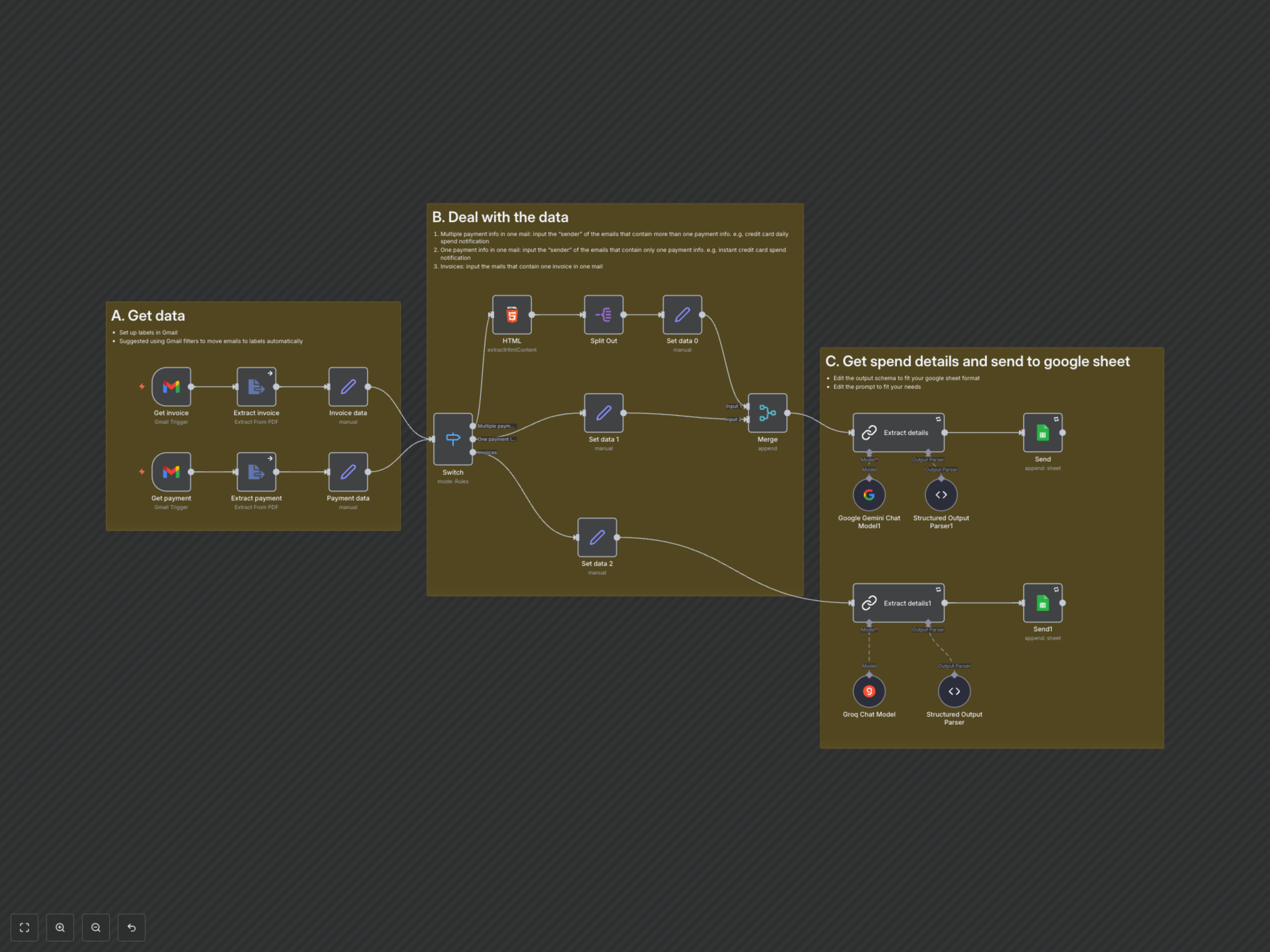
- Utilizes AI (Google Gemini, Groq) to intelligently extract crucial spend details like date, amount, service, category, and currency.
- Extracts data from various sources, including email body content (HTML/text) and attached password-protected PDFs.
- Dynamically categorizes and routes different email types (e.g., multiple transactions in one email vs. single invoices) for precise parsing.
- Centralizes all extracted expense data into a Google Sheet, streamlining financial management and reporting.
How It Works
This workflow starts by monitoring your designated Gmail labels for new emails containing invoices or payment confirmations. It automatically downloads and processes any attached PDFs. Next, a 'Switch' node intelligently routes emails based on sender and content patterns (e.g., a single transaction notification versus a consolidated daily spend report). Leveraging Google Gemini (and optionally Groq), the workflow then uses AI to extract specific transaction details according to a predefined JSON schema. Finally, all parsed spend data (including date, amount, service, category, currency, and card used) is appended as new rows to your specified Google Sheet, providing a real-time, automated expense log.