
Automate AI Customer Support Handoff to Human Agents
Reduce human agent workload by automatically routing complex AI-handled queries, decreasing resolution time by up to 25% and improving customer satisfaction.
AI agents often struggle with complex or out-of-scope customer queries, leading to frustrating dead ends for users. This workflow intelligently detects when an AI agent can't assist, automatically escalating queries to human support via Slack while prompting users for necessary contact information.



Documentation
AI Agent with Smart Human Handoff for Customer Support
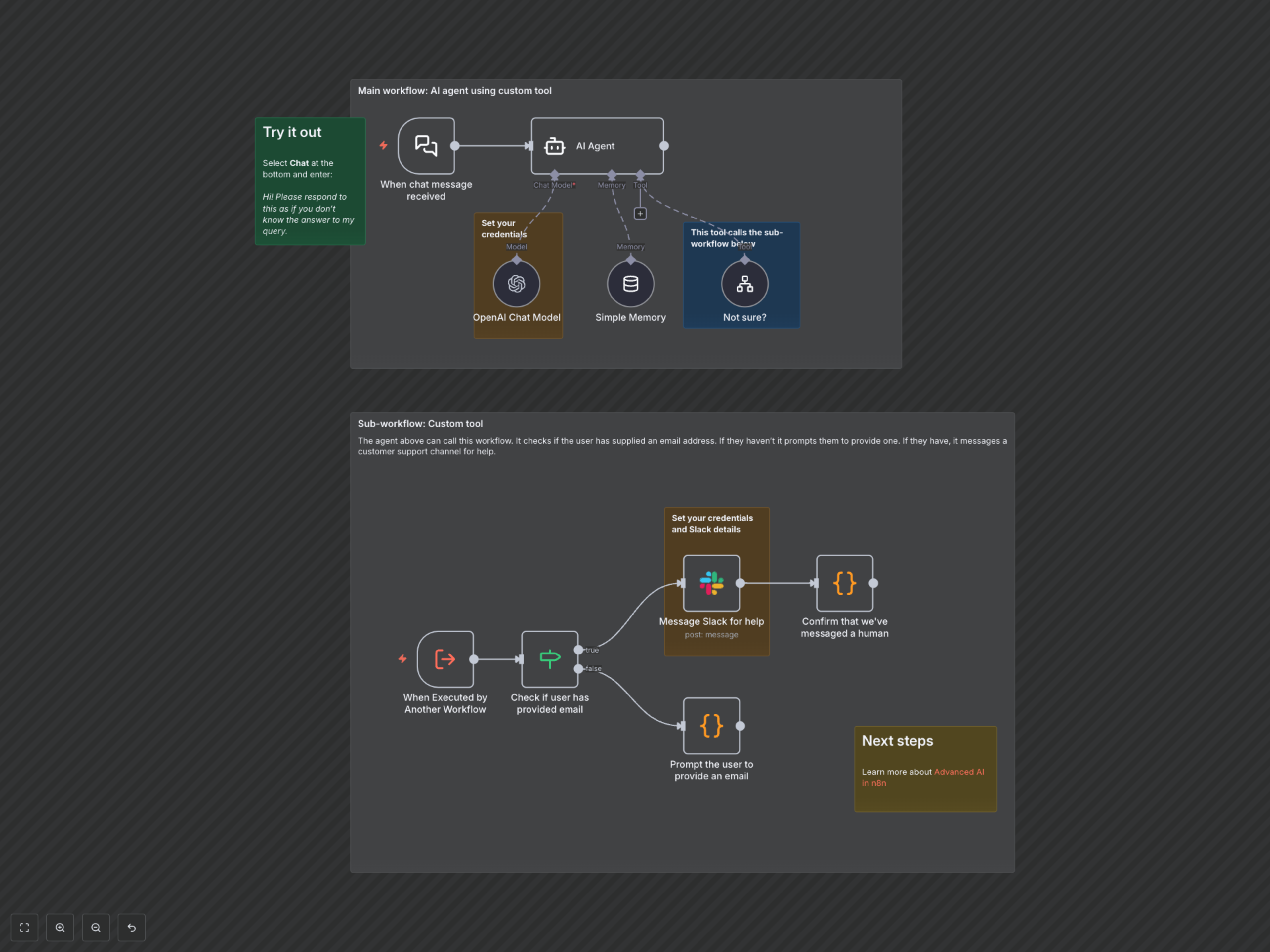
This comprehensive n8n workflow empowers your AI agent with a robust fallback mechanism, ensuring no customer query goes unresolved. It intelligently identifies when an AI cannot answer, escalates to human support, and gathers crucial information like email addresses for seamless follow-up.
Key Features
- Intelligent AI Handoff: Automatically transfers complex or out-of-scope customer queries from an AI agent to human support.
- Email Detection & Prompting: Analyzes user messages for email addresses, prompting users to provide one if missing for efficient follow-up.
- Seamless Slack Escalation: Notifies your support team on Slack with the user's query and contact details when human intervention is needed.
- Improved Customer Experience: Prevents frustrating AI dead-ends by ensuring every customer receives the appropriate level of support.
- Modular Workflow Design: Utilizes a sub-workflow as a custom AI tool for clean, maintainable logic.
How It Works
1. Chat Message Received: The workflow is triggered when a user sends a message to the AI agent. 2. AI Agent Processing: The AI agent attempts to answer the query using its language model and memory. 3. Custom Tool Activation: If the AI agent is uncertain or cannot answer, it activates a custom tool (a sub-workflow). 4. Email Validation: The sub-workflow checks the user's original message for an email address using a regular expression. 5. Human Escalation (with email): If an email is found, the workflow sends the query and user message to a specified Slack channel, informing the user that a human is now involved. 6. Email Request (without email): If no email is found, the workflow prompts the user to provide their email address so that human support can be requested.