Microsoft Outlook Calendar Scheduler (Telegram + OpenAI Integration)
Effortlessly manage your Outlook Calendar via Telegram with AI, automating scheduling, rescheduling, and cancellations for streamlined meeting management.
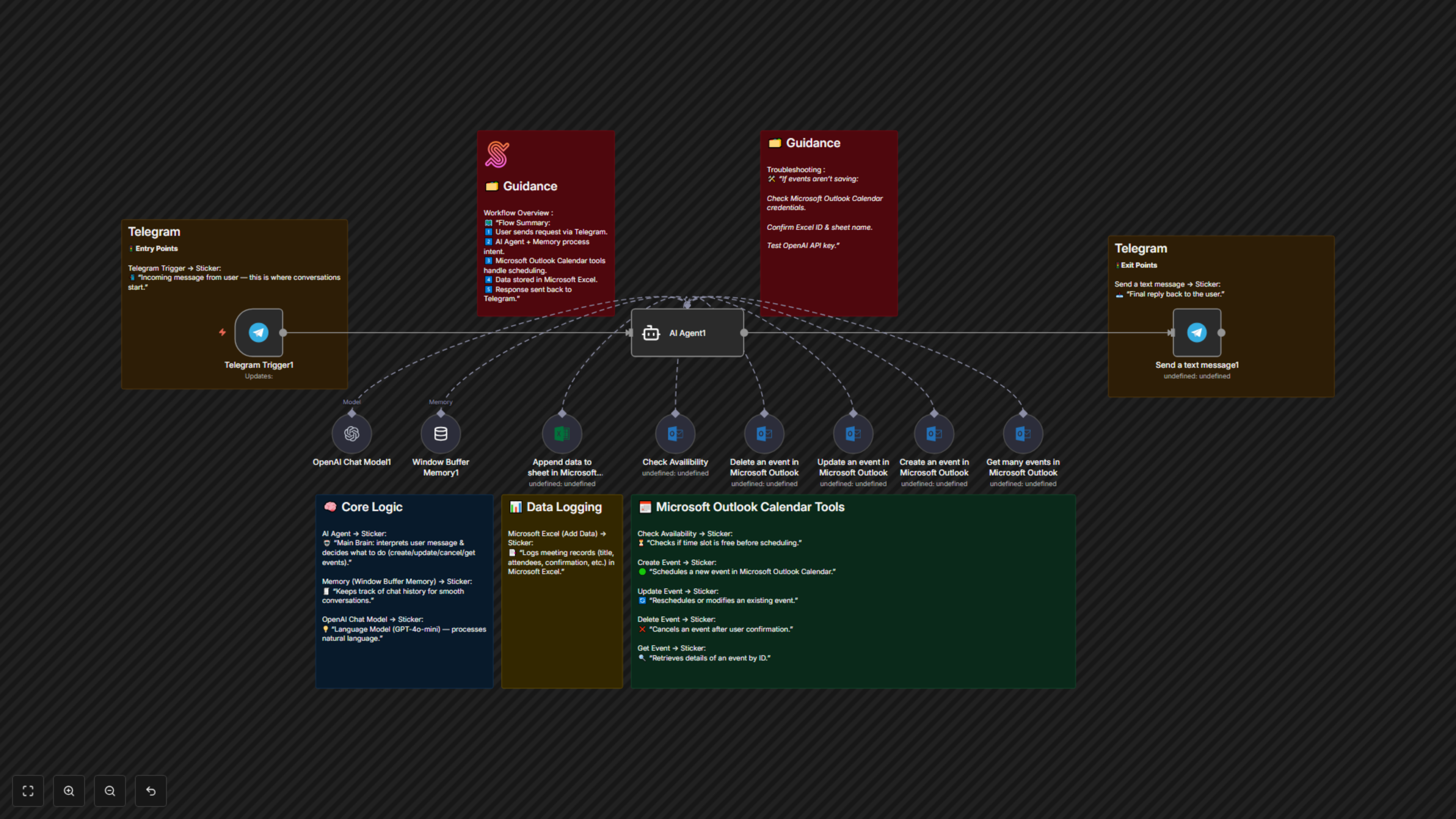
This workflow automates meeting scheduling, rescheduling, and cancellation in Microsoft Outlook Calendar through Telegram chat. It uses OpenAI GPT-4o-mini to interpret user messages, checks event availability, confirms actions, and updates the calendar automatically. Ideal for teams or individuals who want AI-powered meeting management directly from Telegram.


Documentation
Description
This workflow connects Telegram, Microsoft Outlook Calendar, Microsoft Excel, and OpenAI GPT-4o-mini to create an intelligent scheduling assistant.When a user sends a message in Telegram, the AI interprets it and determines whether to create, update, delete, or fetch events.It ensures meeting availability, logs data in Excel, and replies to the user with the result — all conversationally.
Process Overview:
- User sends a scheduling-related message via Telegram.
- The AI Agent (GPT-4o-mini) interprets intent and context.
- Outlook tools check availability and create/update/delete events.
- The workflow logs meeting data into an Excel sheet.
- Telegram replies with confirmation or summary.
Benefits for Customers / Users
- AI-Powered Scheduling – Automatically understands natural language scheduling requests.
- Seamless Outlook Integration – Directly syncs with Microsoft Outlook Calendar.
- Telegram Interface – Users can manage meetings using simple chat commands.
- Data Logging – Automatically records meetings in Excel for tracking.
- Reduced Human Error – Eliminates double-booking or missed scheduling steps.
Requirements
1. Microsoft Outlook Account
- Must have access to a valid Outlook Calendar.
- Requires Microsoft OAuth2 credentials connected in n8n.
2. Telegram Bot
- Create a Telegram Bot via @BotFather.
- Obtain API Token and configure it in n8n’s Telegram credentials.
3. OpenAI API Key
- Add your OpenAI key in the “OpenAI Chat Model” node credentials.
4. Microsoft Excel Workbook
- Prepare a worksheet with the following columns:
- Title
- Date/Time
- Attendees
- Status