
Instant WhatsApp AI Sales Agent: Product Q&A & Brochure Support
Deliver instant, accurate product information 24/7, reducing customer inquiry response times from hours to seconds and significantly boosting sales team efficiency.
Customers often struggle to get instant, accurate answers about complex product information, leading to slow sales cycles and frustrated support experiences. This workflow deploys an AI-powered WhatsApp chatbot that instantly addresses product inquiries by leveraging a dynamic, up-to-date product brochure knowledge base.



Documentation
Instant WhatsApp AI Sales Agent
This powerful n8n workflow creates a sophisticated WhatsApp chatbot that functions as an AI Sales Agent. It is designed to provide immediate and accurate responses to customer queries by leveraging your product catalog or brochure data. This solution dramatically improves customer support efficiency and ensures consistent, factual information delivery, allowing your sales and support teams to focus on high-value interactions.
Key Features
- Real-time WhatsApp engagement: Automate customer interactions directly on WhatsApp, offering instant support.
- Intelligent product knowledge: Instantly answer complex product questions using a dynamic knowledge base derived from your PDF product brochures.
- Personalized conversations: Maintain context and conversational history for each customer using AI memory, providing a more natural interaction.
- Smart message handling: Automatically filter and respond to different message types, ensuring the chatbot focuses on supported text-based queries.
How It Works
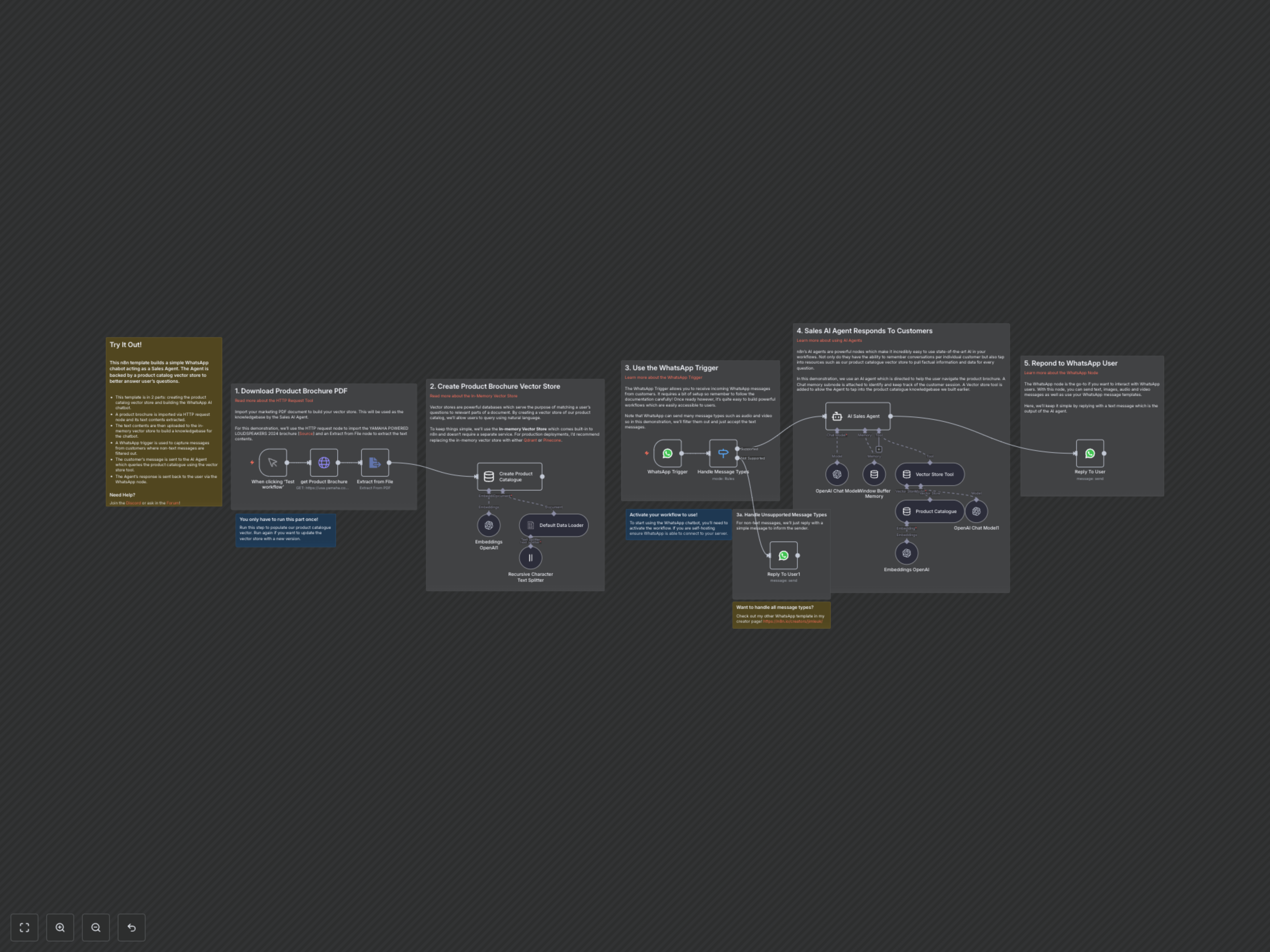
1. Product Catalog Ingestion (Initial Setup): The workflow begins by downloading your specified product brochure PDF via an HTTP request. Its text content is extracted, then split into manageable chunks and converted into numerical embeddings by OpenAI. These embeddings are then stored in an in-memory vector store, creating a searchable knowledge base. This crucial step needs to be run only once, or whenever your product information is updated. 2. WhatsApp Message Trigger: A WhatsApp Trigger node constantly monitors and receives incoming messages from your customers, initiating the automated response process. 3. Message Type Filtering: A Switch node intelligently checks the type of incoming message. If it's a non-text message (e.g., image, video), the workflow sends an immediate, pre-defined response asking the user to send text messages. 4. AI Sales Agent Processing: For text messages, an n8n AI Agent takes over. Powered by an OpenAI Chat Model, it uses a Window Buffer Memory to maintain conversational context with each user. The Agent also has access to a Vector Store Tool, allowing it to query the product catalog knowledge base for factual information relevant to the customer's questions. 5. Automated WhatsApp Response: Finally, the AI Agent's comprehensive and accurate answer is sent back to the customer directly on WhatsApp using a dedicated WhatsApp node.