
Build AI Telegram Bots: Contextual Conversations & User Memory
Eliminate disconnected conversations by 100%, ensuring every user interaction is context-aware and personalized through persistent memory.
Traditional chatbots struggle to retain context and remember past user interactions, leading to frustrating and disconnected conversations. This n8n workflow builds intelligent AI Telegram bots that leverage Supabase for persistent user memory, enabling truly engaging and human-like conversational experiences.


Documentation
AI Telegram Bot with Supabase Memory
Many simple chatbots lack context awareness and user memory, leading to frustrating and disconnected interactions. This n8n workflow builds intelligent AI Telegram bots that leverage Supabase for persistent user memory, enabling truly engaging and human-like conversational experiences.
Key Features
- Persistent User Memory: Stores `telegram_id` and `openai_thread_id` in Supabase to recall past interactions and maintain conversation history.
- Context-Aware AI Conversations: Integrates with OpenAI Assistants API to process user queries with full conversational context, ensuring relevant and coherent responses.
- Seamless Telegram Integration: Automatically triggers on new Telegram messages and sends AI-generated replies directly back to users.
- Dynamic User Management: Detects new users, creates OpenAI threads, and saves their details, or retrieves existing session data for returning users.
- Scalable Backend: Utilizes Supabase as a robust and flexible database for managing user sessions and bot memory.
How It Works
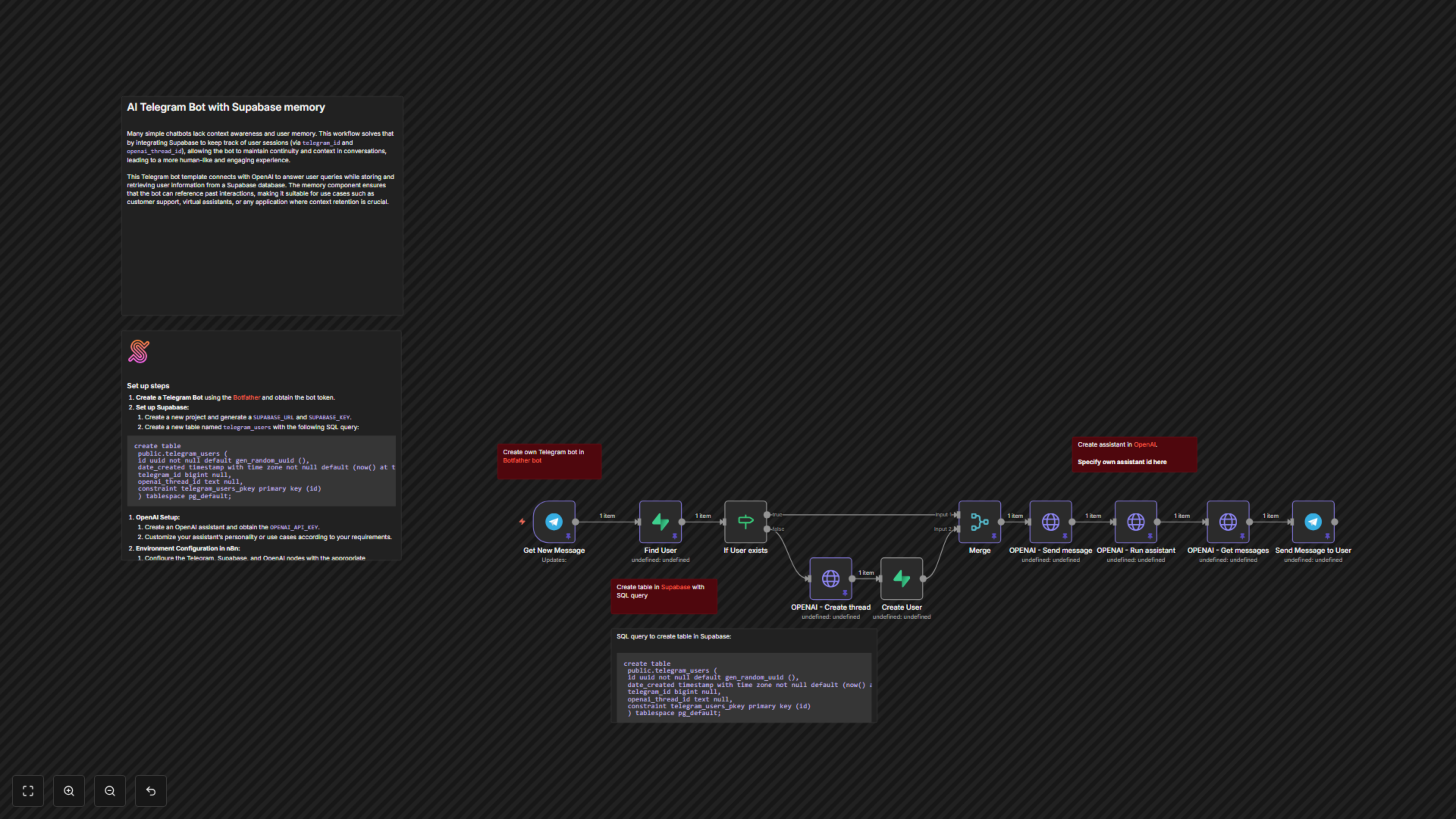
1. **Receive Telegram Message**: The workflow starts when a new message arrives from a user on Telegram. 2. **Find or Create User Session**: It queries Supabase to check if the user's `telegram_id` already exists. If not, it creates a new OpenAI thread and a new user entry in Supabase, linking the `telegram_id` to a unique `openai_thread_id`. 3. **Send Message to OpenAI**: The incoming user message is then added to their specific OpenAI thread. 4. **Run OpenAI Assistant**: The designated OpenAI Assistant is activated to process the message within the established thread context. 5. **Retrieve AI Response**: The workflow fetches the latest response generated by the OpenAI Assistant from the thread. 6. **Send Reply to Telegram**: Finally, the Assistant's response is sent back to the user via Telegram, maintaining a continuous and intelligent conversation.
Supabase Table Schema
For the workflow to function correctly, you need a table named `telegram_users` in your Supabase project with the following schema: