
Automate PDF & Image Text Extraction to Categorized CSV with AI
Automatically extract and categorize financial transactions from PDFs and images, achieving 100% reduction in manual data entry and ensuring consistent, structured data output for analysis.
Manually extracting and categorizing data from diverse documents like bank statements, whether PDFs or images, is often a time-consuming and error-prone process. This workflow automates the entire process, leveraging powerful AI models like Vertex AI (Gemini) and Llama 3.1 via OpenRouter to accurately extract text, categorize transactions, and generate structured CSV files, eliminating the need for manual data entry.



Documentation
Automate PDF & Image Text Extraction to Categorized CSV
Manually extracting and categorizing data from PDFs and images, such as bank statements, is a tedious and error-prone process. This workflow leverages Vertex AI and other LLMs to automatically extract text, categorize transactions, and output them as a structured CSV file, eliminating manual data entry.
Key Features
- Automatically monitors Google Drive for new PDF and image files.
- Intelligently routes files based on type (PDF or image) for specialized processing.
- Leverages advanced OCR for accurate text extraction from PDF documents.
- Utilizes Vertex AI (Gemini) for robust text recognition and data extraction from images.
- Applies Large Language Models (LLMs) via OpenRouter to categorize extracted data, such as financial transactions.
- Automatically converts extracted and categorized data into CSV format.
- Uploads the final categorized CSV files directly to a designated Google Drive folder.
How It Works
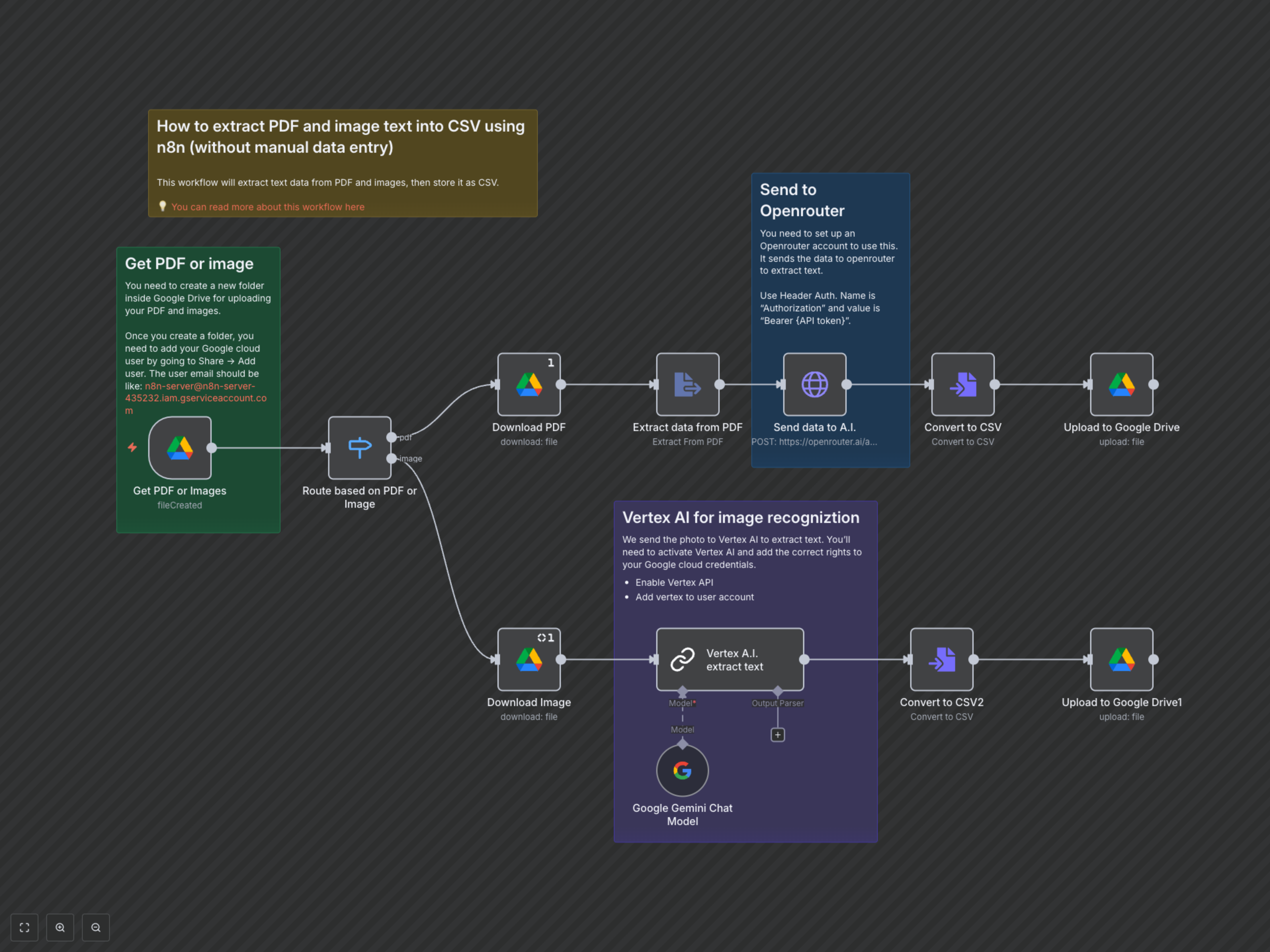
This workflow starts by monitoring a specified Google Drive folder for new PDF or image files. Upon detection, it intelligently determines the file type. If a PDF is uploaded, the workflow downloads it, extracts the text using an OCR process, and then sends this raw text to an external LLM (Llama 3.1 via OpenRouter) to extract structured transaction data and assign categories. If an image is uploaded, it's downloaded and sent to Vertex AI (Gemini) for direct text extraction, transaction parsing, and categorization. Both paths then convert the processed data into a CSV file and upload it to a designated output folder in Google Drive, providing a fully automated data pipeline from document ingestion to categorized export.