
Automate Google Calendar Events from Slack with AI & Sync Attendees
Eliminate manual event coordination and attendee management, reducing event setup time by up to 90% and ensuring accurate calendar entries.
Manual event scheduling and attendee tracking from Slack messages consume valuable time and introduce errors. This n8n workflow intelligently extracts event details using AI, automatically creates Google Calendar events, and keeps attendees synced based on Slack emoji reactions.



Documentation
AI-Powered Event Management from Slack
Manual event scheduling and attendee management are time-consuming and error-prone. This workflow automates the entire process, leveraging the power of AI to interpret event requests from Slack messages and integrate seamlessly with Google Calendar. Streamline your team's event organization and ensure everyone is always in the loop.
Key Features
- AI-driven parsing: Automatically extract event titles, dates, times, and locations from natural language Slack requests using an intelligent AI agent.
- Automated Google Calendar creation: Effortlessly generate new calendar events without manual data entry.
- Smart attendee synchronization: Add or update event attendees in Google Calendar based on specific emoji reactions in Slack.
- Duplicate event prevention: Intelligently checks for existing events to prevent redundant calendar entries and avoid notification spam.
- Dynamic location search: AI agent uses web search tools (SerpAPI, Wikipedia) to find accurate location addresses and URLs.
How It Works
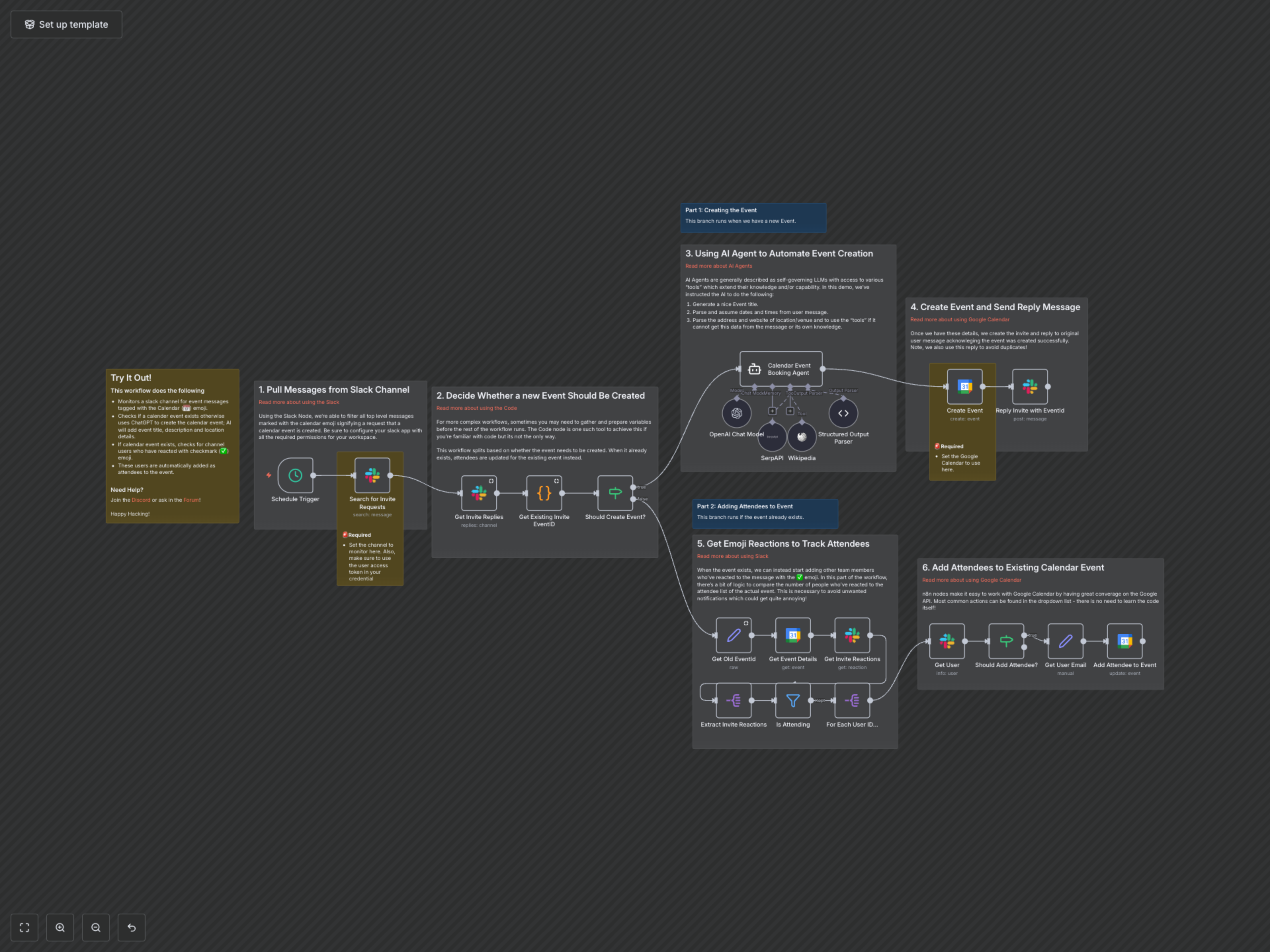
This workflow runs on a scheduled interval (e.g., every 30 minutes) to monitor a designated Slack channel for event requests.
- Monitor Slack for Event Requests: The workflow searches a specified Slack channel for messages containing a calendar emoji (📅), indicating an event creation request.
- Check for Existing Events: It analyzes message replies to determine if a Google Calendar event related to the Slack message has already been created (identified by a unique #eventID tag).
- AI-Powered Event Creation (If New): If no existing event is found, an AI Agent (powered by OpenAI and LangChain) processes the Slack message. The AI uses tools like SerpAPI and Wikipedia to intelligently extract and enrich event details, including title, start/end dates and times, and precise location (address and URL). A new Google Calendar event is then created with these extracted details. A reply is posted in the Slack thread, confirming the event creation and including its unique ID to prevent future duplicates.
- Attendee Management (If Existing): If an event already exists, the workflow retrieves its current attendee list from Google Calendar. It then scans the original Slack message for reactions, specifically the "white_check_mark" (✅) emoji. For each user who reacted with ✅, the workflow fetches their email address from Slack. It then checks if these users are already attendees in the Google Calendar event. If not, they are automatically added as new attendees, ensuring the event guest list is always up-to-date without sending annoying duplicate invites.