
Automate Google Calendar with AI Assistant & Boost Productivity
Automate Google Calendar event creation and retrieval, reducing manual management time by up to 90% and ensuring accurate scheduling.
Manually managing Google Calendar events, responding to inquiries, and scheduling appointments is time-consuming and prone to errors. This n8n workflow deploys an AI assistant powered by OpenAI and LangChain to automate event creation and retrieval, freeing up your time for more critical tasks.



Documentation
AI-Powered Google Calendar Assistant
This n8n workflow transforms your Google Calendar management into a seamless, conversational experience. By integrating OpenAI's advanced AI capabilities with Google Calendar, you can effortlessly create, retrieve, and manage your events using natural language commands, significantly enhancing your productivity.
Key Features
- Conversational AI interaction for seamless calendar management.
- Dynamic event creation: Schedule meetings, appointments, and tasks using natural language.
- Effortless event retrieval: Instantly fetch calendar entries by date ranges or keywords.
- Intelligent context retention: AI agent remembers previous interactions for a coherent conversation.
- Flexible LLM support: Leverages powerful models like GPT-4o for advanced tool-calling capabilities.
- Customizable AI prompts: Tailor the assistant's behavior and guidelines to your specific needs.
How It Works
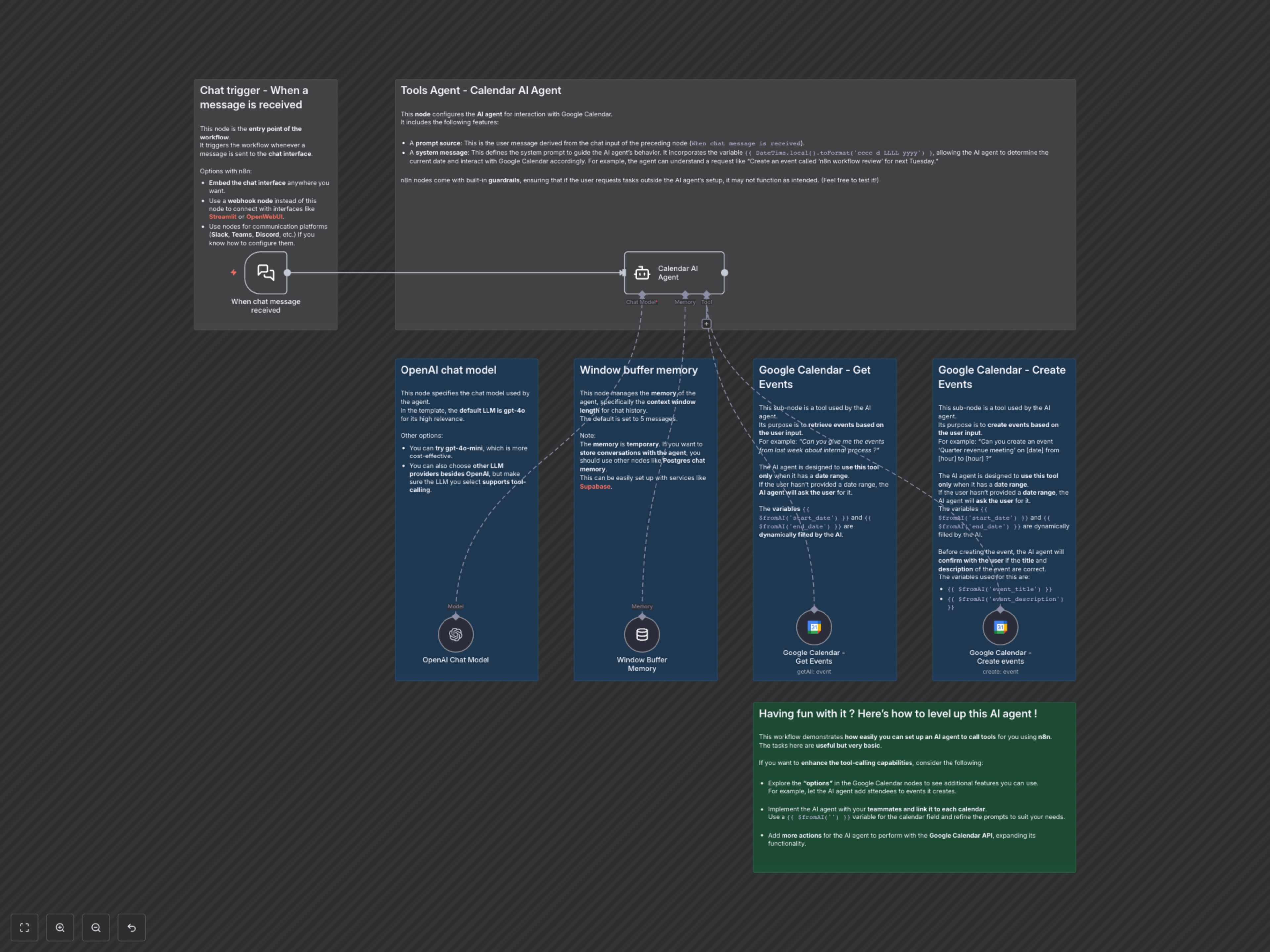
This workflow seamlessly integrates an AI agent with your Google Calendar to automate common tasks:
- Chat Input Trigger: The workflow activates upon receiving a message from your chat interface, serving as the entry point for user interaction.
- AI Agent Orchestration (Calendar AI Agent): This central node, powered by LangChain, acts as your intelligent calendar assistant. It processes user requests, interprets intent, and orchestrates the use of relevant Google Calendar tools based on a detailed system prompt.
- Language Model Integration (OpenAI Chat Model): The workflow utilizes a powerful LLM (default gpt-4o) for natural language understanding and generation, enabling the agent to comprehend complex queries and respond intelligently.
- Conversational Memory (Window Buffer Memory): To maintain context and enable fluid conversations, the agent stores the last 5 messages, ensuring continuity in interactions.
- Google Calendar Tools:
- Get Events: When a user requests to view events, the AI agent intelligently extracts date ranges (e.g., start_date, end_date) and uses this tool to retrieve relevant entries from your Google Calendar.
- Create Events: For event creation requests, the AI agent parses details like event_title, start_date, end_date, and event_description, then uses this tool to add the new event to your calendar, often confirming details with the user beforehand.
- Dynamic AI Data Extraction: Variables like {{ $fromAI('start_date') }} ensure that parameters required by the Google Calendar tools are dynamically populated with information extracted and formatted by the AI agent.