
Automate Gmail Labeling & Boost Email Productivity with AI
Automate email categorization by up to 80%, transforming chaotic inboxes into consistently organized and actionable workspaces with AI-driven precision.
Manually sorting and labeling incoming emails consumes valuable time and leads to an unorganized inbox. This workflow leverages AI to intelligently categorize and label your Gmails, ensuring immediate organization and enhancing your productivity.



Documentation
AI-Powered Gmail Email Categorization
This powerful n8n workflow intelligently automates the process of organizing your Gmail inbox. By integrating with OpenAI's language model, it reads incoming emails, analyzes their content, and then applies the most relevant existing labels or creates new, structured labels on the fly. Say goodbye to manual sorting and hello to an effortlessly organized inbox.
Key Features
- AI-Powered Categorization: Automatically analyze email content, sender, and subject to apply the most appropriate labels.
- Dynamic Label Creation: Intelligently create new sub-labels when no suitable existing label is found, maintaining a structured hierarchy.
- Smart Inbox Management: Automatically move less important emails (e.g., promotions) out of your primary inbox, keeping it clutter-free.
- Consistent Organization: Ensure new labels align with your existing naming conventions for a cohesive Gmail structure.
How It Works
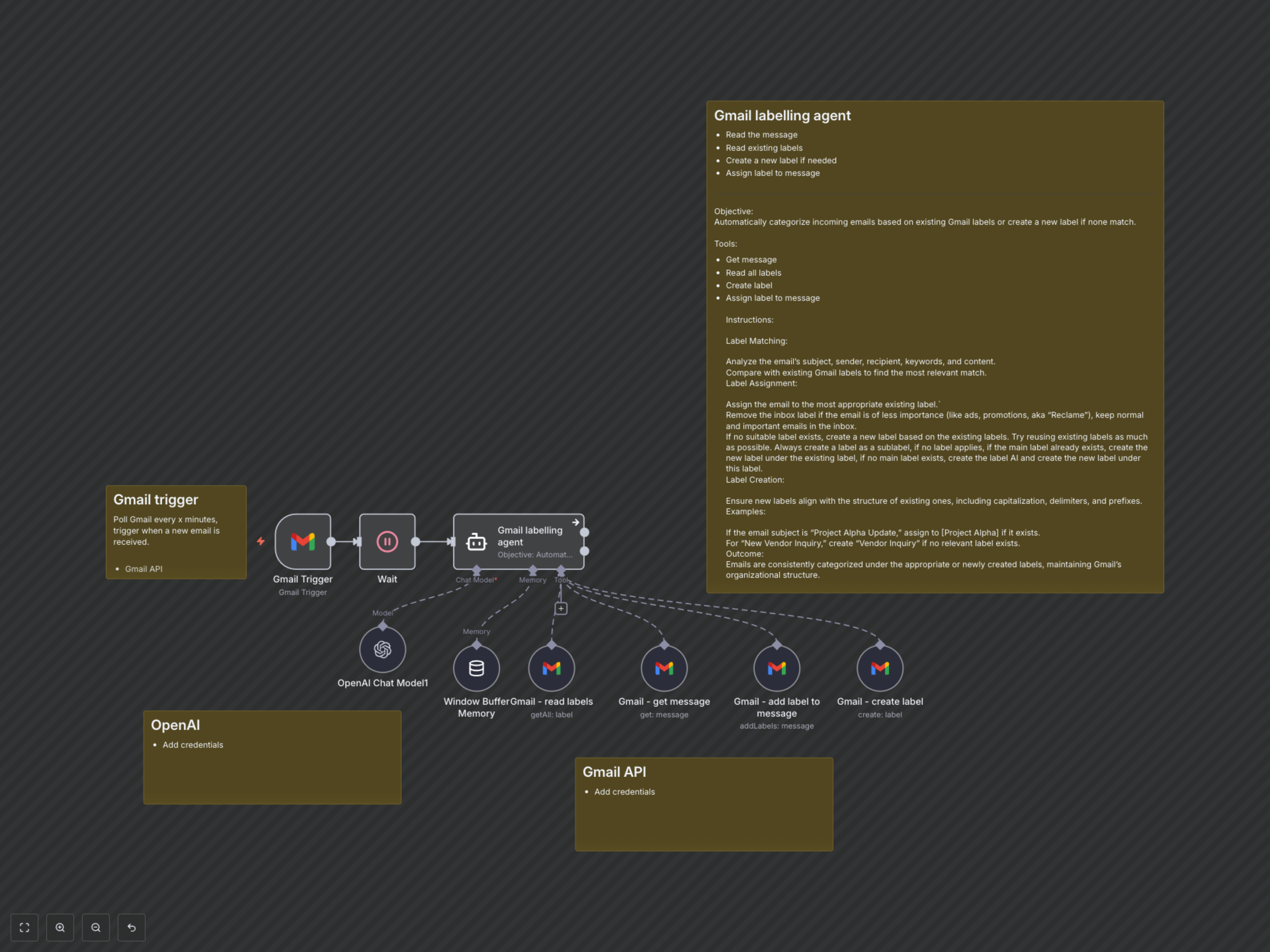
This workflow starts with a Gmail Trigger, polling your inbox every 5 minutes for new emails. When a new email arrives, the workflow pauses briefly before passing the email details to an AI Labelling Agent. This agent, powered by OpenAI's Chat Model and Langchain memory, intelligently decides the best course of action. It can use Gmail tools to read the email's full content, fetch a list of your existing labels, create new labels if necessary (following a sub-label structure, e.g., 'AI/New Label'), and finally assign the appropriate label(s) to the email, removing the 'Inbox' label for less important messages to keep your primary inbox focused.