
Generate SQL Queries Instantly with AI-Powered Schema Interaction
Accelerate database query generation and reduce manual SQL writing time by up to 90%, enhancing developer productivity and data accessibility.
Manually crafting SQL queries or navigating complex database schemas is time-consuming and error-prone. This workflow leverages AI to instantly generate precise SQL queries from your database schema, allowing natural language interaction without direct data access.



Documentation
AI-Powered SQL Generation from Schema
This n8n workflow empowers you to interact with your MySQL database using natural language, leveraging advanced AI to generate SQL queries based solely on your database schema. It eliminates the need for manual query writing and ensures data privacy by not exposing actual data to the AI.
Key Features
- Natural Language to SQL: Transform plain English questions into accurate SQL queries.
- Schema-Only Interaction: AI generates queries using only the database structure, protecting sensitive data.
- Local Schema Caching: Boost performance by caching the database schema locally, avoiding repeated remote database calls.
- Conversational AI Agent: Utilizes LangChain and OpenAI (GPT-4o) for intelligent, context-aware query generation and direct answers.
- Automated Query Execution: Automatically runs generated SQL queries and presents formatted results when applicable.
How It Works
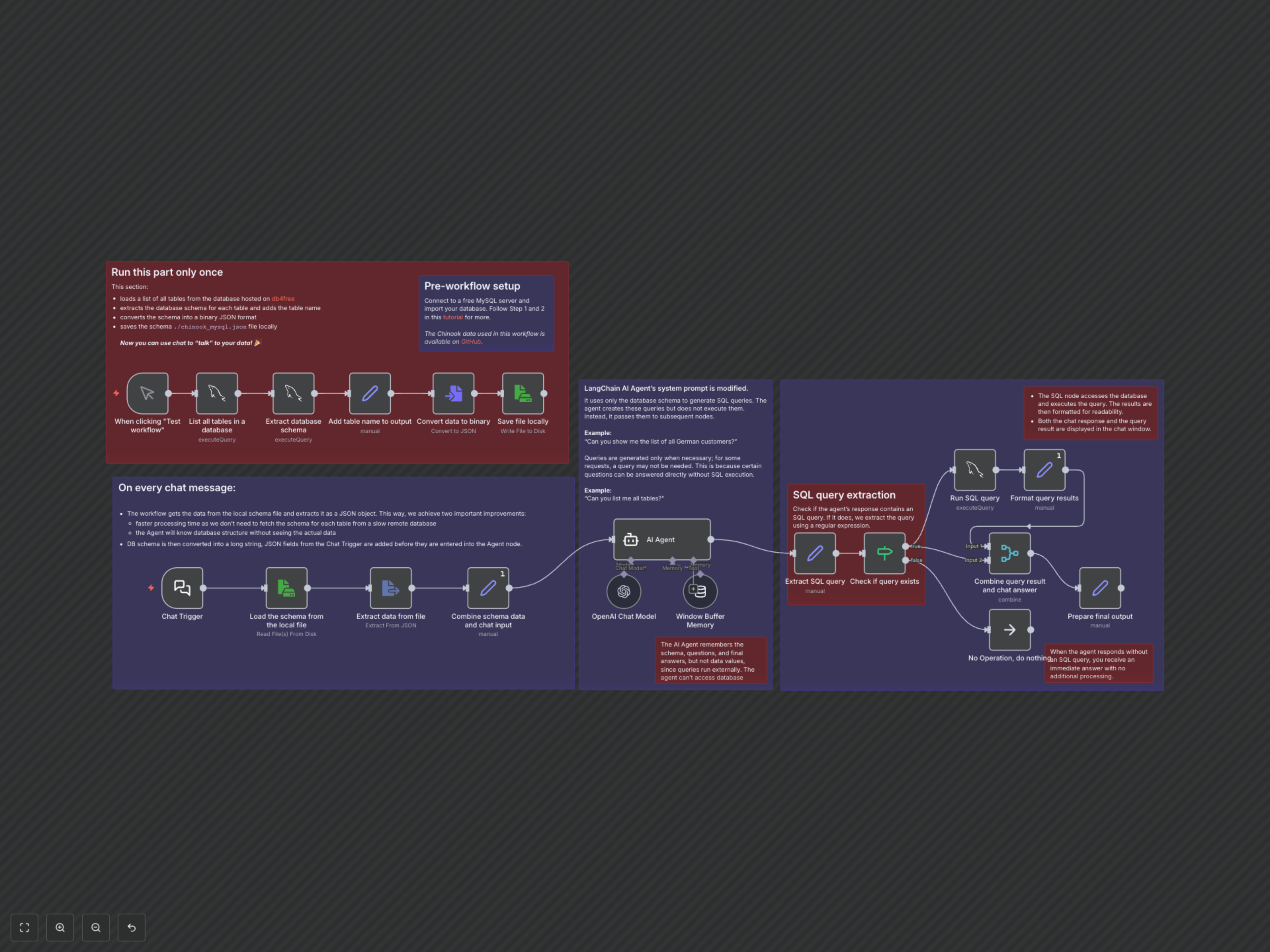
The workflow operates in two main phases: an initial, one-time setup and continuous, AI-powered chat interaction.
- Initial Setup (Run Once): The workflow connects to your MySQL database, extracts all table names and their respective schemas, and saves this comprehensive schema information into a local JSON file (./chinook_mysql.json). This cached schema is then used for all subsequent AI interactions, significantly speeding up the process and minimizing database load.
- Chat Interaction (On Every Message): When a user inputs a natural language query via the Chat Trigger, the workflow loads the cached database schema and passes it, along with the user's question, to the AI Agent (powered by OpenAI's GPT-4o and LangChain). The AI, pre-configured to only use the schema, attempts to generate a relevant SQL query. If a SQL query is generated, it's automatically extracted, executed against the MySQL database, and the results are formatted and presented alongside the AI's natural language response. If no SQL is required, the AI provides a direct answer. The agent's memory ensures context is maintained across interactions.