
Customer List Sync & Enrichment Automation
Reduce contact duplication by 95% with automated new-customer sync and enrichment
Automatically sync new Shopify customers into your marketing list with tidy tags and profile fields. The workflow looks up existing contacts, updates or creates records, logs results, and returns a webhook response — all without manual steps. Keep your lists clean, improve targeting, and speed up your marketing follow-ups.


$29
Ready-to-use workflow template
Complete workflow template
Setup documentation
Community support
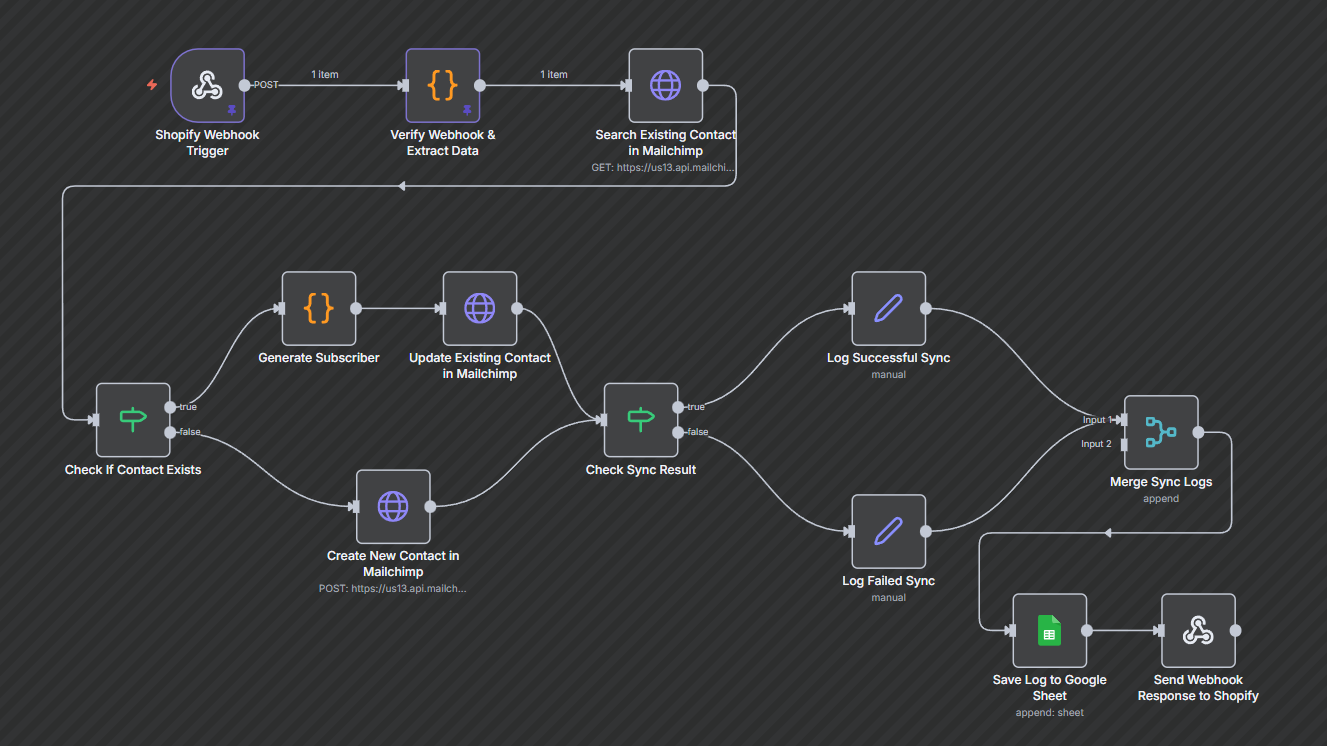
Preview - N8n

Documentation
Description
This workflow automatically syncs every new Shopify customer to your marketing list. It checks whether the customer already exists, updates their profile if needed, or creates a fresh contact with the right tags and region details. Every sync is logged so your list stays accurate, clean, and ready for campaigns.
Workflow Steps
- Receive new customer event — The workflow is triggered whenever Shopify sends a customer.created webhook.
- Extract customer details — Pulls name, email, phone, region, and marketing preferences from the payload.
- Search in Mailchimp — Looks up the customer using their email to determine if they already exist.
- Decision — If the contact exists, update their profile; if not, create a new contact.
- Sync to Mailchimp — Sends the updated or new customer data to the mailing list with tags and merge fields.
- Log the sync result — Captures success or failure details and prepares a structured log entry.
- Save the log — Appends the log to a Google Sheet for audit, tracking, and troubleshooting.
- Acknowledge Shopify — Returns a simple success response so Shopify knows the webhook was processed.
Key Benefits
- Cleaner subscriber lists — Eliminates duplicates and keeps profiles updated automatically.
- Faster campaign readiness — New customers appear instantly in your audience with correct tags.
- Easy troubleshooting — Every sync is logged so you always know what succeeded and what failed.