
Automate Weekly GA4 Reports & Streamline Performance Tracking
Receive comprehensive weekly Google Analytics reports automatically, eliminating hours of manual data compilation and enabling proactive performance optimization.
Manually compiling and analyzing weekly Google Analytics data is a time-consuming and error-prone process. This workflow automates the extraction and comparison of key GA4 metrics, delivering a comprehensive, formatted report directly to your inbox for effortless performance tracking.


Documentation
Automated Weekly Google Analytics Reporting with n8n
Manual data extraction and analysis from Google Analytics 4 (GA4) can be a significant time sink for marketers and analysts. This workflow eliminates repetitive work by automatically pulling critical GA4 metrics, comparing weekly performance, and delivering a comprehensive, beautifully formatted report directly to your inbox.
Key Features
- Automated Data Extraction: Seamlessly retrieve page engagement statistics, Google Search Console results, and country-specific user data directly from your GA4 property.
- Weekly Performance Comparison: Automatically fetches data for the current week and compares it to the prior week, providing immediate insights into trends and changes.
- Comprehensive Metric Tracking: Monitors key metrics like page views, active users, engagement rates, organic search clicks, impressions, average position, new users, and sessions.
- Automated Report Generation: Transforms raw analytics data into a clean, easy-to-read HTML report with distinct sections for engagement, search, and country views.
- Scheduled Email Delivery: Delivers the formatted report to your specified inbox on a recurring schedule, ensuring you always have up-to-date performance insights without manual effort.
How It Works
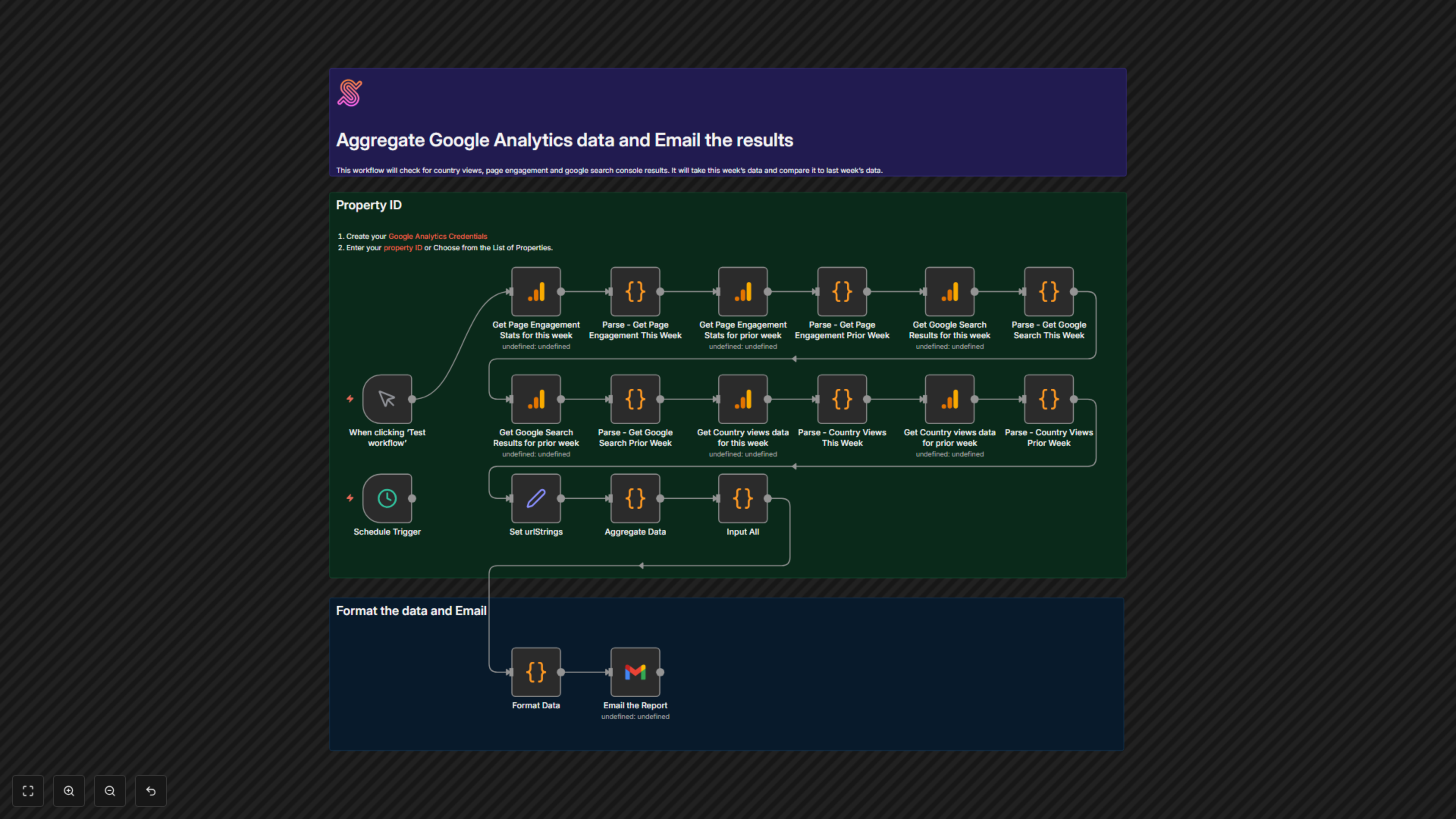
The workflow initiates either manually for testing or on a predefined schedule (e.g., weekly). It then executes a series of parallel Google Analytics nodes to fetch current and prior week data for page engagement, Google Search Console performance, and geographical user views. Each set of data is parsed and transformed into a standardized URL-encoded JSON string by dedicated Code nodes. A 'Set' node then collects these encoded strings, which are aggregated into a structured object by another 'Code' node. Finally, the 'Format Data' Code node converts this aggregated data into a well-structured HTML email report, which is then sent via Gmail to the specified recipient.