
Automate University Term Dates to Calendar with AI
Generate and distribute accurate university term date calendars in minutes, eliminating hours of manual data entry and ensuring timely planning for students and staff.
Manually tracking and entering university term dates into your calendar is a time-consuming and error-prone process. This workflow leverages AI to automatically extract key dates from Excel files, converting them into a shareable ICS calendar file for instant import into any calendar application.



Documentation
Automate University Term Dates to Calendar with AI
Manually adding important term dates to your calendar by hand? Stop! Automate it with this simple AI/LLM-powered document understanding and extraction template. This cool use-case can be applied to many scenarios where Excel files are predominantly used.
Key Features
- Automatically retrieve academic term dates directly from university websites.
- Leverage Cloudflare's Markdown Conversion Service to transform complex Excel files into AI-readable formats.
- Precisely extract crucial event details and dates using advanced AI (Google Gemini and LangChain).
- Effortlessly generate universally compatible ICS calendar files for iCal, Google Calendar, and Outlook.
- Streamline communication by distributing term date calendars automatically via email to students and faculty.
How It Works
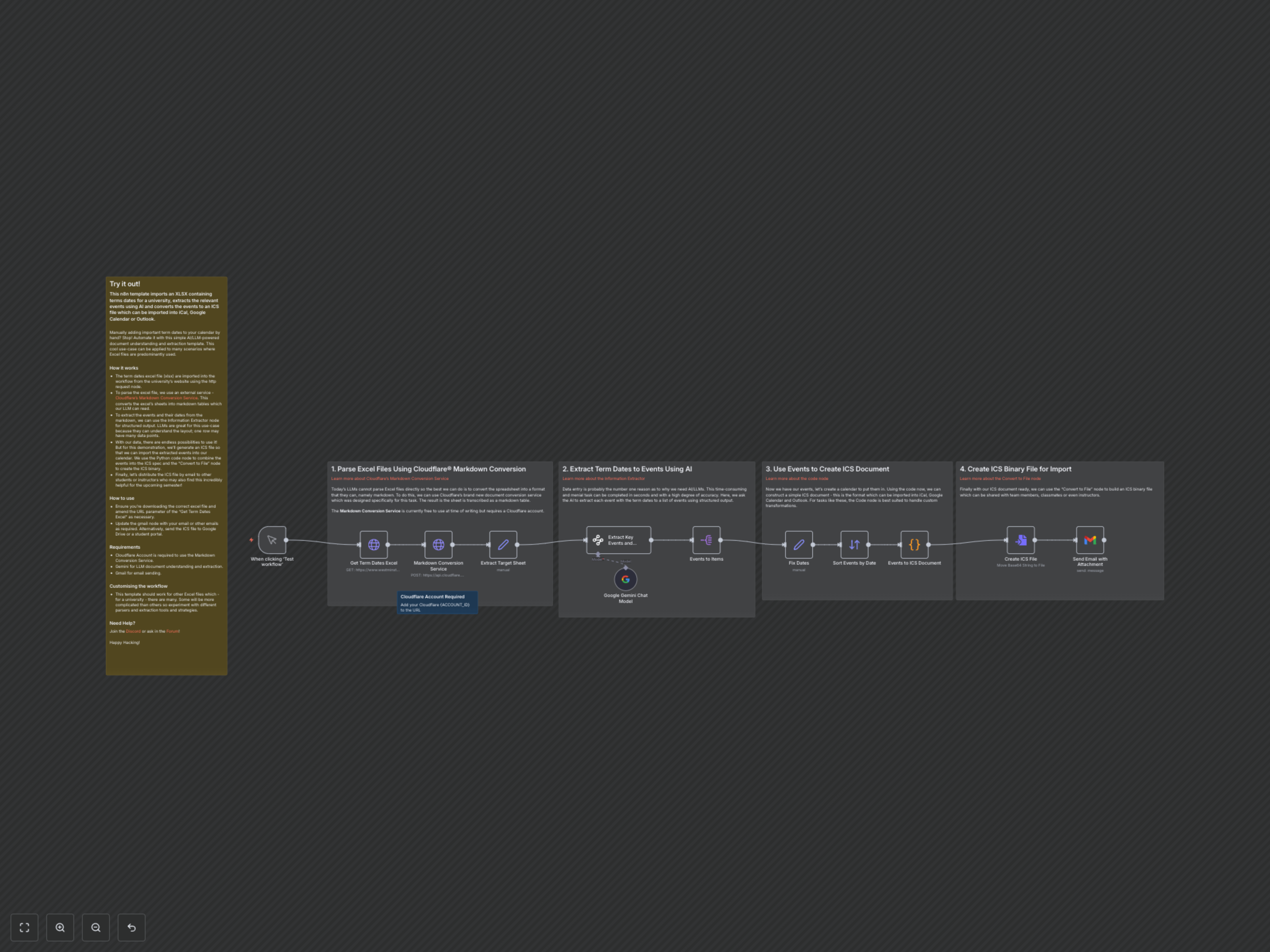
This workflow meticulously automates the entire process of converting raw university Excel term date files into shareable calendar entries. It begins by fetching the latest Excel file from the university's site. To enable AI processing, Cloudflare's specialized service converts the Excel data into a clean markdown format. A sophisticated AI then intelligently extracts all relevant event titles, week numbers, and 'week beginning' dates. These structured events are then compiled into an industry-standard ICS file using a custom Python script, which is finally packaged as a downloadable binary and emailed out.
Detailed Workflow Steps
1. Parse Excel Files Using Cloudflare®️ Markdown Conversion
Today's LLMs cannot parse Excel files directly, so the workflow first converts the spreadsheet into a markdown table. This is achieved using Cloudflare's brand new document conversion service, designed specifically for this task. The service transcribes the Excel sheet into an LLM-readable markdown format. Note: The Markdown Conversion Service is currently free but requires a Cloudflare account.
2. Extract Key Events and Dates Using AI
With the Excel data now in markdown format, the next crucial step is data extraction. The workflow uses an AI-powered Information Extractor (utilizing Google Gemini) to identify and pull out key events, week numbers, and 'week beginning' dates. This eliminates time-consuming and manual data entry, completing the task in seconds with a high degree of accuracy and structured output.
3. Prepare Events and Create ICS Document
Once the events are extracted, the workflow prepares them for calendar creation. It first corrects and standardizes the 'week beginning' dates, then sorts all events chronologically. A custom Python script within an n8n Code node then takes these sorted events and constructs a simple ICS document, which is the standard format for importing into calendar applications like iCal, Google Calendar, and Outlook. This node is ideal for custom data transformations.
4. Create ICS Binary File for Import and Distribution
With the ICS document content ready, the 'Convert to File' node transforms it into a binary ICS file. This final file is then attached to an email and sent via Gmail, making it easy to share with team members, classmates, or instructors. This ensures broad accessibility and effortless calendar updates for all stakeholders.