
Automate Notion Page Vectorization for AI-Powered Knowledge Bases
Automate the transformation of Notion pages into an AI-ready vector database, reducing manual data preparation time by over 80% and enabling instant semantic search capabilities.
Manually transforming Notion content into an AI-ready knowledge base is complex and slow. This workflow automates the extraction, chunking, and vectorization of Notion pages, seamlessly storing them in Supabase for powerful AI-powered search and retrieval.



Documentation
Notion to Supabase Vector Store with OpenAI
Effortlessly transform your Notion pages into a powerful, AI-ready vector knowledge base. This workflow automates content extraction, text chunking, and embedding generation, storing everything in Supabase for advanced semantic search and RAG applications.
Key Features
- Automated ingestion of new Notion pages for a continuously updated knowledge base.
- Intelligent content filtering to focus on textual information, excluding non-essential media.
- Leverages OpenAI for generating high-quality text embeddings, enhancing search accuracy.
- Seamless integration with Supabase vector databases for efficient and scalable storage.
- Prepares your Notion content for advanced AI applications like Retrieval Augmented Generation (RAG) and semantic search.
How It Works
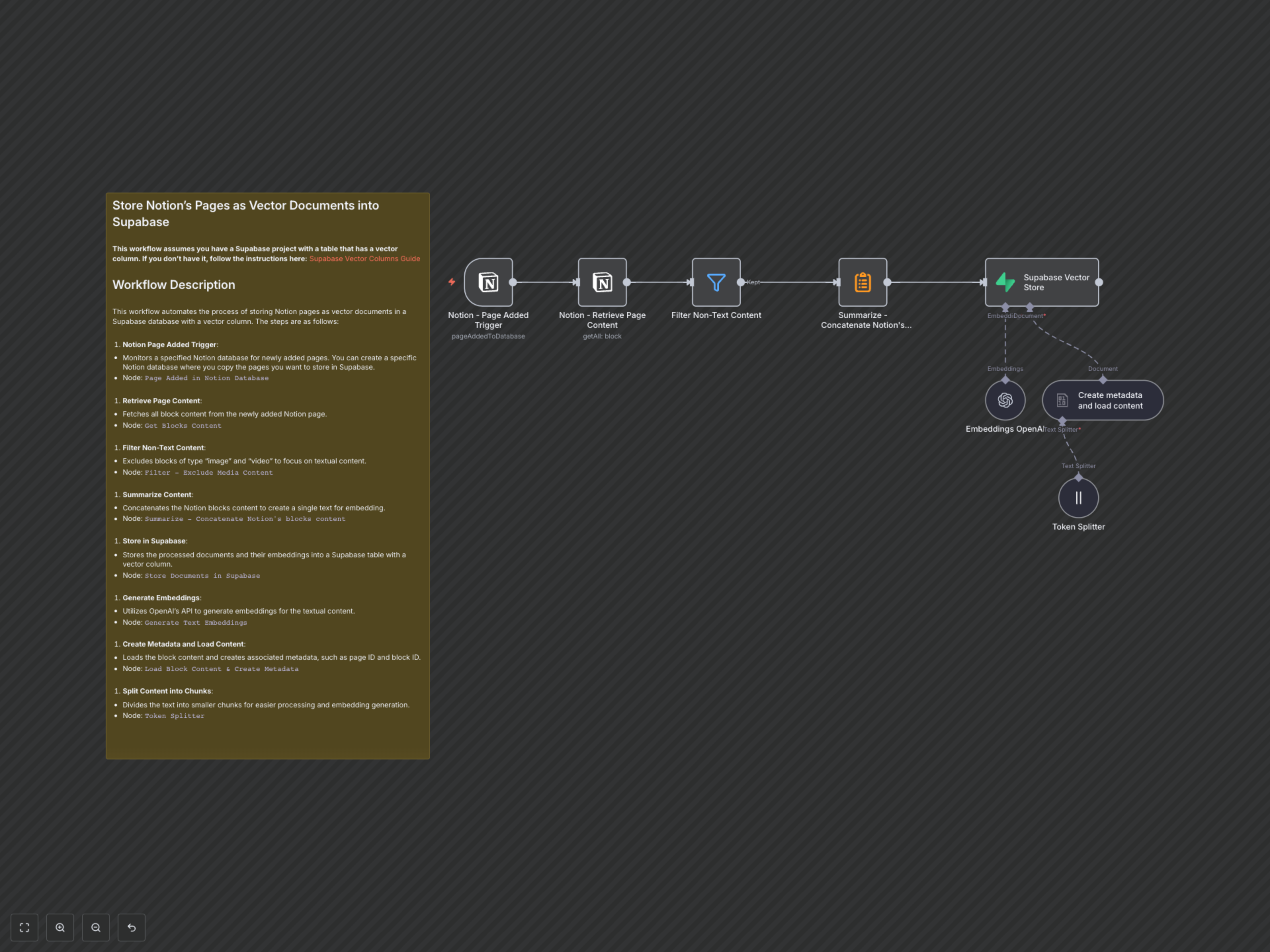
This workflow continuously monitors a specified Notion database for new pages. Upon detection, it systematically processes the content through several stages:
- Notion Page Added Trigger: Monitors a designated Notion database for newly added pages, initiating the workflow.
- Notion - Retrieve Page Content: Fetches all block content from the newly added Notion page.
- Filter Non-Text Content: Excludes non-textual elements like images and videos to ensure only relevant content is processed.
- Summarize - Concatenate Notion's blocks content: Combines filtered text blocks into a single coherent document for embedding.
- Create metadata and load content: Generates structured metadata (e.g., page ID, title) and loads the consolidated text.
- Token Splitter: Divides the content into optimized chunks, ensuring efficient processing and embedding generation by OpenAI.
- Embeddings OpenAI: Utilizes OpenAI's API to generate vector embeddings for each text chunk.
- Supabase Vector Store: Stores the processed text chunks, their metadata, and their OpenAI embeddings into a Supabase table with a vector column, making them instantly searchable.