
Automate GitHub API Answers with AI-Powered RAG Chatbot
Provides instant, context-aware answers to GitHub API queries, reducing developer research time by over 70% and accelerating project delivery.
Manually sifting through complex API documentation consumes valuable developer time and introduces inefficiencies. This workflow creates an AI chatbot using Retrieval Augmented Generation (RAG) to provide instant, accurate answers about the GitHub API, dramatically improving productivity.




Documentation
Build a GitHub API RAG Chatbot with n8n
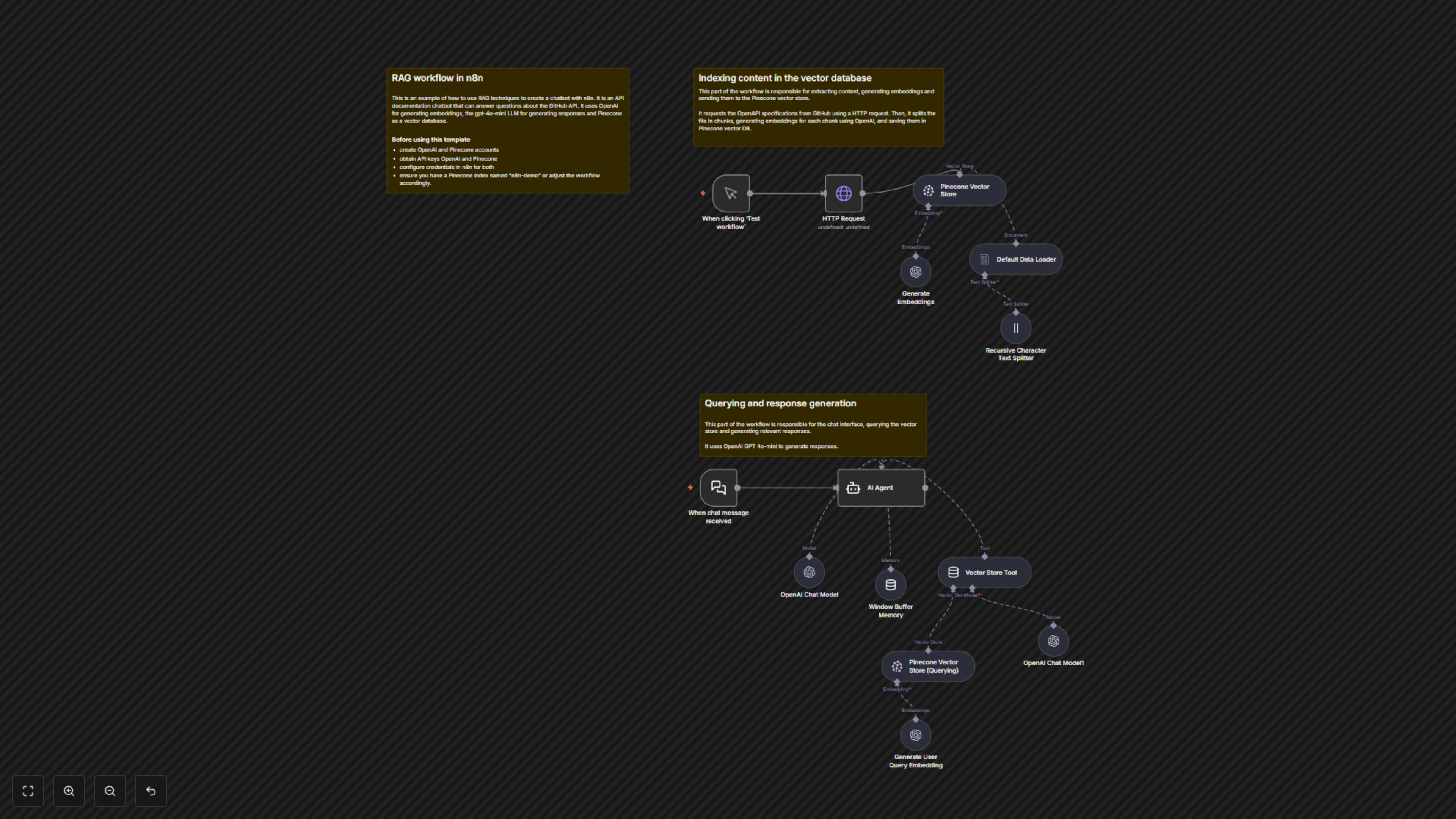
This n8n workflow demonstrates how to build a powerful API documentation chatbot using Retrieval Augmented Generation (RAG) techniques. It provides an AI assistant capable of answering questions about the GitHub API based on its OpenAPI specification, leveraging OpenAI for embeddings and language models, and Pinecone as a vector database.
Key Features
- Provides instant, accurate answers to GitHub API queries through a natural language interface.
- Leverages Retrieval Augmented Generation (RAG) to ensure responses are based on the latest GitHub OpenAPI specification.
- Automates the indexing of GitHub's OpenAPI specification into a Pinecone vector database.
- Utilizes OpenAI's robust language models (GPT-4o-mini) for conversational AI and embedding generation.
- Maintains conversational context using memory for more coherent and helpful interactions.
How It Works
This workflow operates in two main phases: content ingestion and query response. Initially, an `HTTP Request` fetches the GitHub OpenAPI specification. This raw data is then processed by a `Default Data Loader` and segmented into manageable chunks by a `Recursive Character Text Splitter`. OpenAI's `Generate Embeddings` node transforms these chunks into vector embeddings, which are then stored in a `Pinecone Vector Store`. For chat interactions, the `When chat message received` node triggers an `AI Agent`. This agent, powered by an `OpenAI Chat Model` (GPT-4o-mini) and supported by `Window Buffer Memory` for context, uses a `Vector Store Tool` to query the Pinecone database. User queries are embedded by `Generate User Query Embedding`, sent to `Pinecone Vector Store (Querying)` for retrieval, and the most relevant information is fed back to the `AI Agent` to formulate an accurate, context-aware response based on the GitHub API specification.