
Automate CSV Data Sync to Google Sheets for Fresh Insights
Automate CSV data updates to Google Sheets in minutes, slashing manual effort by over 75% and ensuring data freshness.
Manual data import and updates from external CSVs are time-consuming and error-prone, delaying critical analysis. This workflow automates downloading, filtering, and syncing external CSV data directly into your Google Sheet, ensuring your reports are always up-to-date with minimal effort.


Documentation
Automate External CSV Data Sync to Google Sheets
Manual data collection and updating spreadsheets from external sources can be a slow, repetitive, and error-prone process. This workflow streamlines the entire process, allowing you to automatically pull CSV data from any URL, apply custom filtering, and keep your Google Sheets perpetually updated.
Key Features
- Automatically downloads CSV files from any specified public URL.
- Parses raw CSV data and prepares it for seamless integration into Google Sheets.
- Applies powerful custom filters to select only the data relevant to your needs (e.g., specific regions, years).
- Dynamically generates unique keys to efficiently append new records or update existing ones in your Google Sheet, preventing duplicates and ensuring data integrity.
- Maintains an always up-to-date Google Sheet, providing fresh data for analysis and reporting.
How It Works
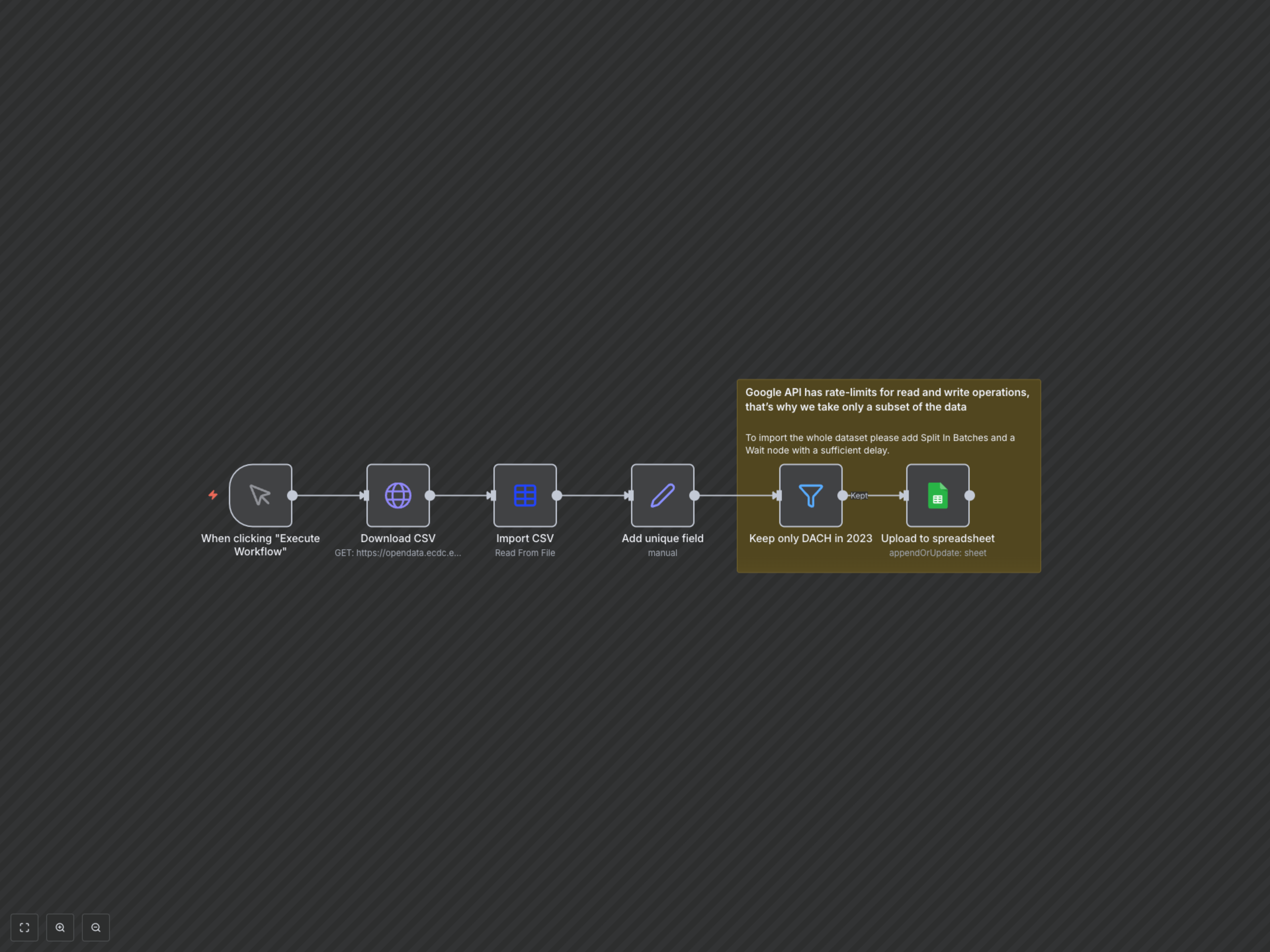
This workflow can be triggered manually or on a schedule (if configured). It begins by using an HTTP Request node to download a CSV file from the specified URL (e.g., COVID-19 testing data from ECDC). The downloaded file is then parsed by the Spreadsheet File node. A Set node generates a unique identifier for each record based on fields like country code and week, which is crucial for conflict-free updates. A Filter node then narrows down the dataset based on customizable conditions—in this example, to include only data for the DACH region (Germany, Austria, Switzerland) for the year 2023. Finally, the Google Sheets node intelligently appends new data or updates existing rows in your designated Google Sheet using the unique identifier, ensuring your spreadsheet is always current and accurate. Note that for very large datasets, Google API rate limits might apply, and the workflow suggests adding batching and wait nodes to handle this effectively.