
Automate Bitrix24 Customer Support with AI-Powered RAG Chatbot
Resolve Bitrix24 customer queries instantly with 24/7 AI assistance, reducing agent workload by up to 60% and improving response times.
Manual handling of Bitrix24 chat inquiries leads to slow response times and agent overload. This workflow deploys an AI-powered RAG chatbot to Bitrix24 Open Channels, instantly answering customer questions using a vectorized knowledge base.





Documentation
Automate Bitrix24 Customer Support with AI-Powered RAG Chatbot
This workflow integrates an advanced Retrieval-Augmented Generation (RAG) chatbot directly into your Bitrix24 Open Channels, providing immediate and accurate responses to customer inquiries. By leveraging a vectorized knowledge base, it significantly enhances customer support efficiency.
Key Features
- Instant Query Resolution: Automatically answers customer questions within Bitrix24 chats, eliminating wait times.
- Contextual AI Responses: Utilizes a RAG model (Google Gemini & Qdrant) to provide highly accurate, document-based answers.
- Automated Knowledge Base Sync: Automatically updates the chatbot's knowledge by extracting and vectorizing documents from Bitrix24 Disk upon bot installation.
- Seamless Bitrix24 Integration: Handles various Bitrix24 Open Channel events including message add, chat join, and bot installation/deletion.
- Reduced Agent Workload: Frees up human agents to focus on complex issues by automating routine inquiries.
How It Works
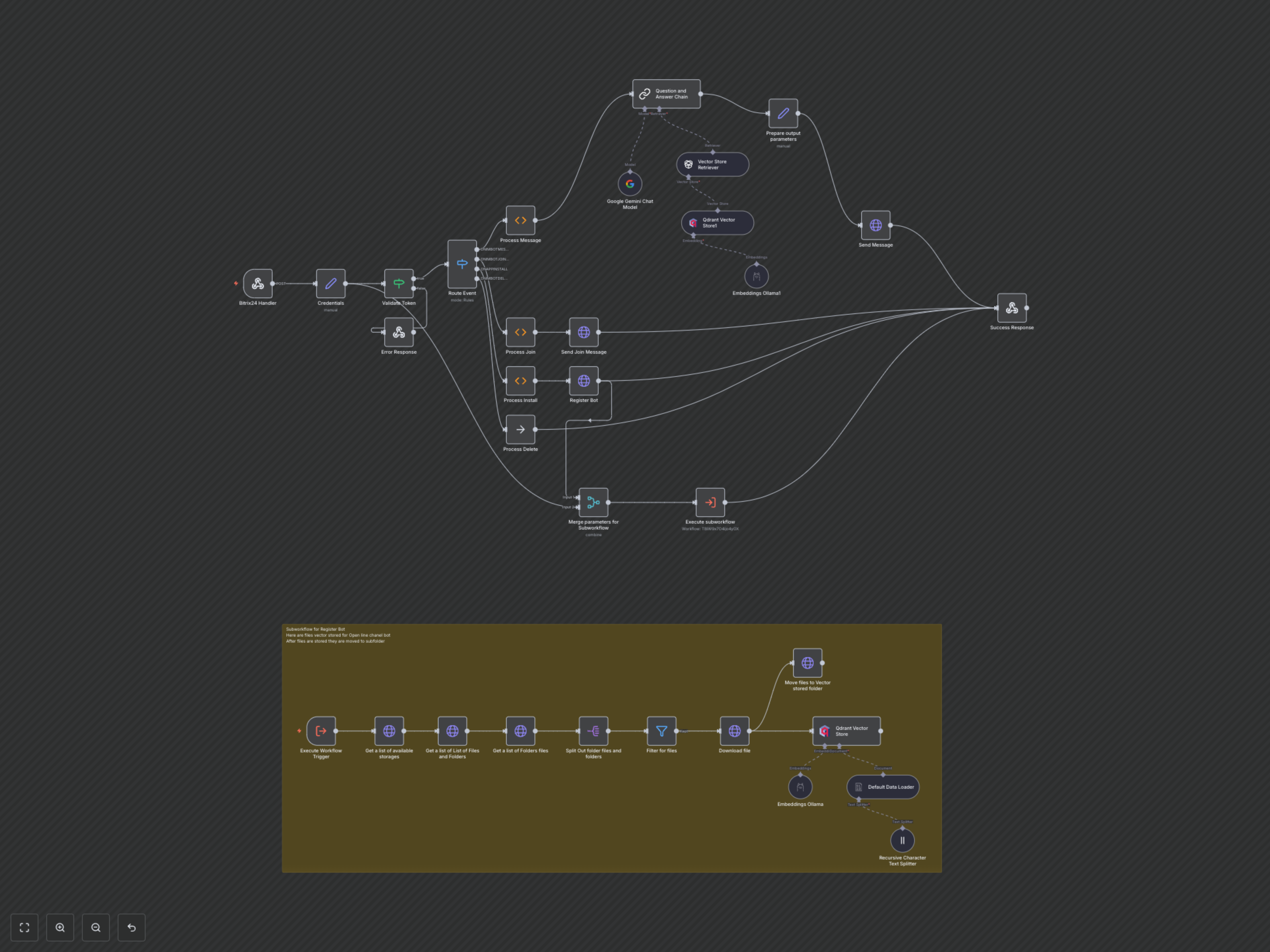
The workflow initiates when a message or event is received via a Bitrix24 webhook. It validates the incoming request, then routes the event to the appropriate handler. For new messages, it processes the query through a RAG chain powered by Google Gemini and a Qdrant vector store, retrieving relevant information from your Bitrix24 Disk documents. The AI-generated response is then sent back to the customer. Additionally, it automates bot registration upon installation and provides welcome messages on chat join. A dedicated subworkflow automatically updates the RAG knowledge base by extracting, splitting, embedding, and storing documents from a designated Bitrix24 Disk folder into Qdrant, triggered upon bot installation.