
Automate AI CV Screening: Recruit Faster with Intelligent Insights
Accelerate initial CV screening by up to 80%, enabling faster identification of top candidates and significantly reducing recruitment cycle times.
Manually sifting through countless CVs is time-consuming and prone to human bias, delaying critical hiring decisions. This workflow leverages AI to instantly analyze resumes against job descriptions, providing matching scores and insights to streamline your recruitment process.

Documentation
AI-Powered CV Screening with n8n & OpenAI
This workflow is ideal for recruitment agencies, HR professionals, and hiring managers looking to automate the initial screening of CVs. It is especially useful for organizations handling large volumes of applications and seeking to streamline their recruitment process.
Key Features
- Automated CV Retrieval: Efficiently downloads CVs from direct links (e.g., Supabase storage or Dropbox).
- Intelligent Data Extraction: Extracts comprehensive text data from PDF documents for in-depth analysis.
- OpenAI-Powered Analysis: Sends extracted data and job descriptions to OpenAI for generating matching scores, summarising suitability, and providing actionable insights.
- Structured Output: Processes AI analysis into a structured JSON format for easy review and integration.
- Scalable Recruitment: Streamlines the initial screening process for large volumes of applications.
How It Works
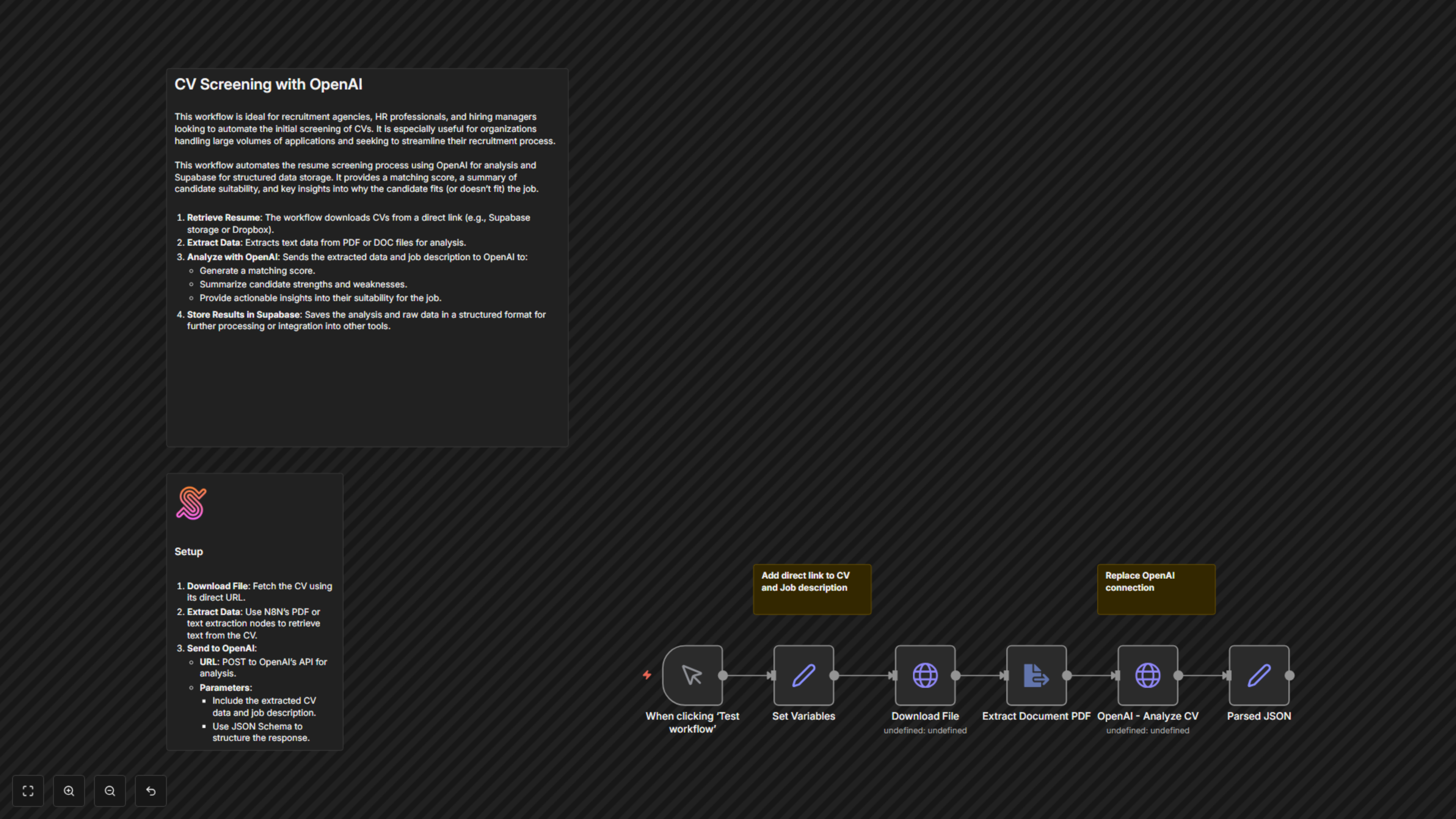
This workflow automates the resume screening process by linking CV retrieval, text extraction, and advanced AI analysis. Here’s a step-by-step breakdown:
- Start (Manual Trigger): The workflow begins when manually triggered, or can be configured to start automatically by a webhook or other event, providing the CV's URL and job description.
- Set Variables: Essential variables like the CV file_url, job_description to compare against, and the specific AI prompt and json_schema for OpenAI's response are defined.
- Download File: The CV is downloaded from the specified file_url.
- Extract Document PDF: The content of the downloaded PDF CV is extracted into plain text, preparing it for AI processing.
- OpenAI - Analyze CV: The extracted CV text, along with the job description and the predefined prompt, is sent to OpenAI's API. OpenAI performs the analysis based on the recruiter persona defined in the prompt and returns structured data according to the JSON schema.
- Parsed JSON: The raw JSON response from OpenAI is parsed and formatted, making the matching score, summaries, and suitability reasons readily accessible for subsequent steps (e.g., saving to a database, sending notifications).
Setup Video Guide
For a visual walkthrough, watch the setup video [8 min] at https://youtu.be/TWuI3dOcn0E.