
AI Chat with Supabase Files: Automate Document Ingestion & Retrieval
Empower your team to retrieve contextual answers from thousands of documents in seconds, reducing research and analysis time by over 90%.
Manually searching large document repositories for specific information is a time-consuming and inefficient process. This workflow automates document processing, vectorization, and enables an AI-powered chat for instant, context-aware information retrieval from your uploaded files.



Documentation
AI Chat with Supabase Files: Automate Document Ingestion & Retrieval
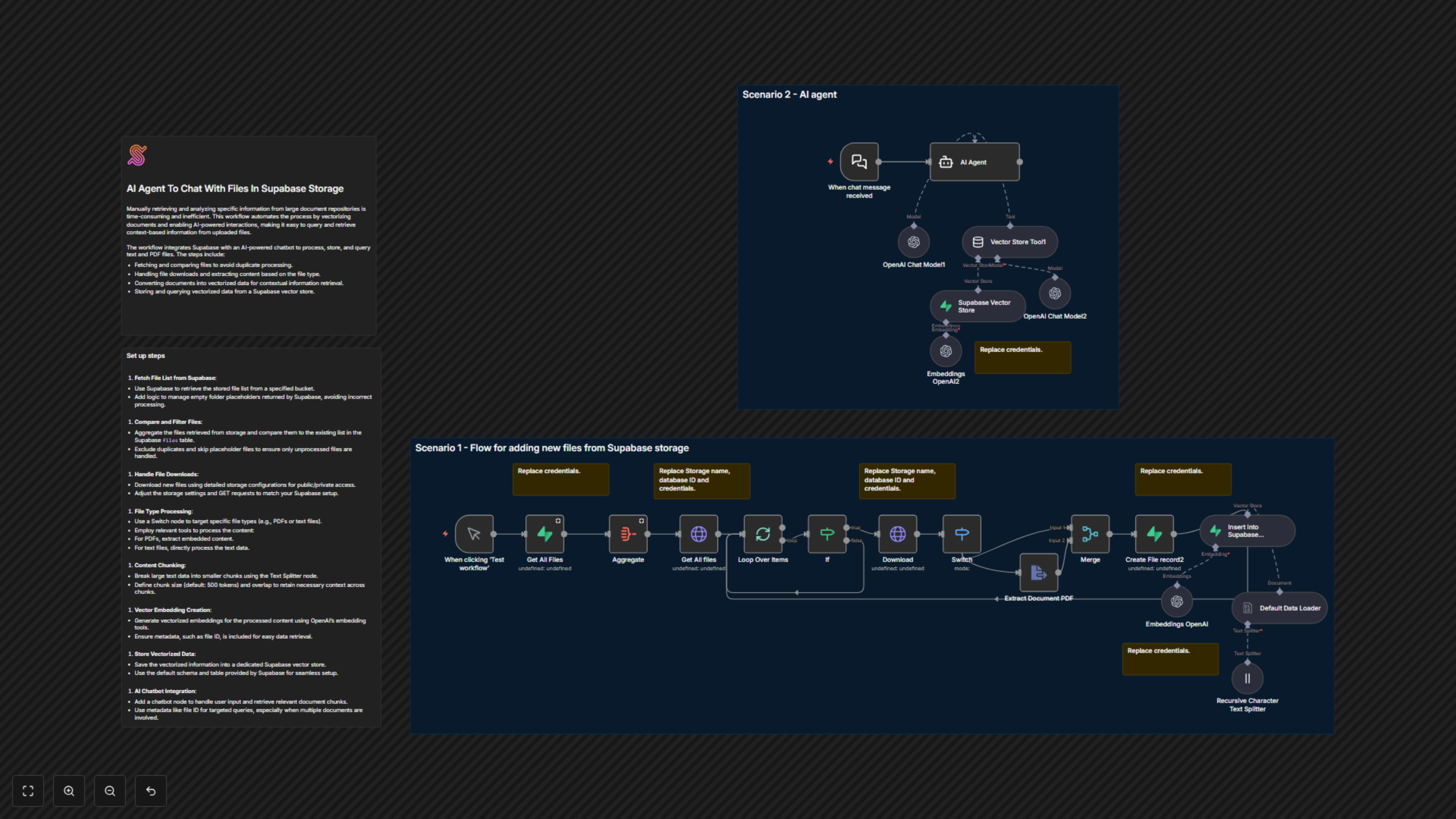
This powerful n8n workflow revolutionizes how you interact with your documents stored in Supabase. It intelligently processes new files, extracts their content, converts it into AI-ready vector embeddings, and stores them in a Supabase Vector Store. Crucially, it then provides an AI agent capable of holding natural language conversations, answering questions, and retrieving highly relevant information directly from your document knowledge base.
Key Features
- Automated document ingestion from Supabase Storage, preventing duplicate processing.
- Intelligent content extraction for various file types, including PDFs and text documents.
- Advanced text chunking and OpenAI vector embeddings for precise contextual understanding.
- Seamless integration with Supabase Vector Store for efficient storage and retrieval of vectorized data.
- AI-powered chatbot for natural language queries, delivering accurate, context-based answers from your uploaded files.
How It Works
The workflow operates in two main scenarios: first, continuously updating your document knowledge base, and second, providing an interactive AI chat interface. It begins by fetching your existing document records from Supabase and comparing them against newly uploaded files in your Supabase Storage. New or updated files are then downloaded, their content extracted (handling both PDFs and plain text), and chunked into smaller, manageable pieces. These chunks are transformed into numerical vector embeddings using OpenAI and stored in your Supabase Vector Store. In the second scenario, a LangChain AI agent, powered by OpenAI, receives user chat messages. It uses a custom tool to query the vectorized documents in your Supabase Vector Store, retrieving the most relevant information to formulate precise and helpful responses.