
Voice-Powered Email Assistant: AI Replies & Gmail Drafts
Generate sophisticated email drafts from voice notes in under 2 minutes, cutting email response time by up to 75% and dramatically enhancing productivity.
Manual email management and drafting can be a significant drain on productivity, especially when on the go. This workflow intelligently identifies emails requiring a reply, sends them to your Telegram bot, and lets you dictate a polished draft using voice notes and advanced AI, streamlining your inbox with minimal effort.



Documentation
Voice-Powered Email Assistant: AI Replies & Gmail Drafts
This powerful n8n workflow revolutionizes email management by combining AI-driven intelligence with the convenience of voice dictation. It streamlines your inbox by filtering out unnecessary emails, then enables you to craft prompt, polished replies simply by speaking.
Key Features
- Intelligent Email Filtering: Automatically identifies and flags emails requiring a personal response, ignoring newsletters and automated messages.
- Seamless Telegram Integration: Forwards actionable emails to a dedicated Telegram bot, providing a convenient hub for all pending replies.
- Voice-to-Email Draft Generation: Transcribes your spoken replies and uses advanced AI to transform them into professionally written email drafts.
- Instant Gmail Draft Creation: Automatically creates a new draft in the original email thread within Gmail, ready for final review and sending.
- Direct Draft Access: Sends a direct link to the newly created Gmail draft back to your Telegram chat for quick access.
How It Works
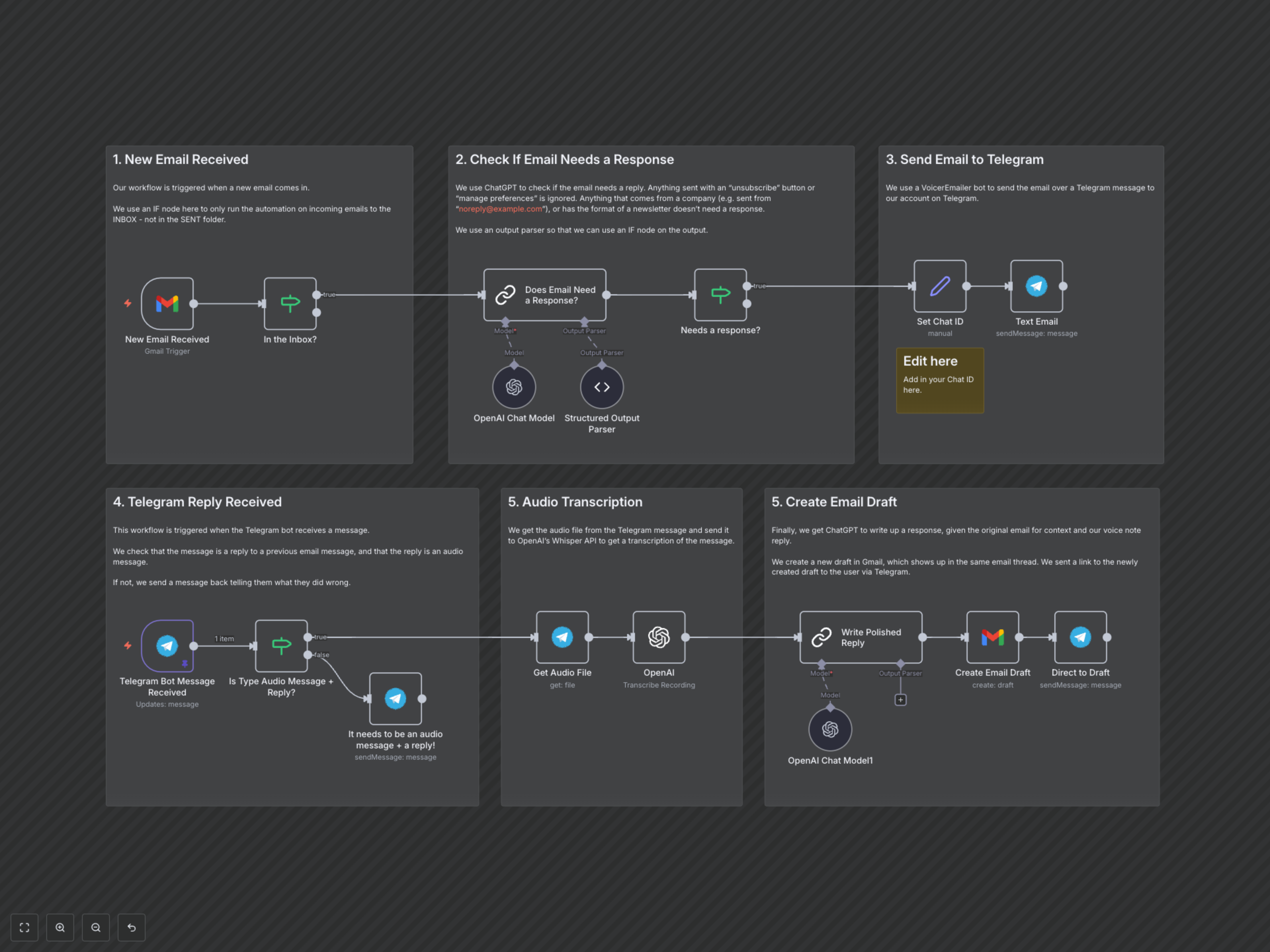
This workflow operates in two main phases. First, it continuously monitors your Gmail inbox. Upon receiving a new email, an integrated AI model evaluates whether it requires a personal response, filtering out automated messages, newsletters, and promotional content. If a response is needed, the email's key details are forwarded to your personal Telegram bot. The second phase begins when you reply to this Telegram message with an audio voice note. The workflow transcribes your voice note using AI, then uses a second AI model to craft a polished, contextually relevant email draft based on the original email and your dictated response. Finally, a new draft is created in your Gmail account, linked to the original thread, and a direct link to this draft is sent back to your Telegram chat for your review and approval.