
Rate Limit n8n Alerts: Prevent Error Storms & Maintain Focus
Proactively log all n8n workflow errors while preventing notification overload by rate-limiting alerts to once every 5 minutes, significantly improving focus and incident response efficiency.
Uncontrolled error notifications from automated workflows lead to alert fatigue and missed critical issues. This n8n workflow logs all execution errors and intelligently rate-limits alerts, ensuring you receive timely notifications without being overwhelmed by error floods.

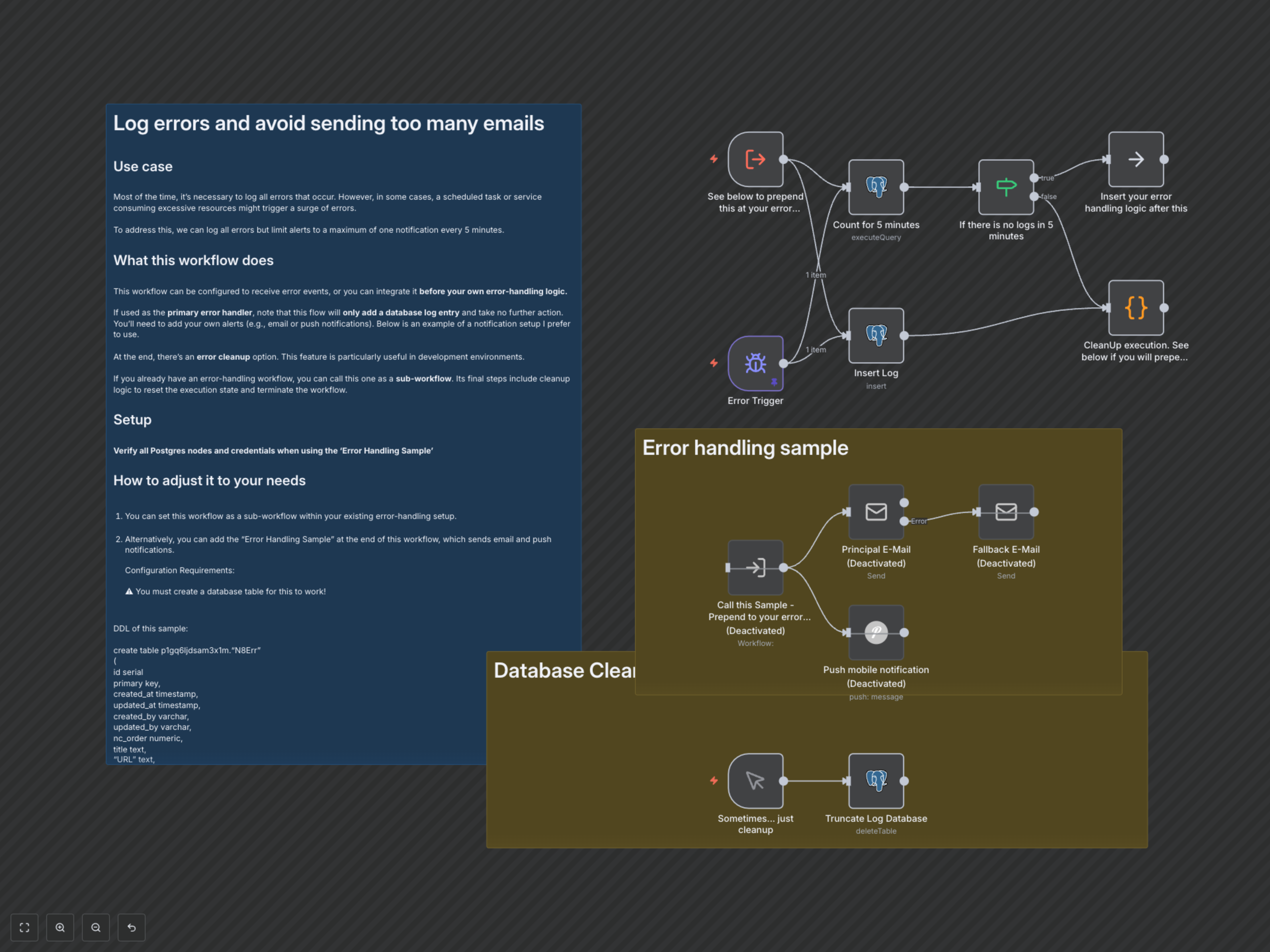

Documentation
Log Errors and Avoid Alert Overload
This n8n workflow provides a robust solution for centralizing error logging and intelligently managing alert notifications. It captures detailed information about every workflow error in a PostgreSQL database while preventing notification fatigue by rate-limiting alerts during error surges.
Key Features
- Comprehensive Error Logging: Automatically record detailed execution information (URL, workflow name, error message, stack trace, last node) for every n8n workflow error into a PostgreSQL database.
- Intelligent Alert Rate Limiting: Prevent notification storms and alert fatigue by dynamically checking for recent errors. Notifications are only triggered if no errors have been logged in the past 5 minutes, ensuring you only receive alerts for new or sustained issues.
- Flexible Integration: Easily deploy as a primary error handler or integrate as a sub-workflow into your existing error-handling logic.
- Optional Database Cleanup: Includes a manual trigger for truncating the error log table, ideal for development environments and testing.
How It Works
This workflow intelligently processes errors to ensure effective logging and controlled alerting. When an n8n workflow error occurs, either directly via the 'Error Trigger' or by calling this workflow as a sub-workflow, full error details are immediately recorded into a PostgreSQL database. Simultaneously, the workflow queries the database to count errors logged within the preceding 5 minutes. An 'If' node then evaluates this count: if no recent errors are found, it signals a new incident, allowing your chosen alert mechanisms (e.g., email, push notifications) to activate. Conversely, if errors have already been logged within the last 5 minutes, the workflow terminates without sending further alerts, preventing alert storms and maintaining operational focus. Additionally, a manual trigger is provided for easily clearing the error log table, which is particularly useful in development environments.