Class Management Fee Payment Workflow (Stripe)
Automate student fee collection via Stripe, validating payments and updating Google Sheets for streamlined class management.
This workflow streamlines student fee payments by connecting Google Sheets with Stripe, automating validation and processing of payments.


$29
Ready-to-use workflow template
Complete workflow template
Setup documentation
Community support
Preview - N8n

Documentation
Description
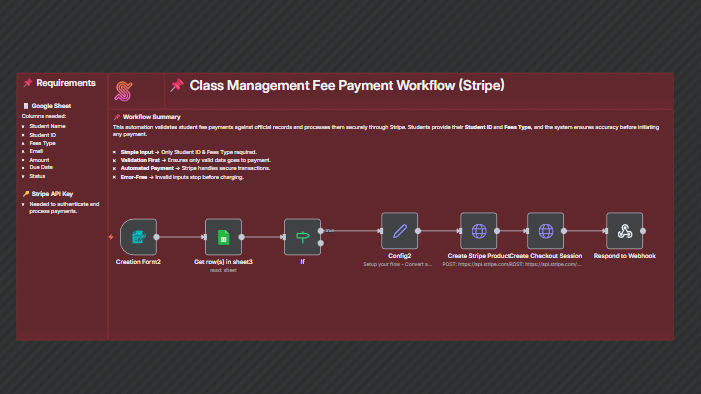
This workflow streamlines student fee payments by connecting Google Sheets with Stripe. Students only need to enter their Student ID and Fees Type; the system will automatically validate the details against the Google Sheet records. If a valid match is found, the corresponding fee amount is fetched and processed directly via Stripe. If no matching data is found, the payment process will not proceed, ensuring only valid records are charged.
- Student submits Student ID and Fees Type.
- Workflow checks the Google Sheet for a matching record.
- If found, the workflow retrieves the fee amount and student details.
- Stripe processes the payment using the retrieved data.
- If no record is found, the process ends without initiating payment.
Benefits for Customers / Users
- Seamless Payment Experience – Students only need to enter minimal details for validation and payment.
- Error Prevention – Invalid or missing records are blocked before reaching the payment gateway.
- Time Efficiency – Automates fee collection without manual checking.
- Data Accuracy – Ensures that payment data is consistent with official student records.
Tools Used:
- Google Sheets – Stores and validates student fee records.
- Stripe – Handles secure and direct payment processing.
- n8n – Automates the entire workflow between validation and payment.