
Chat with SQL Databases using AI for Rapid Data Insights
Enable anyone to retrieve complex SQL data insights in seconds through natural language, reducing data access time by 90% and eliminating the need for specialized SQL knowledge.
Manually querying SQL databases and interpreting complex data is time-consuming and requires specialized skills. This workflow transforms your SQL data into an interactive AI chat experience, empowering anyone to retrieve instant, conversational insights.



Documentation
Chat with SQL Databases using AI for Rapid Data Insights
Tired of complex SQL queries or waiting for data reports? This powerful n8n workflow leverages the intelligence of AI and the flexibility of LangChain to transform your raw SQL database into a conversational assistant. It allows anyone to ask questions in natural language and receive instant, insightful answers, streamlining data access and accelerating decision-making.
Key Features
- Conversational SQL Querying: Interact with your SQLite databases (and easily extend to others) using everyday language, eliminating the need for SQL expertise.
- AI-Powered Data Insights: Utilize OpenAI's GPT-4 to intelligently interpret your questions, formulate SQL queries, and present clear, concise answers.
- Contextual Memory: The built-in memory buffer remembers previous interactions, enabling natural follow-up questions and more coherent conversations.
- One-Time Database Setup: Seamlessly download, extract, and locally save example databases (like chinook.db) or integrate your own for immediate use.
- Extendable Architecture: Easily adapt the workflow to connect with various data sources and integrate different AI models as your needs evolve.
How It Works
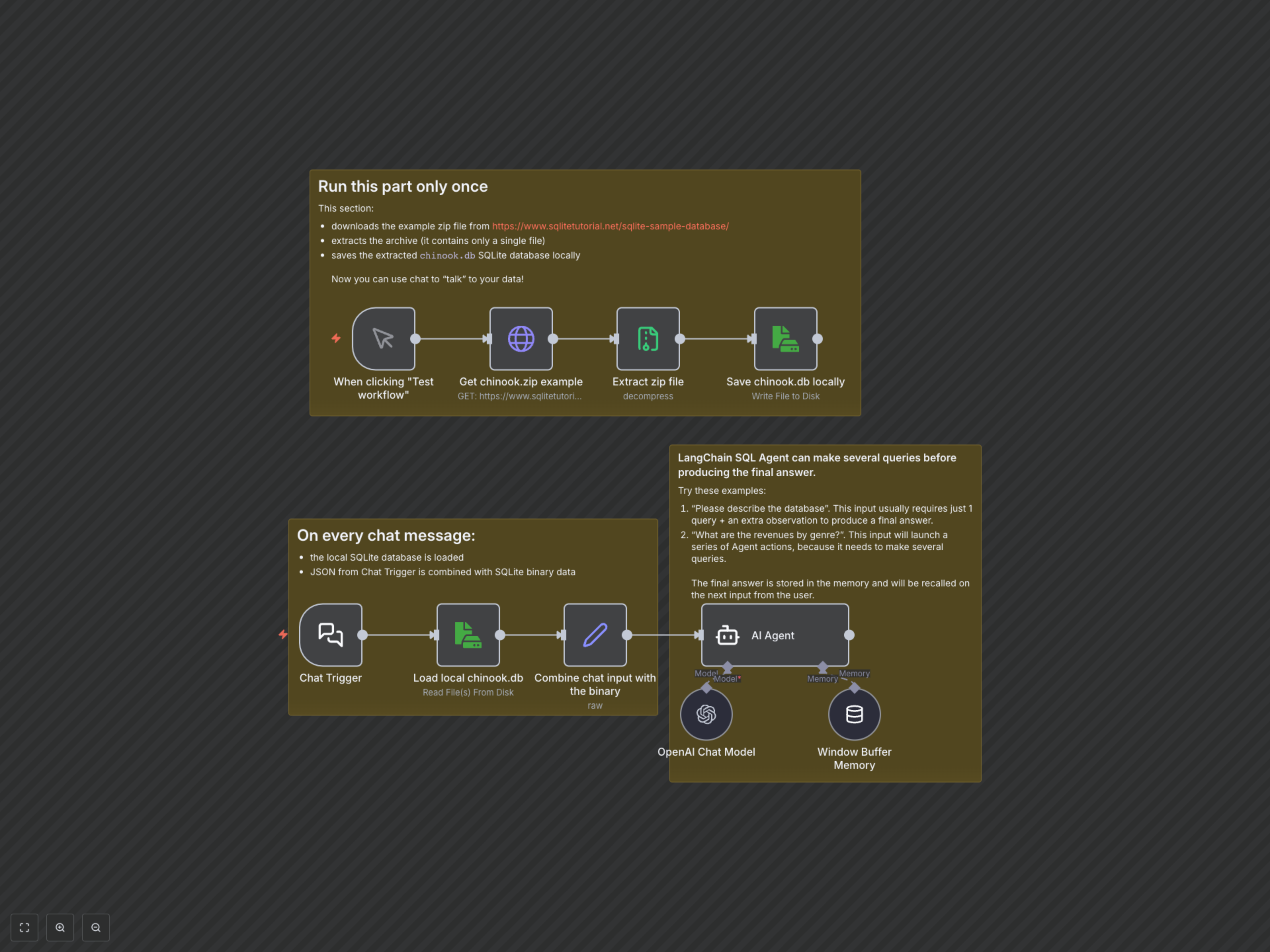
This workflow operates in two main phases. Initially, a dedicated branch handles the one-time setup of your database, downloading an example SQLite database and saving it locally within your n8n environment. Once the database is ready, the core functionality activates. Every message sent via the Chat Trigger loads the local database, combines your natural language query with the database context, and feeds it to the LangChain SQL Agent. The agent, powered by an OpenAI Chat Model and equipped with conversational memory, intelligently processes your request, generates and executes necessary SQL queries, and returns a human-readable answer directly in your chat.