Automated Multi-Platform Marketing: Captions & Visuals from Your Product Database
Automate social media marketing, creating and posting engaging product content across platforms, saving time and boosting brand visibility.
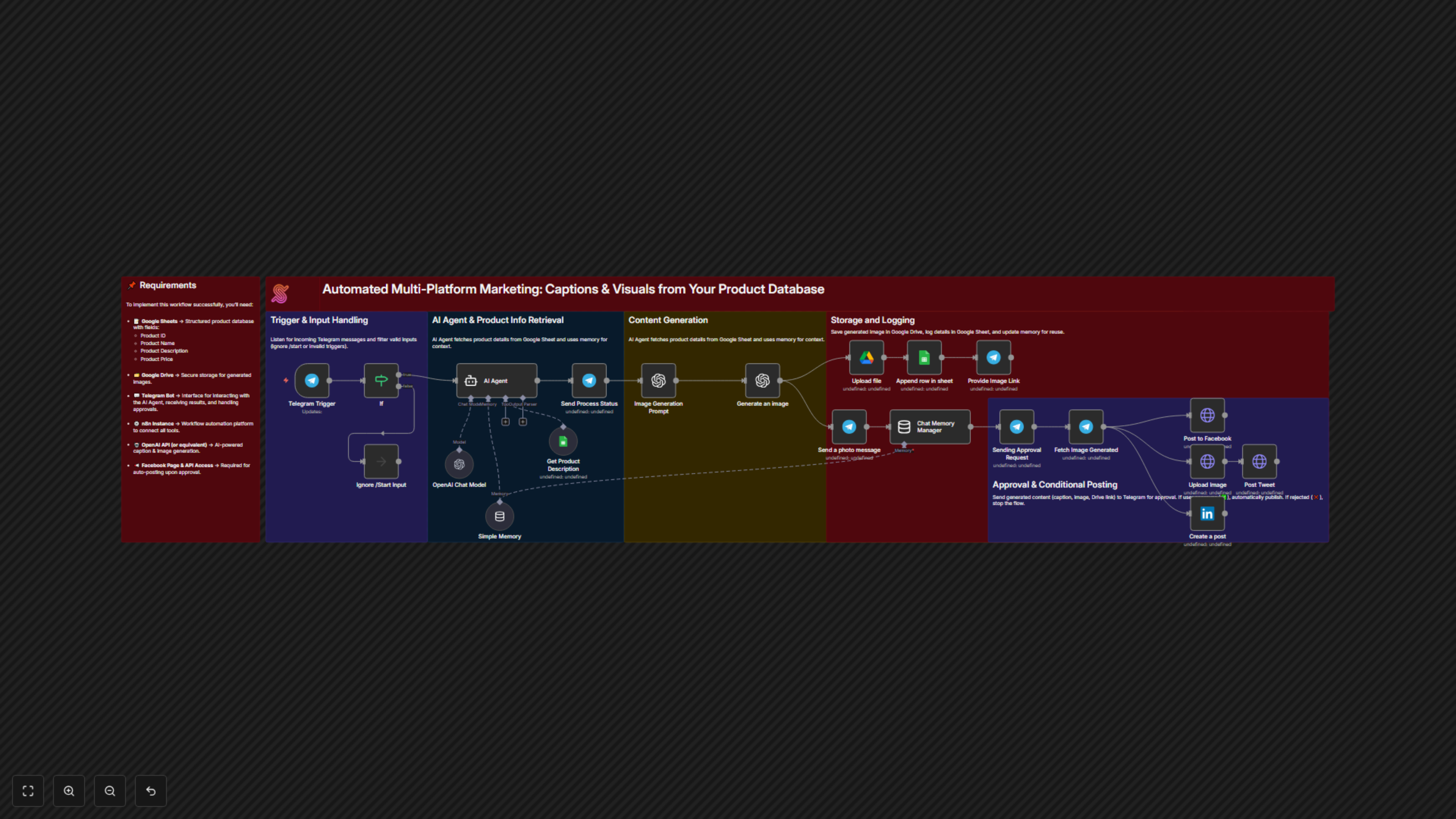
This workflow automates the generation and posting of marketing captions and visuals drawn from a structured product database, streamlining your social media marketing efforts with AI and conditional approvals.


Documentation
📖 Description
This automation workflow empowers marketing teams to create ready-to-use social media content in just seconds through Telegram. The AI-powered assistant works seamlessly with your product database to:
- Retrieve product details (name, description, price) directly from your Google Sheets database.
- Generate engaging captions and tailored visuals using advanced AI content generation tools.
- Deliver content instantly to your Telegram chat, including captions, image previews, and Google Drive links.
- Post automatically across multiple platforms – Facebook, X (Twitter), and LinkedIn – once approved.
All generated content is automatically stored in Google Drive and logged in Google Sheets for reuse, campaign reporting, and centralized management.
This fully automated process allows marketing teams to focus on strategy and growth, while the AI handles repetitive content creation tasks.
🎯 Benefits for Customers
- ⏳ Time-Saving Efficiency – Automates caption writing and image creation, reducing manual workload.
- 🎨 Consistent Branding – Ensures product-based content remains accurate, professional, and aligned with your brand.
- 📲 Instant Delivery & Posting – Get ready-to-post content delivered instantly to Telegram, and publish directly to Facebook, X, and LinkedIn.
- 💰 Cost-Effective – Minimizes reliance on external designers or copywriters for daily content needs.
- 🤝 User-Friendly – Simple setup and operation; maintain your product sheet and let the AI handle the rest.
- 📂 Centralized Archive – Keep all marketing assets organized in Google Sheets & Drive for future campaigns.
📌 Requirements
To implement this workflow successfully, you’ll need:
- 📝 Google Sheets → Structured product database with fields:
- Product ID
- Product Name
- Product Description
- Product Price
- 🗂️ Google Drive → Secure storage for generated images.
- 💬 Telegram Bot → Interface for interacting with the AI Agent, receiving results, and handling approvals.
- ⚙️ n8n Instance → Workflow automation platform to connect all tools.
- 🤖 OpenAI API (or equivalent) → AI-powered caption & image generation.
- 🌐 Social Media API Access → To enable direct posting:
- Facebook Page API
- X (Twitter) API
- LinkedIn API
Tools Used:
- Telegram Bot API – User-friendly chat interface for caption and image delivery.
- Google Sheets – Central product database & logging system.
- Google Drive – Image storage & archival.
- AI Content & Image Generation Tools – Create tailored captions & visuals for your products.
- n8n – Orchestration and workflow automation.
- Facebook, X, LinkedIn APIs – Multi-platform publishing integration.
💡 Remark for Users:
This workflow is configured for multi-platform posting (Facebook, X, LinkedIn). If you prefer to only generate and send content to Telegram, you can simply remove the posting nodes and keep Telegram as your final delivery channel.