
Automate Zoom Meetings & Stripe Payments for Effortless Event Setup
Automate the entire event setup and participant registration process, reducing administrative overhead by over 90% and eliminating manual data entry errors.
Manually creating Zoom meetings, setting up payment links, and tracking attendees is a labor-intensive process. This workflow automates end-to-end event setup, from generating secure Zoom meetings and Stripe payment links to organizing participant data in Google Sheets.



Documentation
Automate Zoom Meetings & Stripe Payments for Effortless Event Setup
This powerful n8n workflow revolutionizes how you manage online events, from initial setup to participant registration. It integrates Zoom, Stripe, and Google Sheets to automate core administrative tasks, saving you valuable time and ensuring a professional experience for your attendees.
Key Features
- Automated Zoom Meeting Creation: Instantly generate secure Zoom meeting links with unique passwords.
- Seamless Stripe Payment Link Generation: Create dedicated payment links for each event, complete with metadata for participant tracking.
- Dynamic Participant List Management: Automatically create a new Google Sheet tab and update it with attendee details upon successful payment.
- Automated Notifications: Keep teachers/hosts informed about new event creations and participant registrations via email.
- Confirmation Emails: Send immediate, personalized confirmation emails to participants with all necessary event details.
How It Works
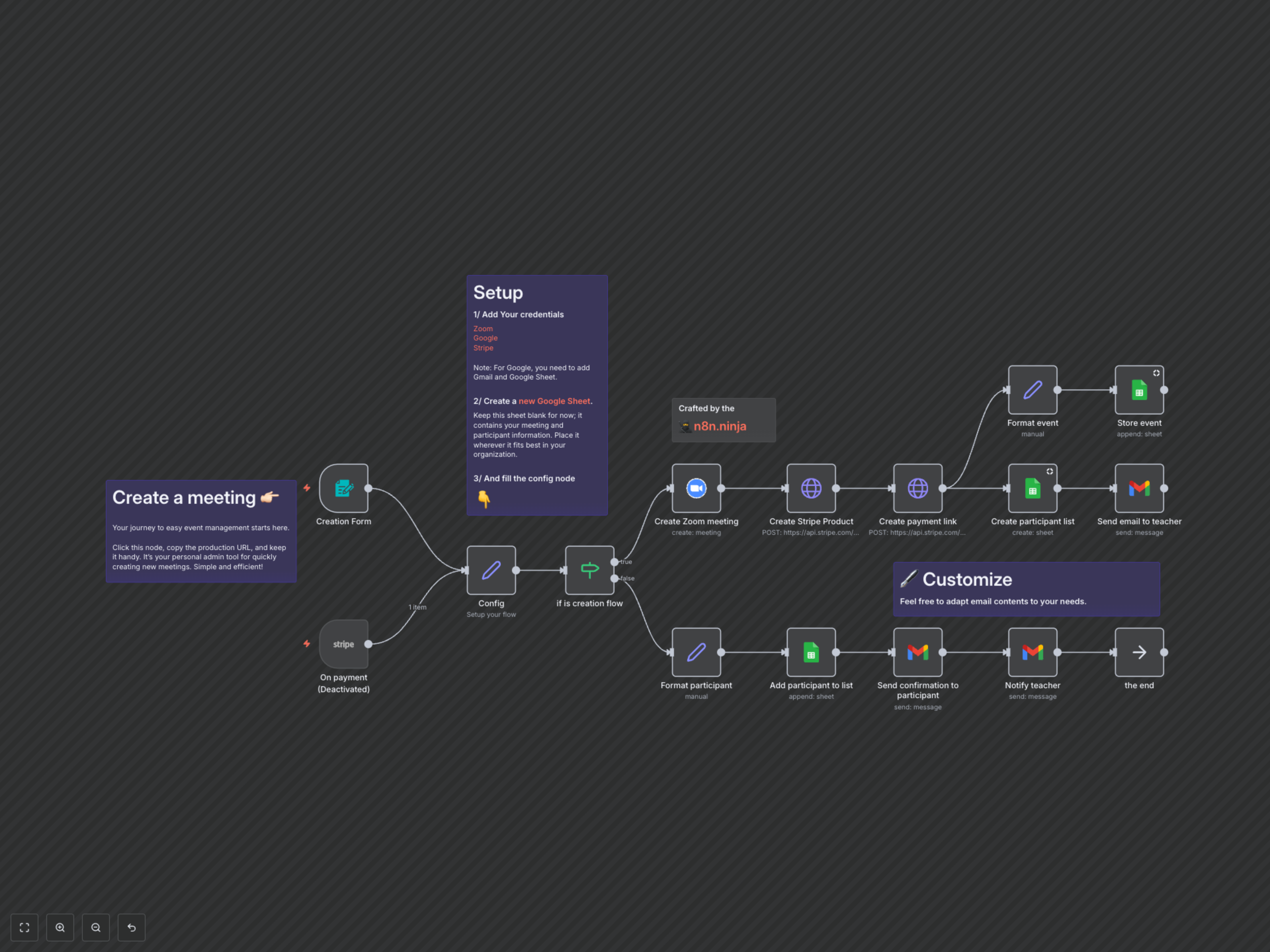
The workflow operates in two main modes: event creation and participant registration. For event creation, it is triggered by an n8n form where you input details like event title, price, date, and time. Upon submission, the workflow first creates a secure Zoom meeting and generates a unique Stripe Product and Payment Link. Crucial event and Zoom details are embedded into the Stripe payment link's metadata for later retrieval. Concurrently, a new tab is created in your configured Google Sheet to specifically track participants for this event, and all event details are stored in the main sheet. The host then receives a comprehensive email with the Zoom details, payment link, and a link to the participant sheet. The second mode, participant registration, activates when a Stripe payment for an event is completed. It automatically retrieves event metadata, adds the participant's details (name, email, address, payment info) to the correct event-specific Google Sheet tab, sends a personalized confirmation email to the participant with their Zoom access details, and notifies the event host of the new registration.