
Automate Training Feedback Management & Drive Program Improvement
Accelerate training feedback response times by 60%, empowering rapid program adjustments and boosting participant satisfaction.
Manual training feedback collection and follow-up are time-consuming and often lead to missed opportunities for improvement. This n8n workflow automates capturing feedback from Airtable, intelligently routes it to Usertask for action, and ensures timely communication and recognition, streamlining your training program management.




Documentation
Training Feedback Automation Workflow
This n8n workflow revolutionizes how organizations manage training feedback, transforming a manual and reactive process into an automated, proactive system. By integrating Airtable for feedback collection, Usertask for action management, and intelligent routing, it ensures every piece of feedback, whether positive or critical, leads to concrete improvements and celebrated successes.
Key Features
- Automated Feedback Capture from Airtable for continuous monitoring.
- Intelligent Routing based on feedback rating (1-5) to trigger appropriate actions.
- Dynamic Task Creation in Usertask for poor and moderate feedback, ensuring accountability.
- Urgent Email Notifications for critical feedback, prompting immediate attention.
- Automated Public Recognition for excellent feedback on LinkedIn, boosting morale and marketing.
- Centralized Tracking and Follow-up for all feedback levels.
How It Works
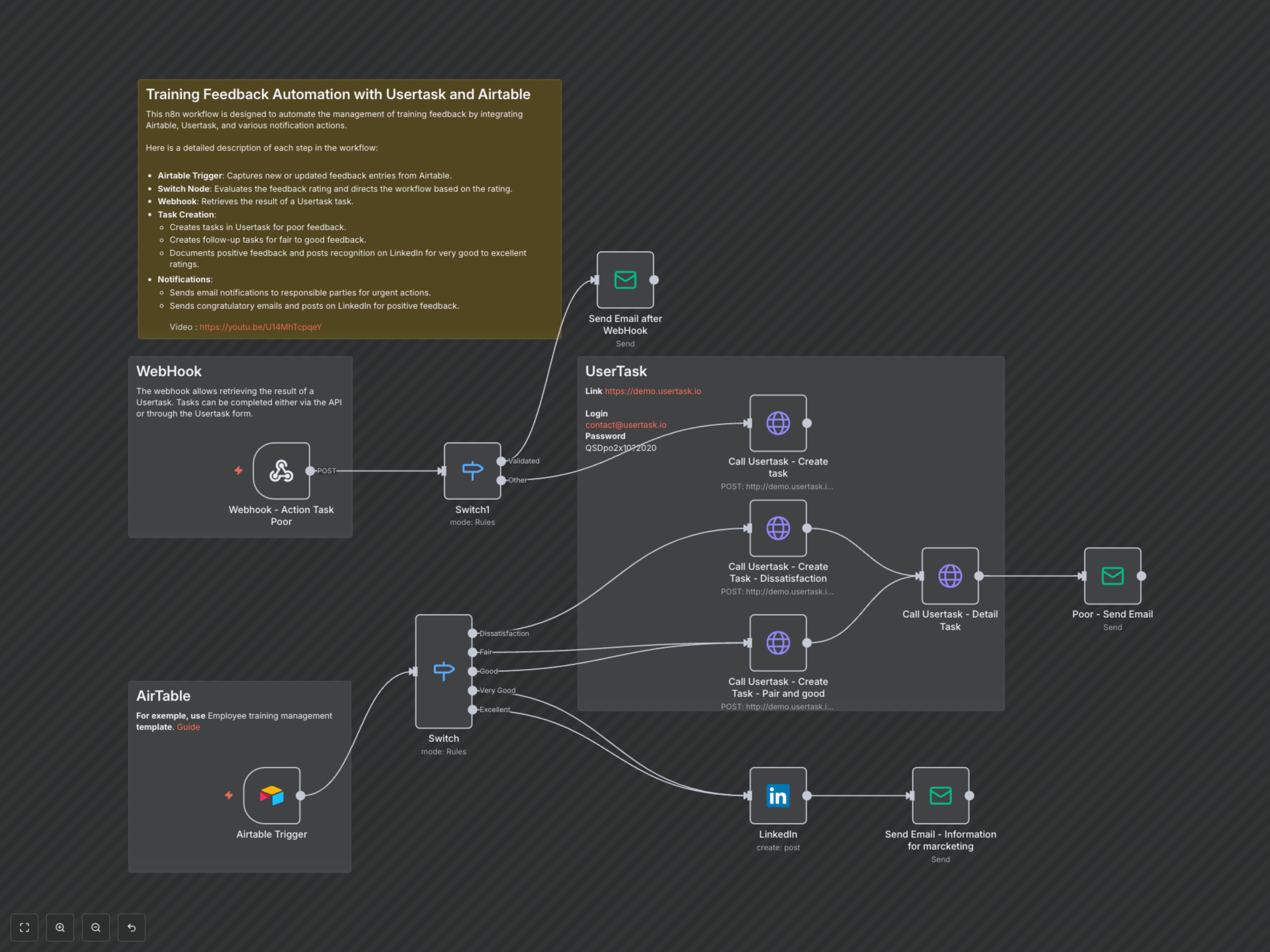
The workflow begins by continuously monitoring an Airtable base for new training feedback entries. Upon detection, a primary Switch node evaluates the 'Content' rating (1-5) provided in the feedback. For feedback indicating "Dissatisfaction" (rating 1), an urgent task is created in Usertask, triggering an immediate email notification to relevant stakeholders. For "Fair" (rating 2) or "Good" (rating 3) feedback, a Usertask is also created for immediate attention, labeled as 'Urgent: Training Feedback Requires Immediate Attention', prompting a review for potential program enhancements. When "Very Good" (rating 4) or "Excellent" (rating 5) feedback is received, the workflow automatically drafts and posts a celebratory message on LinkedIn, highlighting the facilitator and course success, followed by an internal email for marketing information. A dedicated Webhook acts as a listener for updates from Usertask tasks. When a task status changes (e.g., "Validated"), the workflow sends an email notification summarizing the action taken. If a Usertask action is not explicitly 'Validate', it may trigger the creation of a new urgent Usertask, ensuring no feedback goes unaddressed.