
Automate Shopify Order Fulfillment: CRM, Invoicing, Emails, Trello
Automate all post-Shopify order actions—CRM updates, invoice generation, and personalized customer outreach—reducing manual processing time by over 90% and enhancing overall efficiency.
Manually managing new Shopify orders across CRM, invoicing, and customer communications is inefficient and prone to errors. This workflow automates critical post-purchase actions, seamlessly updating CRM, generating invoices, creating Trello tasks, and sending dynamic customer emails to save valuable time.



Documentation
Shopify Post-Purchase Automation: CRM, Invoicing & Smart Customer Emails
Manually handling new Shopify orders across multiple business systems is a significant drain on time and resources. This comprehensive n8n workflow completely automates your post-purchase operations, ensuring every new order triggers seamless updates across your CRM, accounting, project management, and customer engagement platforms.
Key Features
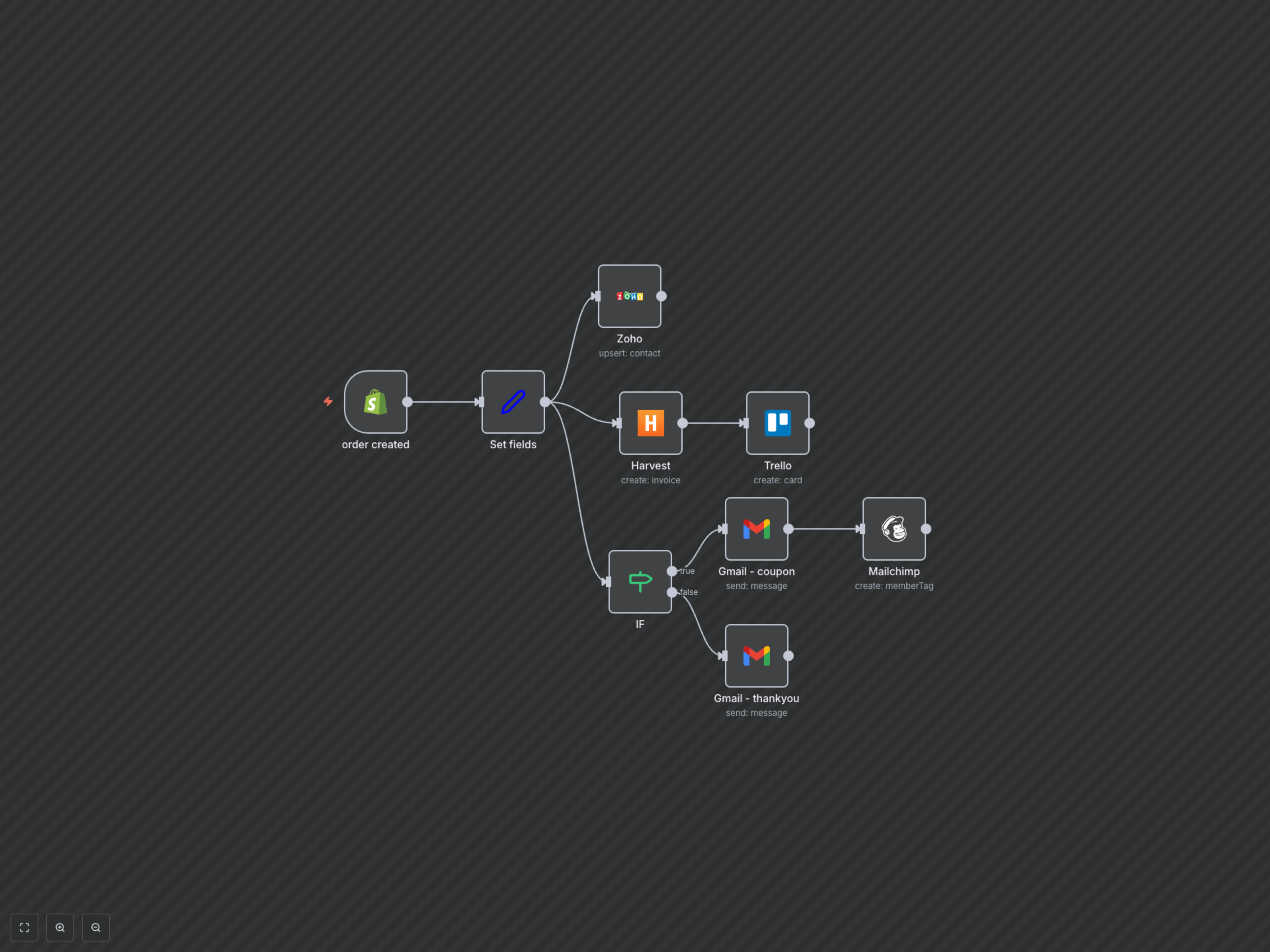
- Automatically upsert customer contact and address details into Zoho CRM.
- Instantly create new invoices in Harvest based on Shopify order details.
- Generate a new Trello card for each order, providing a centralized tracking system.
- Send conditional thank-you emails: a coupon for high-value orders and a standard message for others.
- Tag high-value customers in Mailchimp for targeted marketing campaigns.
How It Works
This workflow is triggered every time a new order is created in your Shopify store. First, it extracts crucial customer and order details using a Set node. This data then flows to Zoho CRM, where a new contact is created or updated. Simultaneously, an invoice is generated in Harvest, and a new card is added to Trello for operational tracking. An IF node then evaluates the order's total value: orders above $50 trigger a personalized email with a discount coupon via Gmail, and the customer is tagged in Mailchimp as a 'high-order' client. For orders below $50, a standard thank you email is sent. This ensures comprehensive, automated post-purchase handling without any manual intervention.