
Automate Palo Alto Security Advisory Alerts, Reduce Response Time
Streamline security operations by automating advisory retrieval and intelligent filtering, reducing manual review time by over 85% and accelerating critical incident response.
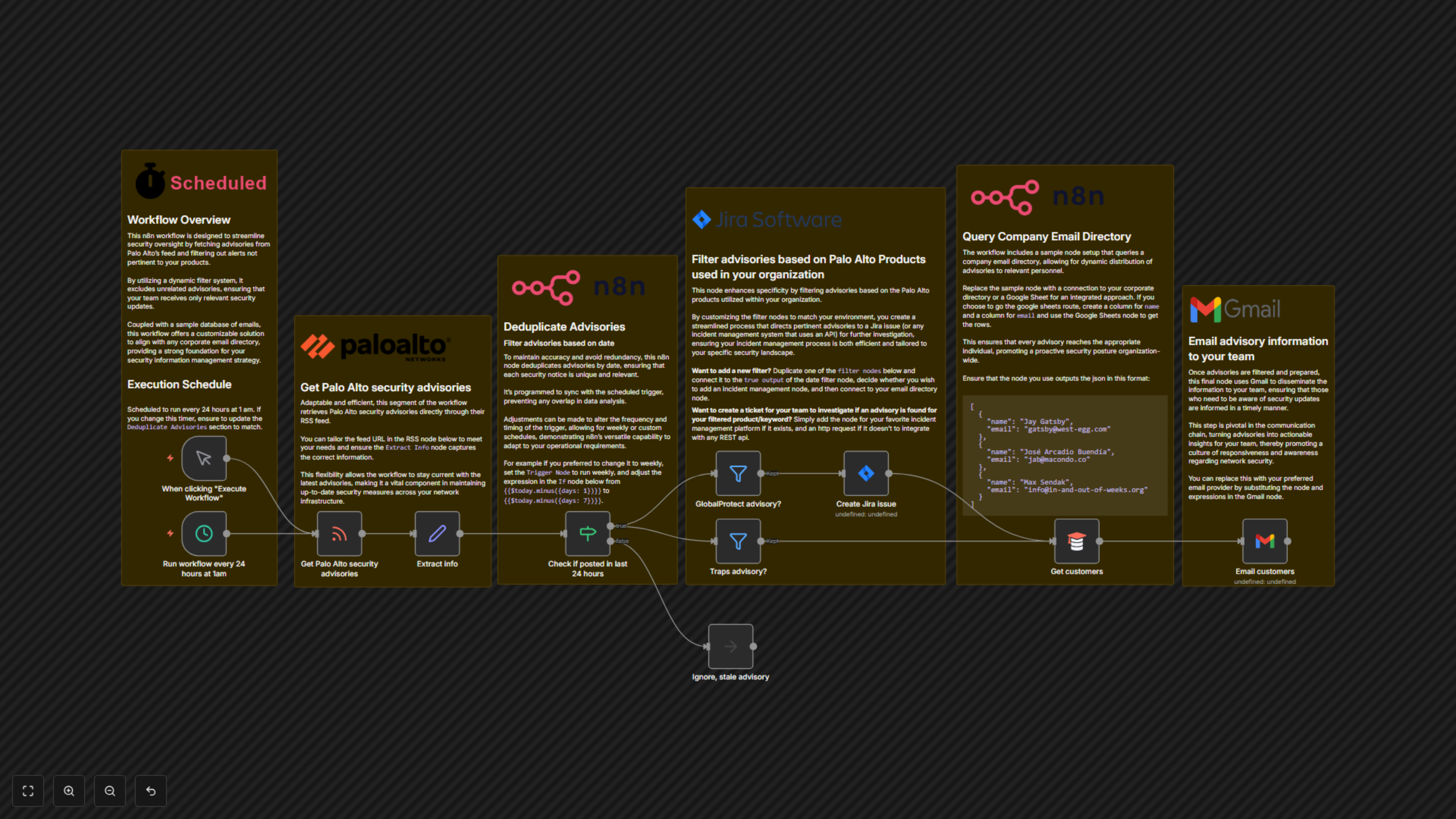
Manually monitoring security advisories from multiple vendors is time-consuming and risks delayed response to critical vulnerabilities. This n8n workflow automates the real-time retrieval and intelligent filtering of Palo Alto security advisories, creating immediate Jira tickets and alerting relevant teams to ensure rapid action.


Documentation
Automated Palo Alto Security Advisory Monitoring
This n8n workflow revolutionizes how your SecOps team handles Palo Alto Networks security advisories. It automates the entire process from fetching new alerts to filtering relevant ones, creating actionable Jira tickets, and notifying key personnel, drastically improving your incident response posture.
Key Features
- Automated Advisory Fetching: Reliably retrieves the latest Palo Alto security advisories from their official RSS feed on a scheduled basis.
- Intelligent Filtering: Dynamically filters advisories based on specific Palo Alto products (e.g., GlobalProtect, Traps) used within your organization, ensuring only relevant alerts are processed.
- Automated Incident Creation: Instantly creates detailed Jira issues for filtered advisories, prepopulating critical information like severity, link, and publication date.
- Deduplication Logic: Prevents redundant alerts by checking if an advisory has been published within the last 24 hours, ensuring your team receives only new, unique notifications.
- Customizable Team Notifications: Automatically emails relevant team members or customers with crucial advisory details, supporting a proactive security communication strategy.
- Flexible Integration: Easily adaptable to integrate with your existing corporate email directory or other incident management platforms via their APIs.
How It Works
The workflow runs automatically every 24 hours at 1 AM (customizable). It first fetches the latest security advisories from the Palo Alto Networks RSS feed. Each advisory's details, including type, subject, and severity, are extracted. A deduplication step then checks if the advisory was published in the last 24 hours, preventing repeat alerts. For new advisories, the workflow filters them based on specified Palo Alto products (e.g., GlobalProtect, Traps). If a relevant advisory is found, it automatically creates a new issue in Jira with all pertinent details. Concurrently, it queries your company's email directory to identify relevant stakeholders and sends out a customized email alert with the advisory information, ensuring rapid dissemination and action.