
Automate n8n Workflow Backups to Nextcloud, Prevent Data Loss
Safeguard all n8n workflows with automated backups every 6 hours, eliminating manual effort and ensuring instant recovery from data loss.
Manually backing up n8n workflows is a time-consuming task that risks data loss and prevents quick recovery. This workflow automatically fetches and uploads all n8n workflows to Nextcloud, ensuring your valuable automations are always secure and recoverable.

Documentation
Automated n8n Workflow Backup to Nextcloud
This workflow provides a robust solution for automatically backing up all your n8n workflows, ensuring data integrity and quick recovery in case of accidental deletion or system issues.
Key Features
- Automatically fetches all active n8n workflows.
- Schedules backups every 6 hours to a specified Nextcloud folder.
- Converts workflow data to a readable JSON format before storage.
- Prevents data loss and enables rapid restoration of valuable automations.
How It Works
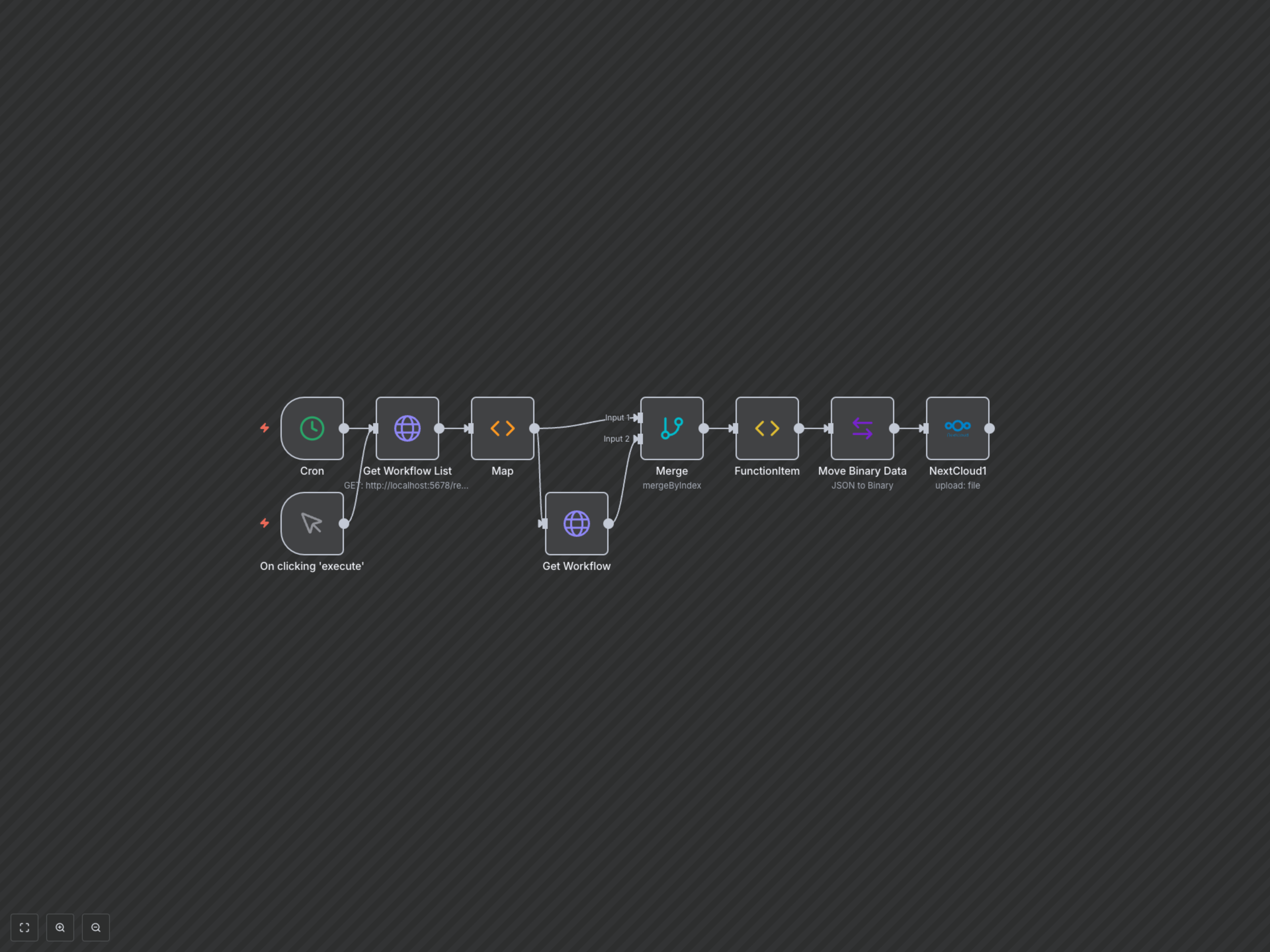
This workflow is triggered either manually or automatically every six hours by a Cron node. It first fetches a list of all active workflows from your n8n instance using an HTTP Request to the local API. Each workflow's data is then individually retrieved. After merging and processing, the workflow data is converted into a binary JSON file and uploaded to a designated folder within your Nextcloud instance, named after the workflow.