
Automate n8n Error Handling & Get Instant Failure Alerts
Automatically configure robust error handling across all n8n workflows, eliminating manual setup and ensuring immediate notification of failures to minimize downtime.
Manually configuring error handling for every n8n workflow is tedious and often overlooked, leading to unaddressed failures. This workflow automatically ensures all active n8n workflows have an error handler, providing immediate email notifications when any workflow fails.

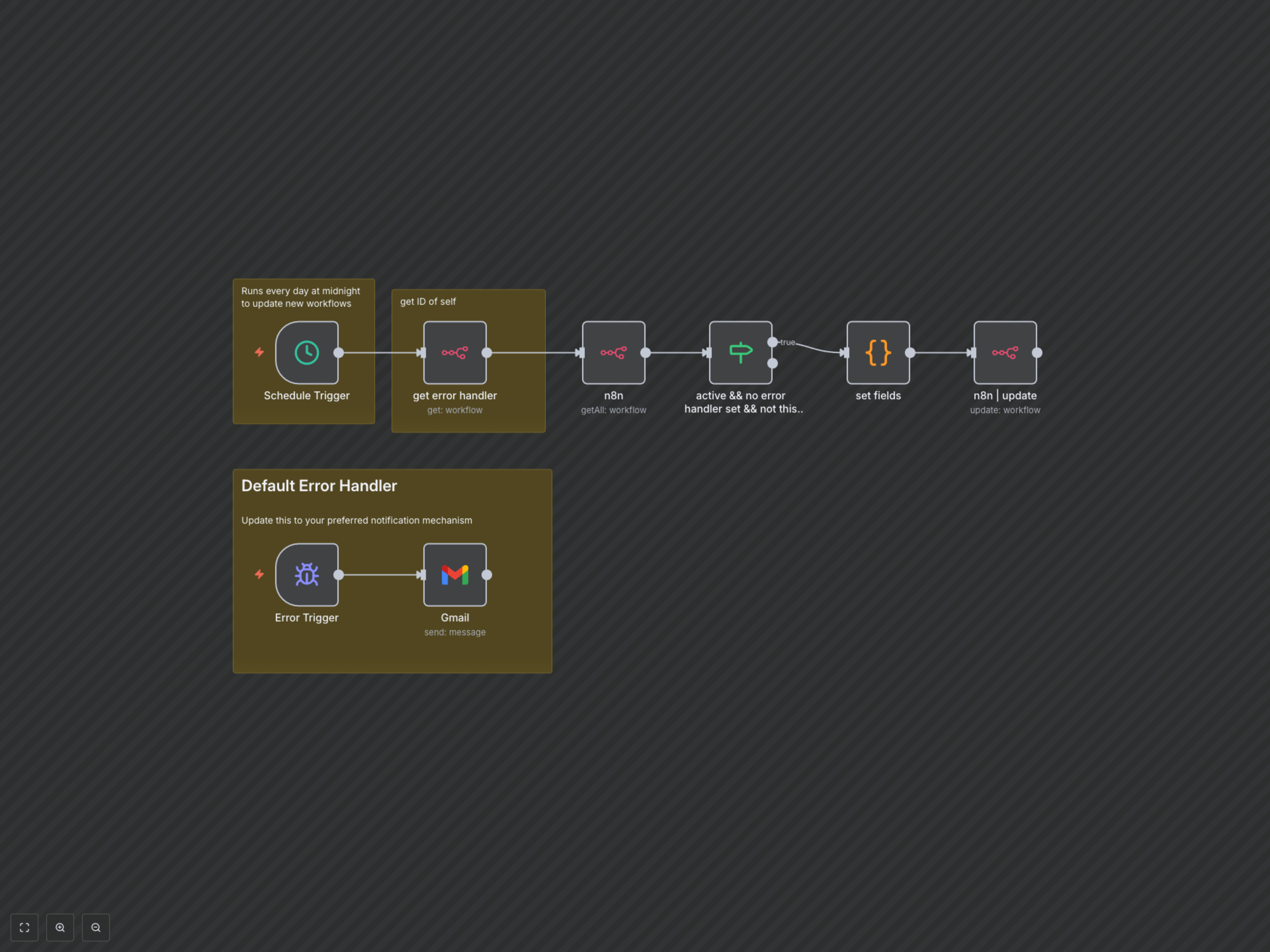

Documentation
Automated n8n Error Management
This comprehensive n8n workflow streamlines your operational reliability by automatically configuring error handling for your workflows and sending instant notifications when issues arise.
Key Features
- Automate Error Handler Assignment: Automatically detects and assigns itself as the error handler for all active n8n workflows without a pre-existing setup.
- Centralized Failure Alerts: Receive immediate, detailed email notifications for any workflow failures, including a direct link to the failed execution.
- Prevent Overlooked Issues: Ensures no workflow failure goes unnoticed, significantly reducing potential downtime and data discrepancies.
- Effortless Setup: Once deployed, this workflow proactively manages error handling across your n8n instance.
How It Works
This workflow operates in two main parts: 1. Daily Configuration: A scheduled trigger runs daily (e.g., at midnight) to scan all active n8n workflows. It identifies any workflow that does not yet have a dedicated error handler and automatically assigns this workflow's ID as their error handler. This ensures new or updated workflows are always covered. 2. Instant Notification: Should any workflow configured with this error handler fail during execution, the 'Error Trigger' node activates. It then sends a detailed email notification to your specified address, providing the name of the failed workflow and a direct link to the execution details for quick troubleshooting.