
Automate Meeting Summaries & Schedule Follow-ups with AI
Streamline post-meeting workflows by automatically generating summaries and scheduling follow-up meetings, saving hours of manual administrative effort and ensuring critical actions are never missed.
Manually summarizing meetings and ensuring follow-up actions are scheduled drains valuable time and can lead to missed opportunities. This workflow harnesses AI to automatically process Google Meet transcripts, generate concise summaries, identify key takeaways, and proactively create follow-up calendar events with attendees.



Documentation
AI-Powered Meeting Summary & Follow-up Automation
This n8n workflow revolutionizes your post-meeting process by intelligently transforming raw Google Meet transcripts into actionable insights and automated follow-up tasks. It's an indispensable tool for teams looking to maximize meeting effectiveness, ensure timely execution of next steps, and drastically reduce manual administrative overhead.
Key Features
- Automatically retrieves Google Meet transcripts from Google Drive, eliminating manual file handling.
- Leverages an advanced AI agent to provide intelligent summaries, highlight key points, and identify next steps from meeting discussions.
- Proactively identifies and schedules follow-up meetings based on AI analysis of transcript content.
- Automatically adds identified attendees to newly created Google Calendar events, ensuring everyone is in the loop.
- Significantly reduces manual administrative tasks, leading to better meeting outcomes and timely follow-through on commitments.
Workflow Overview
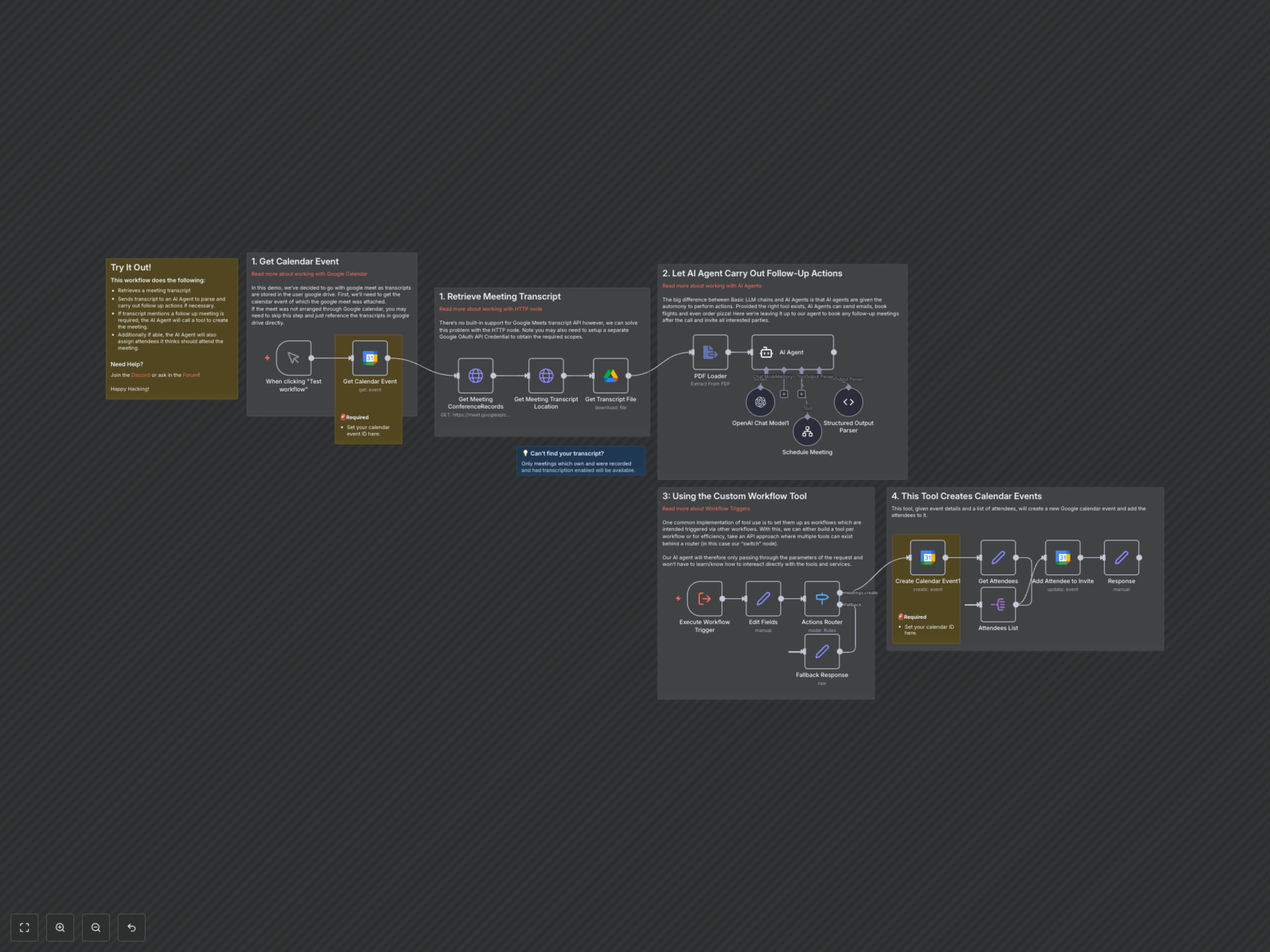
This workflow first retrieves details of a Google Calendar event that corresponds to a recorded Google Meet. It then accesses the Google Meet API to find the conference record and subsequently downloads the meeting transcript from Google Drive. The transcript is processed by an AI agent (powered by OpenAI and LangChain) which is instructed to summarize the meeting, identify key points, next steps, and create follow-up calendar events as needed. The AI agent utilizes a custom n8n tool to schedule new meetings and add attendees, ensuring a seamless and automated follow-up process.
1. Retrieve Meeting Transcript
The workflow starts by fetching the specific Google Calendar event. This is crucial as Google Meet transcripts are often stored in Google Drive and linked to the calendar event. Using HTTP nodes, the workflow interacts with the Google Meet API to locate the conference records and transcript details, then downloads the transcript file (expected as PDF) via Google Drive. This initial phase ensures all the raw data for AI processing is gathered automatically.
2. Let AI Agent Carry Out Follow-Up Actions
Once the transcript is extracted, it's fed into an AI agent powered by OpenAI. This agent is given a specific role to summarize the meeting, identify key goals, extract important points mentioned by attendees, list all agreed-upon next steps (or suggest new ones), and critically, identify and perform follow-up actions like creating calendar events. Unlike basic LLM chains, this AI agent has the autonomy to act based on its analysis, making it a powerful tool for intelligent automation.
3. Using the Custom Workflow Tool
A key aspect of this workflow is the 'Schedule Meeting' custom tool, implemented as a separate sub-workflow triggered by the main AI agent. This approach allows the AI agent to focus on decision-making and simply pass parameters to dedicated workflows for execution. This specific custom tool acts as an API endpoint, taking event details and attendees as input and routing them through a 'Switch' node to perform the `meetings.create` action, ensuring modularity and efficiency in tool usage.
4. This Tool Creates Calendar Events
When the AI agent determines a follow-up meeting is necessary, it invokes the 'Schedule Meeting' tool, providing all required details like title, description, date, time, and attendees. This tool then leverages the Google Calendar node to create the new event. It first creates the event and then iterates through the identified attendees, adding each one to the newly created calendar invitation. This ensures that all relevant parties are automatically invited to the follow-up meeting without any manual intervention.